Did Quicken change how Fidelity tracks cash in core accounts?

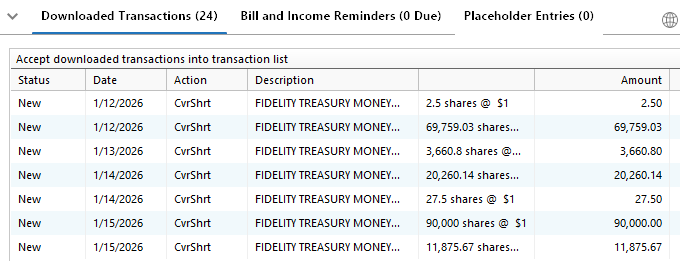
On this morning one-step update, I picked up a lot of "CvrShrt" transactions dated over the last 30 days that seem to be covering cash used from core accounts when making investment purchases. Is this what we can expect in the future or what?
Comments
-
I had the same issue this morning for the first time. Anxious to see the answer.
2 -
All of my Fidelity accounts received either ghost transactions or these cvrshrt transactions that make no sense. I was able to delete the cvrshrt ones, but the ghosts wouldn't go away until I went through each account downloaded box (which were empty) and clicked "done" as if I were done accepting transactions and then restarted quicken.
0 -
The same thing happened to me this morning. There were some cvrshrt transactions which I could not accept because there were no matching transactions, so I deleted them, and two other Fidelity accounts showed downloaded transations but there weren't any.
0 -
When I downloaded transactions from my Fidelity account, I received several Cover Short Sale transactions that Quicken lumped into one Cover Short Sale transaction. When I looked further into my account, I found out that these were 3 bank draft transactions that combined into one transaction. Looking back in my account, I saw that the first one of these Cover Short Sale transactions in happened on January 15. Prior to that, these bank drafts were downloaded as a Withdraw transaction. Why are these transactions that were previously downloading as a Withdraw transaction are now downloading as a Cover Short Sale transaction?
Quicken user since 1991, DOS version0 -
I have an issue with accounts downloading CvrShrt and CvrShrtX transactions downloading. Logged into Fidelity and there are no corresponding transactions showing for the downloaded transactions.
I have multiple Fidelity accounts and all were flagged for downloaded transactions. Some had the CvrShrt and CvrShrtX transactions, but other flagged account had empty transaction windows. On those transactions that where flagged and had no transactions downloaded, clicking on the done button did not clear the flag.
Anyone know what is happening?
0 -
Same issue for me this morning 2/10/26 - One Step Update generated a bunch of cvrshrt transactions in two of my Fidelity IRA Accounts. Various dates all in the month of Jan.2026, I am able to delete them and they didn't come back but curious if this is something that changed with the cash / core configuration within quicken? These don't show up on Fidelity Web Site and once deleted don't come back… so far anyway…
0 -
I'm seeing the same issue. Any cash transactions which require a sale of a MM fund, SPAXX or FDLXX for example, are coming into Quicken as Covered Shorts - rather than a sale of the MM fund.
0 -
These faux "covered shorts" are ironic, given that Quicken and Fidelity have not handled "buy to close" option transactions properly since the big EWC+ changeover. 😉 For me, these are mostly settlements of equity transactions, which shouldn't be downloading at all. I will simply delete these.
 1
1 -
Looks like someone (Fidelity?) without testing.
0 -
Hello All,
Thank you for taking the time to report this issue!
We will be forwarding this issue to the proper channels to have this further investigated. However, we request that you please navigate to Help > Report a problem within your Quicken program and submit a problem report with log files and screenshots attached in order to contribute to the investigation.
It would also aid the investigation to include a sanitized file when submitting the problem report. A sanitized file is a data file that removes personally identifiable information so you can comfortably share this file with the Quicken team.
While you will not receive a response through this submission, these reports will help our teams in further investigating the issue. The more problem reports we receive, the better.
Please let us know once that's done, and we apologize for any inconvenience in the meantime! Thank you.
(CTP-16265)-Quicken Anja
Make sure to sign up for the email digest to see a round up of your top posts.0 -
In my case, Fidelity sweeps any dividends or interest earned from one fund in a single account, with multiple funds, into their money market fund. When you go into Fidelity to see these transactions, they are hidden. There is an option on the website in the more filters selection to see money market settlements at the bottom, Slide that on (green) and you see the transactions. It is odd that Quicken sends them through and recognizes them as covershort, etc.
It is incredibly unfortunate how quicken handles money in and out of these sweep accounts that are part of an overall account with multiple funds. When a dividend, or interest comes in from one fund in the account, that dividend gets automatically swept into the Fidelity money market fund, that is if you are not doing a DRIP. Good luck trying to come up with the sequence of transactions needed to a) put the dividend or interest into the sweep account, and then b) when you do get the right sequence, good luck being able to access it easily should you do something like buy more shares of something you actually want within your IRA, or other account. When you buy the shares Quicken asks if you want to take the money from the cash value of this account, or select another one? Since the money is not in another account, and there is no cash balance in the account, the money is in the sweep account, there is no easy way to say, hey, use the cash in my sweep fund in this account.
When you setup an account Quicken asks if the account is a single investment, or if it is multiple. For some reason it does not seem to know how to deal with multiple funds in one account, and be able to easily use them as the investment firms do when they sweep funds, etc.
I could be wrong here, and if I am I would love for someone to enumerate for me how you go about easily moving money around in an account that has multiple funds, one of which that happens to be a sweep account for cash.
0 -
@Quicken Anja I just reported this problem as you requested, however I could not attach a sanitized file (too big). Quicken suggest I upload to a shared location and send a link to the file. I don't know where to upload the file.
0 -
Hello @JLP1976,
Thanks for reporting the issue and for trying to include the sanitized file—no worries at all that you couldn’t attach it due to size limits.
The sanitized file is more of a nice-to-have for additional context. The most important pieces for our escalation team are the log files that are already included with your report.
If the team determines that a sanitized file is absolutely necessary, I’ll reach out to you directly with alternative instructions on how to provide it.
Appreciate you taking the time to submit everything!
-Quicken Anja
Make sure to sign up for the email digest to see a round up of your top posts.0 -
@Quicken Anja I just submitted the report. I just don't know whether this is a bug or a new feature. Regardless, it wasn't communicated and I don't know whether it is the new normal.
0 -
I have the same issue. Everything was working fine last night. Now I see lots of "CvrShrt" transactions, and Quicken says I will need to relink all my bank and CC accounts when I did One Step Update. (as of Feb 10 ).
Please fix this.
0 -
Also having this problem today. some of these CVRSHT transactions were already downloaded correctly a couple of days ago and now this. attempting to send the reports (also large file). I sure hope you get this bug corrected sooner rather than later
0 -
It is too late for me to report the problem as requested because I've already recovered from backup. After I restored to the backup, I tried to update but got a message that all of my on-line connections were no longer valid. Now I'm having to re-establish online connections for 22 accounts. What a pain!
So I again set up the online connections but three of the accounts reverted back to storing passwords in the vault, which was not required with the previous connections. Also, I could not set up the online connection to Chase because Quicken kept giving an error message that the login failed but the login was successful all three times I tried it. When I connected to Fidelity, I once again got one CvrShrt transaction, so that was an improvement from the multiple CvrShrt transactions I previously received before I restored from backup. At least I knew now not to accept the bogus transaction.
If I had better understood the problem when it first occurred, I would have deleted the bogus transactions when I after I downloaded or accepted them, but at the time I thought that they were real transactions that were in the wrong format.
The fun of being a Quicken customer never stops.
Quicken user since 1991, DOS version2 -
After all the previous issues with treating Fidelity core account money market shares (SPAXX) as cash, a new wrinkle has emerged: downloaded movements of cash out of the account are being entered as core fund share redemptions for the covering of short sales. What gives?
0 -
Hello All,
Thanks for taking the time to report this!
This issue has been escalated internally, though we do not have an ETA on resolution at this time. While the investigation remains ongoing, please refer to this Community Alert for any and all available updates and information.
We apologize for any inconvenience in the meantime! Thank you.
-Quicken Anja
Make sure to sign up for the email digest to see a round up of your top posts.0 -
@tb953 Thanks for detailing how to see these sweep transactions on the Fidelity site. I also just saw these today for 1 account. I filtered for "redemption" (Past 30 days) in addition to "view settlements in money market" filter. They matched the 2 transactions. Both were for "Redemption from Core Account…". The cash for these were already settled correctly in my account so I deleted them.
Plus, these transactions were for an IRA account that Fidelity manages, so I knew there were no options (short sell) to be covered as I believe the law prohibits such transactions in this type of account.
I also got a CVRSHRT in my brokerage where I withdrew money from an ATM and Fidelity reimbursed the fee. Usually, I get a Withdrawl and Deposit transaction. Today I got one transaction for the net amount.
So, it looks like a couple of things are going on.
0 -
In my case, Fidelity sweeps any dividends or interest earned from one fund in a single account, with multiple funds, into their money market fund. When you go into Fidelity to see these transactions, they are hidden. There is an option on the website in the more filters selection to see money market settlements at the bottom, Slide that on (green) and you see the transactions. It is odd that Quicken sends them through and recognizes them as covershort, etc. …
I can confirm that the downloaded CvrShrt transactions all are redemptions from or purchase into the core account. I'll leave the option to view them in the Fidelity registers on until this is resolved. That way I can validate what the spurious downloaded transactions are before deleting them.
0 -
Until today, my 'core account' looked like cash in the register. A cash balance with no display of bought, sold, and the like. I do normally see the ReinvDiv transactions. It appears to me that the handling of the core account as cash has been broken somewhere. Time to get working again on my excel replacement for quicken!
0 -
Fortunately I had no cash transactions on my Feb 10 Quicken online update, but today (Feb 11) I hit the motherload of CvrShort and CvrShortX core cash acct transactions being downloaded. Most of the downloaded transactions are old duplicates of proper updates (the oldest going back to 1/17/2026).
At least the cleanup should be easy; delete all of the downloaded transactions and manually enter a few properly.
I guess the timing of this was fortunate. I was tempted to extend my QW subscription for another year, but obviously Quicken downloads with Fidelity are still very unstable. Since the subscription only adds online download/upload capability that has been excessively time consuming over the past year. I'll just continue to use Quicken manually without download capability. Very sad situation, I've used Quicken since the early 1990's and it became more and more capable and dependable over the years. But it has become too unreliable and simply consumes too much of my effort to maintain; basically it adds negative value to me now.
2 -
These cover short transactions are all the core account redemptions that had been missing - duplicates for me since I had to add those redemptions manually. I am hoping this is the first step in getting back the automatic core redemption transactions we used to have with Fidelity. Frankly, I never had so many issues with Quicken as I have had in the past 2 or 3 years and I have been a user since 1997. I don't understand why that is.
0 -
The cash transactions are back to normal for me today. 👍️I treat my money market account as cash and have zero interest in tracking redemption and similar activity in my register. Hopefully this was a one-time glitch.
Now if only Quicken could only stop treating "cover short" option transactions as "bought" transactions…
0 -
I had the same thing. I think it stems from how I treat my cash in the Fidelity account in Quicken (as just "free-floating" cash, not tied up in a money market fund) vs how Fidelity treats it (as tied up in a money market fund, which means the cash has to be released from that MMkt fund the same day as [or the day after] I make a security purchase with the cash or I transfer out some of the cash -- this is the temporary cash "shortage" Fidelity is "covering"). I just delete all these downloaded CvrShrt transactions - basically ignore them. Works for me. It's a pain to delete each one, but probably easier for me than getting to the bottom of the issue. I accept only the security purchase or transfer out transactions from the download. I guess this hassle is the price one pays for getting a much higher interest rate on 'sweep' cash in a Fidelity account vs a non-SIP Schwab account.
0 -
When I updated my accounts today, my Fidelity checking account had 14 “buy” transactions added to the ledger that do not exist in my online Fidelity checking account. All other Fidelity accounts (I believe) are working fine. I am using Quicken for mac and I did send a sanitized file and explanation to "report a problem".
0 -
This is very frustrating to have these serious ongoing issues with Fidelity. Yes, I am keeping up with the issue here:
UPDATE! 2/11/26 Fidelity Core Cash Transactions Downloading as “Cover Short Sale (CvrShrt)”
I have an event that I haven't yet seen posted here. My Fidelity account has FDRXX the MMF security. I have been entering the Bought/Sold transactions of FDRXX as needed. Today, three transaction were downloaded: 1. a Matched FDRXX that corresponded to a manually entered Bought transaction in response to a Sold transactions of a different security; 2. A normal ReinvLG transaction, and; 3. A CvrShrt transaction for FDRXX that appears to correspond to manually entered Sold transaction which compensated for a WithdrawalX from the account.
I say 'appears to' because the date and amount match but when I Accept it I see the message:
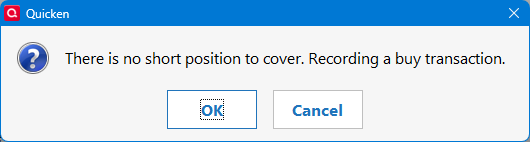
When I click OK, a Bought transaction is entered NOT a Sold transaction. Oh, and then the downloaded transaction did NOT change to Accepted! I was able to Accept the transaction multiple times!
This is clearly another issue. The guys/gals making these changes are clearly not doing adequate testing on their fixes.
2 -
Totally agree with DoctorBrown.
Having the same issue. It adds a lot of manual fix of those transaction and is time wasteful for the users.
The core cause, seems like, is the lack of software change validation process. I.e., poor QC or lack of it. Not very professional.2 -
Agree with Double-A " I just delete all these downloaded CvrShrt transactions - basically ignore them.
Too bad Quicken does not have a "delete all transactions" option like they do with "select all transactions". If they did, you could first individually accept the "valid transactions" and then use "delete all transactions" option for CvrShrt transactions.
0