Cannot Edit "Action" in Register for Manual Investment Transaction

I'm trying to manually enter transactions that did not download for my Fidelity HSA during the months that such transactions could not download to Quicken ("Ticket 1999090" described here). After manually adding a "Bought" transaction on the investment account's register, I tried editing the "Action" field in the register to change it to a "BoughtX" transaction that creates a linked transaction on the separated "checking" account that tracks the cash balance ("Show cash in a checking account" option within the investment account's settings). However, I am unable to select or edit the "Action" field in the register for non-downloaded transactions. When entering "Edit" mode for either a downloaded or manual transaction, both "Bought" and "BoughtX" show as "Buy - Shares Bought" on the Enter transaction drop-down field, so the difference cannot be specified there.
How can I manually enter investment transactions with the "X" designation to properly track their effect on the linked "checking" account with the cash balance for this HSA?
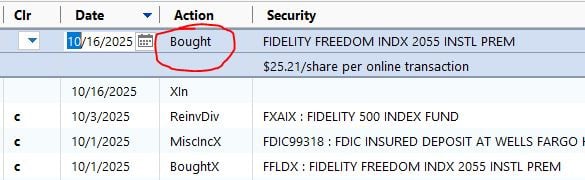
Fig. 1 - Manually-entered transaction does not allow selection or editing of the "Action" field in the register view.
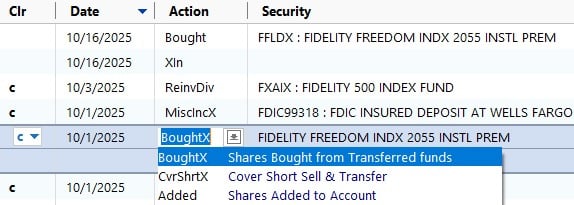
Fig. 2 - Downloaded transactions allow selection and editing of the "Action" field, permitting entry of the "BoughtX" action that draws from the account's linked cash transactions.
Running:
Quicken Classic Deluxe for Windows
Version R65.29
Build 27.1.65.29
Windows 10 Pro, 22H2, 64-bit
Comments
-
Hello @Paddle2419,
Thank you for reaching out with this question! To turn a buy transaction into a boughtX transaction, you need to select the account the funds are coming from. It will default to "From this account's cash balance", but you can select the other option, then click the dropdown to select the funding account.
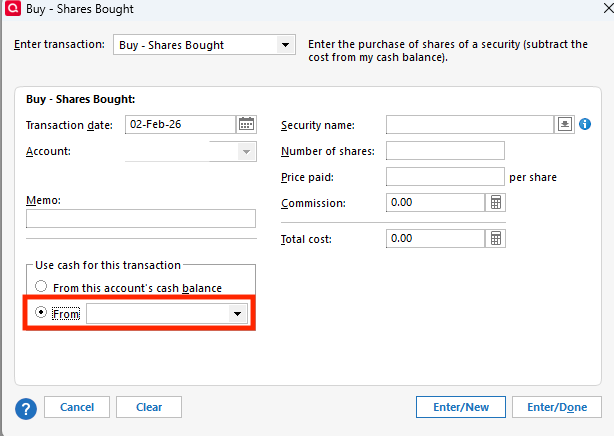
I hope this helps!
Quicken Kristina
Make sure to sign up for the email digest to see a round up of your top posts.
0 -
Hello @Quicken Kristina
Thank you for the response. Unfortunately, I do not see the highlighted "Use cash for this transaction" box with the options shown in your screenshot. This space is simply blank in the Edit window for transactions for this specific account, and it applies to transactions entered manually or through download. Comparing the Edit window's appearance for other accounts, I encountered three situations:
#1: No "cash" options box; space is blank. Encountered with Fidelity HSA and Fidelity 401(k) accounts; the HSA is configured in Quicken to "Show cash in a checking account" while the 401(k) is not.
#2: Provided "cash" options box, but options cannot be edited away from (correctly) selection option. Encountered with Fidelity CMA account configured in Quicken to "Show cash in a checking account".
#3: Provided "cash" options box that is fully editable. Encountered with investment accounts (Fidelity and otherwise) that are NOT configured in Quicken to "Show cash in a checking account", except for the 401(k) mentioned earlier.
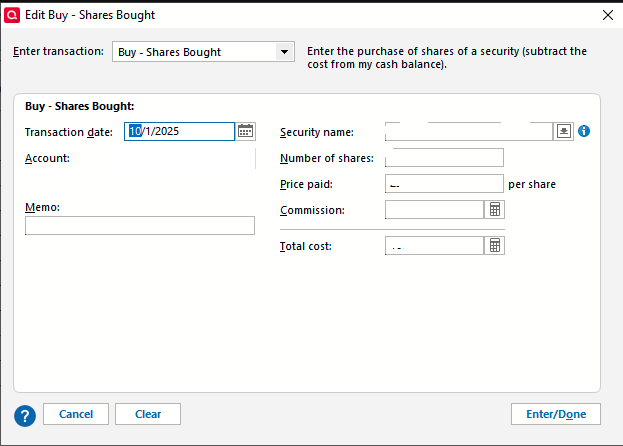
Situation #1
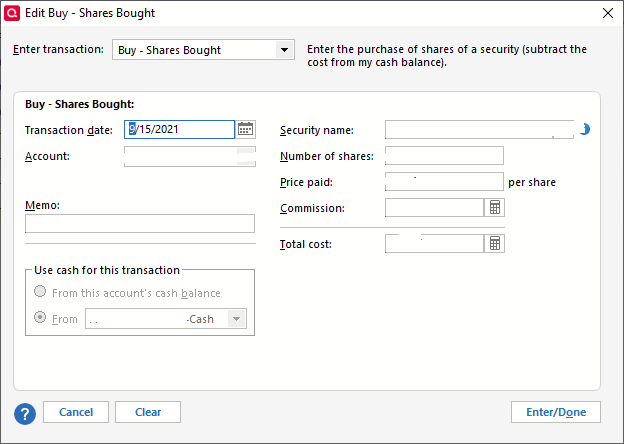
Situation #2
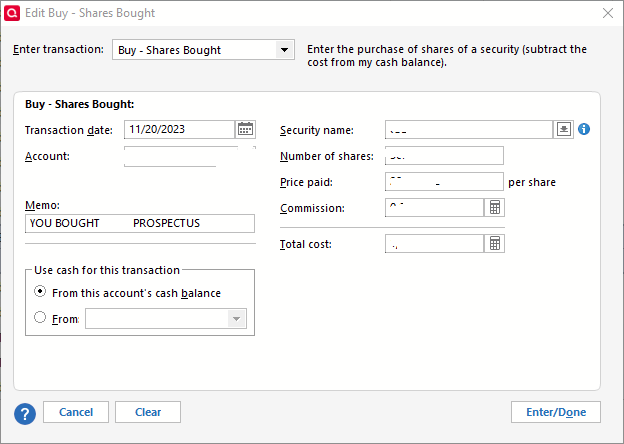
Situation #3
Any suggestions on how to continue troubleshooting?
[Edited - Removed Partial Account Number]
0 -
Thank you for your reply and your screenshots,
What account type is that investment account showing as in your Quicken file (brokerage, 401k, etc.)?
Since you mentioned this is a HSA account and you're filling in the timeframe where it could not download transactions, one possible culprit is placeholders. If connecting the HSA account caused new placeholders to be created, it's possible that is what is blocking you from editing the bought transactions into BoughtX. If that is what's happening, you should be able to resolve the issue by backing up your file and deleting the placeholders.
Thank you!
Quicken Kristina
Make sure to sign up for the email digest to see a round up of your top posts.
1 -
That did it! Deleting the placeholder entries allowed me to edit the "Action" field for entries on the register, manually changing a "Bought" transaction to "BoughtX" so that a linked transaction would be created on the connected "Cash" account. Thank you for helping find a resolution!
1 -
Thank you for the follow-up,
I'm glad to hear the issue is resolved!
If you need further assistance, please feel free to reach out!
Quicken Kristina
Make sure to sign up for the email digest to see a round up of your top posts.
0
