Short categories in split transactions (Q Mac)

I use the “short categories“ preference setting so in a transaction, the category field only shows the last sub-category, rather than the entire category tree.
In split transactions, the short preference setting is ignored, and, the field is left justified. As a result, I can only see the top category and maybe one subcategory.
Either honor the short category preference, or at least, right justify the field so I can see the last sub-category on the far right of the field.
Comments
-
This really seems like it should be reported as a bug rather than an "enhancement request". A meeting which works throughout the program except in one place is clearly a bug.
MODERATORS: Can you check to see if there is any existing bug report for this, and if not, can it be reported as such, rather than wasting months or years trying to get this Idea to the number of votes required?
Quicken Mac Subscription • Quicken user since 19930 -
This may be a bug related to this specific user. I cannot replicate it in v8.4.2. Short categories work fine for me in split transactions.
Quicken Mac Subscription; Quicken Mac user since the early 90s0 -
@RickO Hmm… I tested this before posting, because I don't usually use short category names. But It seems to fail for me. With short category names enabled, here's a transaction with no split:

The Category shown is the short name; the full path is Auto:Parking & Tolls. So far so good. Now I open the splits window for this transaction, and in both the main Category field and the split line, it shows the long category name:
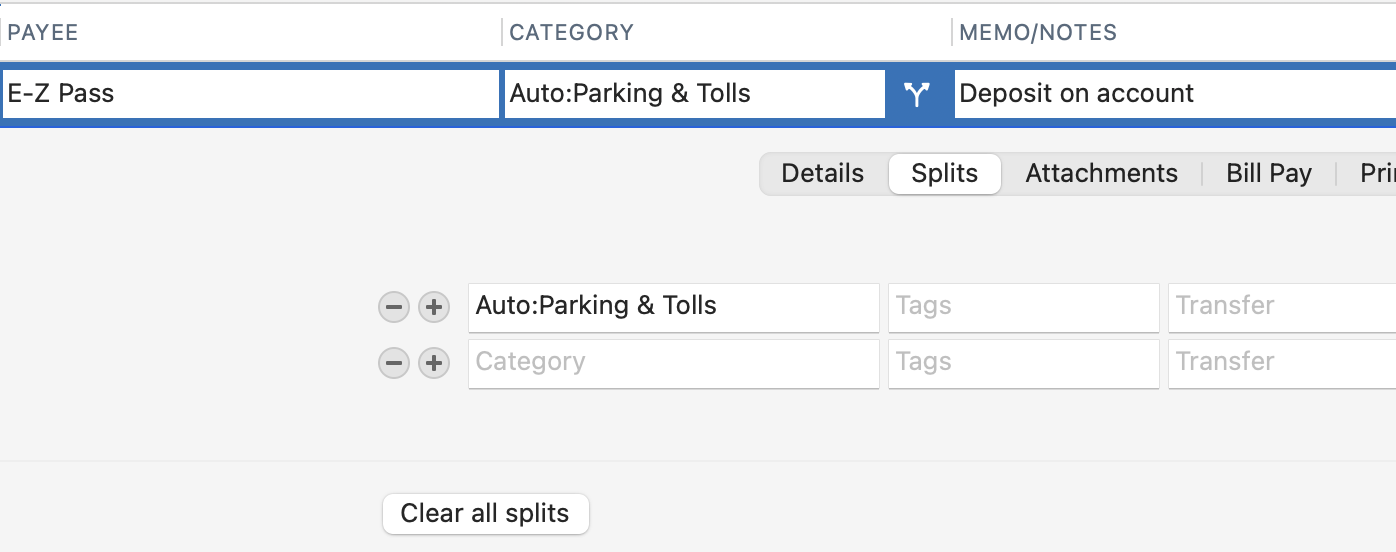
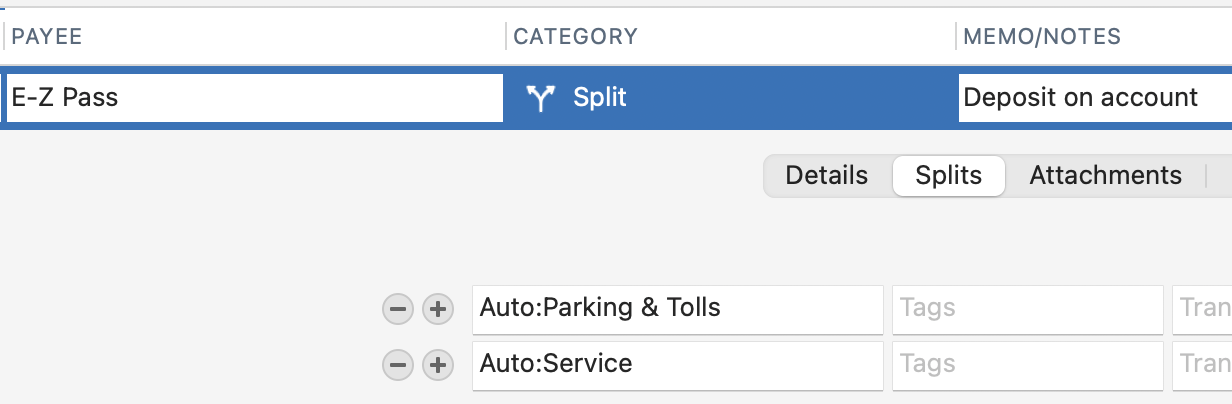
If I add another split line, the main category changes to "Split", while the individual split lines show the long category names.
@RickO Are you saying that if you have a transaction with a subcategory as a split line, Quicken is showing only the short name (subcategory) for you? I wonder how we could be doing the same thing and getting different results?
Quicken Mac Subscription • Quicken user since 19930 -
Okay, I've figured out what's going on. The display of long names even when you have the short name option selected is not based on whether it's a split transaction or not, but instead is based on whether the transaction you're looking at is in edit mode. For example, here are a split and a non split being displayed but not edited:

Note that short names are displayed for both. Also note that to display a split transaction this way, you need to have the option "Automatically Show Splits in Register" enabled.
Now look at the split transaction opened for edit (the only way to see the split lines if you don't have Automatically Show Splits in Register" enabled). Note that long names are now displayed:

But now look at the non split transaction opened for edit:

Note that now the long category name is displayed.
So bottom line: the program logic is to display long category names whenever a transaction is open for edit, regardless of the short/long setting in Register Settings. This is consistent for both split and non split transactions. Thus, I believe it's behaving as designed and this is not a bug.
We can discuss whether this should be an enhancement request, which would be to show only short names even when editing a transaction. But I don't think that's really feasible since you wouldn't know which top level category you're using for categories that have identical lower level names.
Quicken Mac Subscription; Quicken Mac user since the early 90s0 -
I came here to point out what @RickO just posted - you always get the long names when the transaction is being edited. I don't think I've ever used the short names setting, so I have no opinion on how it should work & will leave that to the folks who do.
0 -
@RickO and @Jon Yup, you're right. I never have Settings > Registers set to "Automatically show splits in register", so any time I see splits, it's because I've double-clicked on the transaction in order to see the split. Even if I'm not thinking I'm editing the transaction, it is indeed open for editing. (I also don't use short names, which is why this hasn't been on my radar.)
@markmark I think there's a separate issue could help you, which is the ability to adjust the column widths in the splits sub-window. If the Category field could be wider, then it wouldn't be a problem for you to see the long names during editing. (For me, it's the Memo field which is painfully too small in the splits sub-window that I would love to be able to widen.) there is an existing Idea request for making the splits fields adjustable in width and order:
I would be happy if they just made the splits sub-window mirror the columns settings for the register itself: show/hide the same fields as the register, in the same order as the register, and the same widths as the register. For instance, in most of my registers, I have the Memo field (which I use extensively) immediately to the right of the Category field; in many of my registers, I do not have Transfer and or Tags column visible. So it's frustrating to open a split and have these other field shown, the fields be in a different order, and in a different width than I've set for the register.
Quicken Mac Subscription • Quicken user since 19930 -
Hello All,
Thank you for taking the time to report this behavior in the Community. We apologize that you are experiencing this.
We have forwarded this issue to the appropriate channels for further investigation. In the meantime, we request that you please navigate to Help > Report a problem and submit a problem report with log files attached and (if you are willing) a sanitized copy of your data file in order to contribute to the investigation.
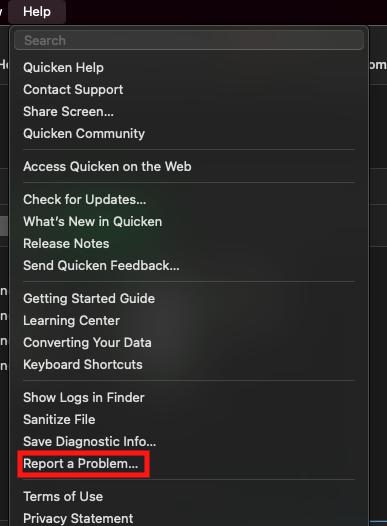
While you will not receive a response through this submission, these reports will help our teams in further investigating the issue. The more problem reports we receive, the better.
We apologize for any inconvenience!
Thank you.
(CTP-16324)
Quicken Kristina
Make sure to sign up for the email digest to see a round up of your top posts.
0


Categories
- All Categories
- 6 Product Ideas
- 34 Announcements
- 251 Alerts, Online Banking & Known Product Issues
- 19 Product Alerts
- 265 Welcome to the Community!
- 301 Before you Buy
- 1.5K Product Ideas
- 55.8K Quicken Classic for Windows
- 16.9K Quicken Classic for Mac
- 1K Quicken Mobile
- 834 Quicken on the Web
- 129 Quicken LifeHub