Duplicate screen entries after downloading and while accepting entries process

Maybe this has already been reported and I just couldn't find any responses, but I'm still having issues with entries being temporarily duplicated after downloading them from my credit union and then going through the acceptance process. This doesn't happen on all entries but it does happen during almost every download session. When moving down the list of items and accepting them, the screen duplicates an entry and incorrectly displays the actual entry selected in the download list. However, once I go through the whole list, all entries appear to be correct with no duplicated entries. It appears to me that this is a bug in how the items are being displayed during the process. There is no file corruption (I've run the validation tool).
I reported this to Quicken support months ago and again the other day. It was supposed to have been resolved in one of the releases but it's still happening.
I'm currently on version R65.29 of Quicken Classic on a Thinkpad laptop running Windows 10.
Comments
-
@MelSmith please see this post discussing what sounds like the same issue:
Quicken user since Q1999. Currently using QW2017.
Questions? Check out the Quicken Windows FAQ list-1 -
Yes, I've read this thread. Quicken support said that the fix should be in but it's still duplicating the entries on the screen (but not into the actual file). I'm pretty sure this is a bug in the display while accepting downloaded entries. As I said, for my situation, sometimes during the acceptance process or when I'm finished, the problem goes away and the downloaded items are accepted and correct.
-1 -
I have never seen any reports that this issue had been fixed. Can you cite a reference stating the issue was fixed?
Quicken user since Q1999. Currently using QW2017.
Questions? Check out the Quicken Windows FAQ list0 -
I see this same problem. Here are screenshots to demonstrate. I do not have the option to "Automatically add to banking registers" option selected. In this session, there was just one transaction for this credit card account. The behavior is the same with checking accounts.
Before accepting a downloaded transaction, my register looks like this
After accepting by clicking Accept below the Downloaded transaction, a duplicate is shown in the register but it is not really there.
If I click on Done, the duplicate disappears. This has been going on for months. You must ignore the phantom duplicate and not accept it.
If the downloaded transaction matches one that is already in the register with other transactions below it, there is no duplicate.
[adding] If I accept the transaction by clicking on the green Save icon next to the newly created transaction in the register, there is no duplicate.
QWin Premier subscription0 -
I thought that I had seen a "Fixed" item in one of the updates that said this had been remedied but I've checked back through two years of releases and can't find any. I have reported this a couple of times to support and I remember at least one agent told me they thought it had been fixed. Obviously, for me and for many of you, it hasn't. And, it's very annoying.
0 -
@MelSmith Instead of clicking on Accept below the downloaded transaction at the bottom, try clicking on the green Save button to the right of the transaction in the register.
Does that accept the transaction without creating a phantom duplicate? It works for me.
QWin Premier subscription1 -
Thanks, Jim. I'll try that workaround. However, I maintain that this is a bug in the software that has been going on for months and Quicken should fix this. We shouldn't have to employ a workaround.
0 -
Same issue here, and on both bank and credit card accounts. Noticed it early last week.
Quicken Deluxe for Windows 11 Pro. Latest subscription version. I've been a user for decades.
- Jim S.
0 -
Thanks! It has worked me.👍️
Quicken Deluxe for Windows 11 Pro. Latest subscription version. I've been a user for decades.
- Jim S.
1 -
Same problem.
0 -
@jjkrogs As posted above, instead of clicking on Accept below the downloaded transaction at the bottom, try clicking on the green Save button to the right of the transaction in the register.
Does that accept the transaction without creating a phantom duplicate? It works for me.
QWin Premier subscription0 -
The work-around failed on a pension check being deposited into my checking account. While the downloaded transaction said "Match", it did not choose the already entered deposit when I clicked on it. It chose to make a new entry. When I clicked on the green enter button it indeed made a duplicate entry.
I had to delete that one and checked clear on the one I already had made that it said it Match to.
Quicken Deluxe for Windows 11 Pro. Latest subscription version. I've been a user for decades.
- Jim S.
1 -
Another observation. Even if I choose to match manually with a previously entered transaction and accept that match, Quicken still adds the newly downloaded transaction as a new one.
Quicken Deluxe for Windows 11 Pro. Latest subscription version. I've been a user for decades.
- Jim S.
1 -
It's getting strange. I can't define the situations that cause this behavior anymore. Even when I'm super careful, I get duplicate entries when doing a One Step Update. I always need to double check after reconciling as it clears the wrong entry. One repeating thing is the wrong entries never have a category, so they are easy to spot.
Quicken Deluxe for Windows 11 Pro. Latest subscription version. I've been a user for decades.
- Jim S.
1 -
I am having a similar problem, and it's been happening for about 3 months. I use Windows version Quicken Deluxe, everything is updated. I do not use the web or download data from another source, it's all just Windows PC.
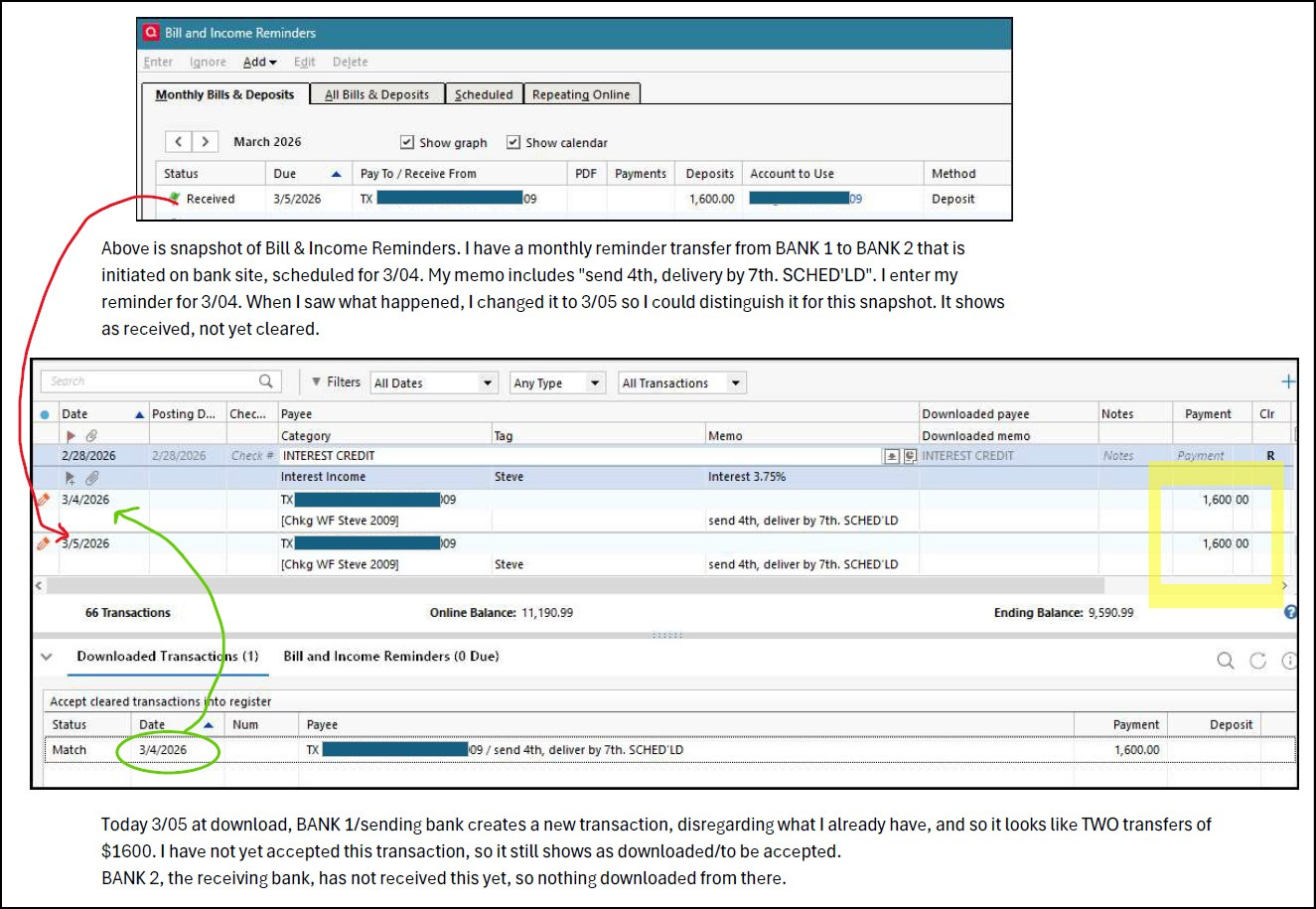
I use Bill and Income Reminders for all my routine transactions; it's sort of my budget. )Yes, I know, probably not the way Quicken is intended, but it works for me.) I have a scheduled monthly transfer from BANK 1 to BANK 2 that is initiated on BANK 1 site, scheduled for 3/04. My memo says "send 4th, delivery by 7th. SCHED'LD". I enter my reminder for 3/04. When I saw this error happen again today, before accepting/deleting the duplicate, I changed of my reminder transaction to 3/05 so I could distinguish it for this snapshot. It shows as received, not yet cleared.
Today 3/05 at download, BANK 1/sending bank created a new transaction, even including my memo. It wants to match the transaction with its own duplicate, and ignores my original entry. So, it looks like TWO transfers of $1600. I have not yet accepted this transaction, so BANK 1 still shows as downloaded/to be accepted. The receiving BANK 2 has not received this yet, so nothing downloaded from there.
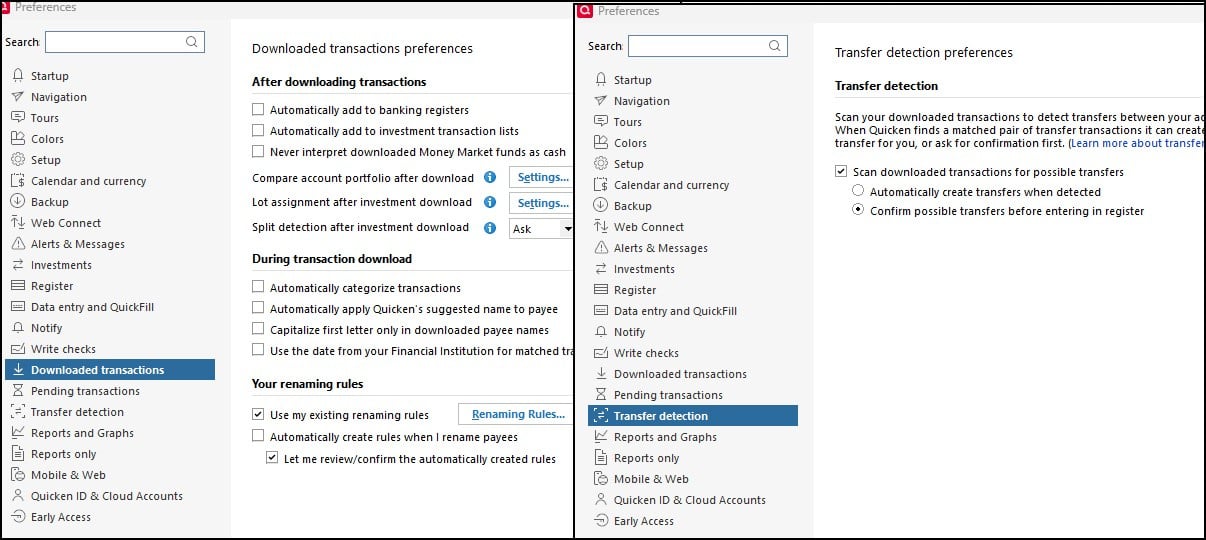
This problem has happened with this particular sending bank (CIT). The first few times this happened, before I realized it, I see my balances all out of whack. Now I know to watch for it, but it's really annoying! My preferences are set to scan downloaded transactions, and to confirm possible transfers - snapshot attached for my choices. Is there some other setting I should make that will help, or is it a glitch/error that is beyond my control? Other than keeping a watchful eye.
Thank you - two snapshots included.
 0
0 -
The financial institution doesn't matter. It happens with PNC Checking, PNC VISA, Chase VISA, and Fidelity (Elan) VISA.
So, on transfers, the category shows? I don't do many transfers and haven't seen this yet. Its only showed up for me in the past month.
Quicken Deluxe for Windows 11 Pro. Latest subscription version. I've been a user for decades.
- Jim S.
2 -
@jimshu1, I find that I must be mindful to watch for duplicates! And, when I see them, I do a manual matchup to accept the download to MY entry and not to the duplicate. Yes, on transfers, it comes with the category! I even had stopped memorizing payees for a while, but it still showed up with category.
1 -
OH, and I just did my banking now, and on download the receiving bank transaction came through, and it is also duplicated! But, I noticed yesterday and today too, while it is duplicated in the one with the download, and category is there, it did not show in the other account. Today instead of doing manual match up, I chose unmatch, and then it matched itself up with the correct/my entry. It's all very odd!
0 -
I have several reminders that are generated automatically monthly into my accounts. When my institution shows a transaction has been downloaded, it shows a match in the "Downloaded Transaction" window. I select "Accept All". The matched transactions are then duplicated in my transaction list. I have to delete the duplicates and select clear and save for each transaction that were entered as reminders. This problem has been occurring for several months.
0 -
One other observation: this duplication does not seem to occur for me with investment accounts. Just bank checking, savings, and credit card accounts regardless of the card type.
Quicken Deluxe for Windows 11 Pro. Latest subscription version. I've been a user for decades.
- Jim S.
1 -
Like Jim, I use Quicken mainly for checking, savings, CCs. The problem I've noticed for me, is that the duplication is only as the transactions are selected and displayed. I usually just select and accept each one so I can verify the data is correct. As soon as I finish with the list of transactions, all of them seem to be fine, with no duplication. So, it seems to be mainly in how the software is displaying each item. The duplication is only on the screen, not in the file.
1 -
Like Jim, the problem only occurs listed under the "Banking" accounts category.
I also want to update my input above. When I open the downloaded transactions window, the duplications are already entered in the the register and shown as matched. I now delete the duplicate transactions with no categories shown. The downloaded transactions still show matched. Once I accept all, it clears the transactions that were added as reminders.
0 -
Like Jim, the problem only occurs listed under the "Banking" accounts category.
I accept the automatically matched transactions, and they end up being entered new without a category, and the one they would have matched to are still there.
This has been happening for about a week.
Member since 1984.
Quicken Premier.0 -
I am having the same issue. When using both "One Step Update" or "Update Now" in a specific bank account, I end up with duplicate transaction entries in the register (as described in many of the comments). This has been an issue for me for about 2 weeks. I then manually delete one of the duplicates. I am a long-time Quicken user and have never seen this "duplication issue" before.
I just disabled Transfer Detection under Preferences > Transfer detection. Will see if this solves the issue for me and let everyone know.
I am using Windows 11, Quicken Classic Premier, version R66.23, Build 27.1.66.23
March 18 update: Disabling "Transfer Detection" did not solve this issue. 😒
1 -
I confirm. This problem still exists. Disabling Transfer detection does not solve the issue.
0 -
Hi Jim, I also experience this bug with your company's software. It is why, in another thread, I recommended focusing on things like this instead of developing new pop-up ads upon startup for other related products.
0 -
Hi Jim, I also experience this bug with your company's software.
@jjkrogs To be clear, the other SuperUsers and I are not Quicken employees. We are users like you. We volunteer our time to help other users. The only people on this forum who are Quicken employees are the Moderators, whose user names begin with "Quicken."
QWin Premier subscription1 -
OK, so it is not the Transfer Detection setting that is causing this problem.
I have been studying this carefully and I have a new theory. The problem occurs when there is a matching transaction already in the register. When transactions are downloaded, sometimes Quicken finds the matching transaction and highlights it but also creates another transaction.
My theory is that the phantom transaction is created if the transaction in the register has a matching entry in the Memorized Payee list and that entry has the "Mark transaction as cleared" box checked. I reviewed my MPL and found several entries with that box checked. I do not remember ever selecting that option, but I don't think transactions that are entered via Reminders should be marked as Cleared. I un-checked all of the affected MPL entries and will see if that fixes it for me.
If you try this, please let us know if that fixes it for you.
QWin Premier subscription1 -
I have literally hundreds of transactions in my MPL list. Is there a quick way of knowing if they are checked as "Mark transaction as cleared"? It looks like I have to open each to check. Is that true?
Thanks for any replies!
Quicken Deluxe for Windows 11 Pro. Latest subscription version. I've been a user for decades.
- Jim S.
0 -
[Update}
Based on one day of importing, it does not appear that the "Mark as cleared" option in the MPL is the only cause of this issue, but you may want to clean up your MPL anyway.
I still see a phantom duplicate when accepting New (not Matched) transactions, after accepting the last one by clicking on Accept below the transaction in the Downloaded Transactions (C2R) area. This creates a new cleared transaction in the register as it should, but also creates a phantom duplicate below it. The duplicate does not have an updated balance at the right. If I click on Done, the duplicate disappears and all is OK. The duplicate also disappears if I click on another transaction in the register or switch to another account and back.
[end of update]
_______________@jimshu1 I feel your pain. I ended up editing each of my 130 or so memorized payees and un-checking the "Mark as cleared" box if it was checked. It appears that the box gets checked if you memorize the Payee from a transaction that has been cleared; there may be other paths as well.
You can check for Reminders that will be entered soon to see if they use the MPL and fix those entries, or if you will be entering transactions manually, you can check and fix the MPL before entering them.
In general I think Payees that are entered via Reminders do not need MPL entries, unless you sometimes enter the transactions manually. The Reminder can supply the Category, Tag, and Memo
I may be wrong, but I think the only use for the "Mark as cleared" option is if you are manually entering transactions when reconciling to a paper statement in an offline account. With an online account, I think the only way a transaction should be marked as cleared is via a downloaded transaction.
So far it is really just a suspicion that having the "Mark as cleared" box checked is what is causing the phantom duplicates, but now that I have un-checked all of them we will see.
QWin Premier subscription1




Categories
- All Categories
- 6 Product Ideas
- 34 Announcements
- 249 Alerts, Online Banking & Known Product Issues
- 19 Product Alerts
- 266 Welcome to the Community!
- 301 Before you Buy
- 1.5K Product Ideas
- 55.8K Quicken Classic for Windows
- 16.9K Quicken Classic for Mac
- 1K Quicken Mobile
- 834 Quicken on the Web
- 129 Quicken LifeHub