How can I "unstore" passwords

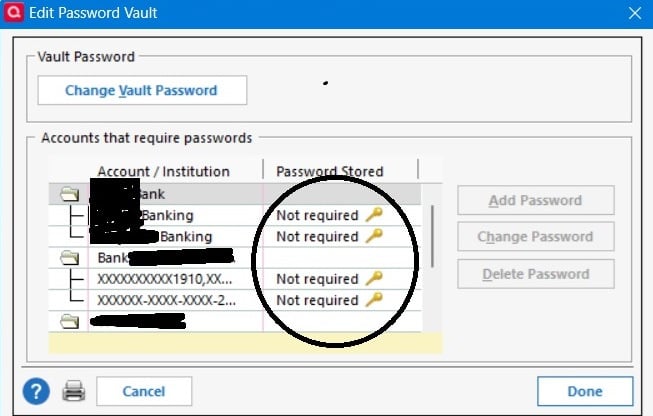
I'm using Windows desktop Classic. Quicken stores passwords using some third party. It makes it impossible to enter passwords manually, which is required by my bank. the "Change Password" dialog looks like this, password "not required." How can I get around this and enter a password. I'm not happy with the workaround of downloading QFX files and manually importing new transactions. I want manual control over passwords.
Answers
-
First, if you have not already done so you might want to read this Support Article regarding the various download connections methods: .
"Not required" for PWs in the PW Vault is used for accounts that are set up to download via the Express Web Connect (EWC) or Express Web Connect Plus (EWC+) connection methods. If your financial institutions support either of these methods then they do not require you to manually log in for OSU.
With EWC, the login information is saved on the aggregator's (Intuit's) servers. It needs to be saved there because Intuit generally connects with financial institutions at night to download the data to their servers where it is saved.
With EWC+, there is no login information saved anywhere. Set up for downloading engages an authorization process where by you are pushed to your browser where you need to log in and authorize the financial institution to download data to Intuit. Then the financial institution provides a rotating token to Intuit that Intuit then uses to connect with the financial institution and download your financial data from them, again, usually at night, saving it to their servers.
So, with both EWC and EWC+, when you do OSU you are not connecting with the financial institution. Instead, you are connecting with Intuit and requesting Intuit to download the data they already have to your Quicken installation.
If you do not want your login/security token information, as well as your financial data, saved on Intuit's servers you must deactivate the download connections for your accounts. Then each time you want to download you will need to do Add Account or Set Up Now and set up the download connections from scratch, again. When done downloading, you must then remember to deactivate the connection, again.
There are risks to data integrity when doing this because sometimes when the connection method is changed the Opening Balance transaction dollar amount will get changed and sometimes there will be duplicate transactions entered into the register. You will need to review the register each time you do this to determine if/when either of these issues has occurred and when they have you will need to manually edit the register to resolve those issues.
Another risk with the deactivating/reactivating process: When prompted you must be careful to ensure that the downloaded data is LINKED to the correct account(s) in Quicken. If care is not taken, then the data might download into the wrong account(s) or will be set up as new account(s).
One other option, as you noted, is to manually download the data from your online account in QFX files (called the Web Connect method). Not all financial institutions support this method.
Another option is to set up downloading with the Direct Connect (DC) method. But the majority of financial institutions do not support DC and of those that do, some will charge a monthly fee for that service. With DC the PWs are generally saved in the PW Vault. The PW Vault is saved only in your data file so neither Quicken nor Intuit have access to it. When you run OSU you really are making a direct connection to the financial institution using that login information in the PW Vault. If, instead, you want to manually enter your login information during OSU, then delete your PW Vault. That will delete the login information, does not deactivate the download connection and you will then be requested to manually enter the login information during OSU.
If none of these options is acceptable to your or is available to you, then manually managing your accounts is the option you are left with.
Quicken Classic Premier (US) Subscription: R66.23 on Windows 11 Home
1 -
Thanks, that does help. But I have now asked three different people at Frost Bank this question: Which of these Quicken download types do you support?
- Express Web Connect (Quicken Connect in Quicken for Mac)
- Express Web Connect Plus
- Direct Connect
- Web Connect
Each has told me (even though I say I don't mean Plaid), the answer I get is "We only use Plaid."
The protocol Quicken auto-selects is Express Web Connect. Am I stuck with that, or can I reconfigure within Quicken for Express Web Connect +?
0 -
It's your FI, not you or Q, that decides what download methods they support.
SOME FI's support multiple methods. US Bank, for example, supports Direct Connect, Express Web Connect+ and Web Connect … but they use slightly different FI names for each of those methods.
And, Express Web Connect is being replaced by Express Web Connect+.
Lastly, without you disclosing the name(s) of the banks, we can't lookup which method are supported.I missed that Frost Bank was already named … sorry.Q user since February, 1990. DOS Version 4
Now running Quicken Windows Subscription, Business & Personal
Retired "Certified Information Systems Auditor" & Bank Audit VP0 -
Frost Bank only supports Express Web Connect and Web Connect (QFX files). So, to use Express Web Connect you have to give your username and password, and it is stored on the Intuit server.
EDIT: note that if you select Tools → Add account and type in the financial institution name and select it, and then select the Advanced link it will bring up a dialog that shows you the possible choices.
0 -
Frost Bank, using a slightly different name, also appears to support Direct Connect.
Frost Connect - DC https://www.frostbank.com 888-481-0336 https://frostconnect.com/ui ACTIVE ACCOUNTINFO,BANKING&DIRECT
It's possible that you'd have to work with Tech Support at the bank to set this up and also possible that there's a fee for using Direct Connect.
Q user since February, 1990. DOS Version 4
Now running Quicken Windows Subscription, Business & Personal
Retired "Certified Information Systems Auditor" & Bank Audit VP2


