Date Format in the Register

I did not see this specific issue in the previous posts.
I modified the date that Windows 11 displays in the task bar to include the short version of the day-of-the-week but it messed up Quicken. Here's the details.
The Windows date format in managed in Control Panel/Region/Additional Settings/Date Tab.
The standard format is M/d/yyyy. This causes the task bar AND Quicken dates to look like this: mm/dd/yyyy (e.g. 2/18/2026 or 02/18/2026 for Quicken).
When I change the date format to this: ddd M/d/yyyy (just adding the ddd) the task bar now looks like this: Wed 2/18/2026. But Quicken changes to 18022026 (ddmmyyyy), no slashes even.
I want the DOW on the task bar but I want Quicken to honor the M/d/yyyy.
Please, don't tell me the programmers overlooked this and the product is working as designed.
Thanks.
Answers
-
AFAIK, the Windows Short Date format is used by Quicken and you should leave it in the standard US short date format, mm/dd/yyyy
There may be other international short date formats that can be used, but for use with Date keyboard shortcuts, the US format works best.0 -
Using 'ddd' IS an allowable 'short date format'. It might not be 'standard' but it's 'legitimate'. Tell me, do you use every 'standard' setting in Windows? You never customize anything?
It just shows that Quicken doesn't really know how to use it properly.
Do the Quicken developers see these posts? If not, is there a way for me to communicate directly with them and bring this to their attention?
Thanks.
0 -
Start a new post as an idea and if it gets enough votes, it goes to the powers to be to decide if it gets implemented, but one person asking for it just isn't going to carry enough weight.
-splasher using Q continuously since 1996
- Subscription Quicken - Win11 and QW2013 - Win11
-Questions? Check out the Quicken Windows FAQ list0 -
It takes about 50 votes for an Idea to be considered for implementation.
QWin Premier subscription0 -
OP created the idea post in Mac section for idea posts.
Quicken user since Q1999. Currently using QW2017.
Questions? Check out the Quicken Windows FAQ list1 -
Using 'ddd' IS an allowable 'short date format'. It might not be 'standard' but it's 'legitimate'. Tell me, do you use every 'standard' setting in Windows? You never customize anything?
My Win11 settings allow for these "Short Date formats".
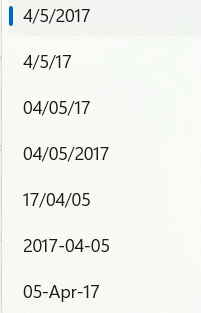
I'm not going to toggle through those 7 variations to see which if any don't work. As already suggested, to get the +/- date change feature to work, you pretty much need the mm/dd/yy or yyyy format selected. That you can set the taskbar to a different setting does not seem relevant to me. Much of Quicken's programming predates current Windows features. Neither Quicken, Inc. nor Intuit before them could be adept enough to update 30+ year old programming to follow Microsoft's changes.
2 -
Here's how to add the DOW to the task bar. It's done via Control Panel.
Click on the following links inside Control Panel: Region/Additional Settings. Now click on the 'Date' tab. In the Short Date Field simply insert ddd and a space in front of the short date format and click Apply. The task bar will instantly include the DOW.
A small comment in the window shows this: d, dd = day, ddd, dddd = day of week
0



