Fidelity CC-505 Error on all accounts / Fidelity Reporting Connection Issue error

Transaction download not working at all today for all Fidelity accounts 2/21/26. CC-505 error on all Fidelity accounts.
Quicken Classic for Windows (R66.12) on Windows 11.
Quicken Classic Premier (US): R66.28 on Windows 11 Pro
Comments
-
[Removed - Duplicate Post]
Quicken Classic Premier (US): R66.28 on Windows 11 Pro
0 -
I also am seeing CC-505 error on all my Fidelity accounts…
0 -
CC-505 on all Fidelity Investment accounts.
I then attempted to 'Reset Account' on the 'Online Services' tab, which deactivated the account. 😡
0 -
FYI, I was getting the same CC-505 this AM on all Fidelity.. A quick search led me to this:
https://www.quicken.com/support/error-when-using-online-services-cc-505/And, well, thats a new one for me. Selected "update transactions" from the gear options on the account register and that set off an update operation.. which completed without error… but 0 transactions downloaded. An OSU right after this was successful with all the transactions expected.. for all accounts.
0 -
Same here on all Fidelity accounts.
CC-505 error
0 -
Same here. Will try again later.
0 -
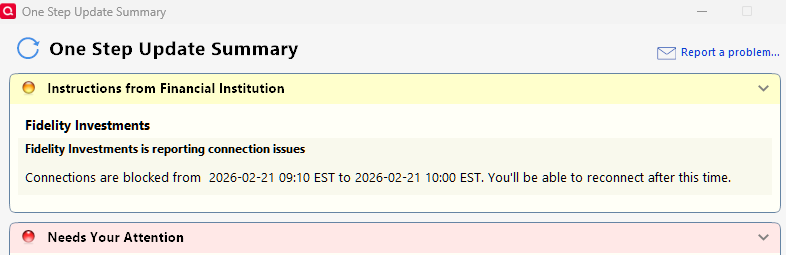
There is now an error message that says the problem should be resolved by 10:00 AM EST.
 0
0 -
My message says 9:00 AM MST.
0 -
Hello All,
Thank you for taking the time to report this issue.
We will be forwarding this issue to the proper channels to have this further investigated. However, we request that you please navigate to Help > Report a problem within your Quicken program and submit a problem report with log files and screenshots attached in order to contribute to the investigation.
It would also aid the investigation to include a sanitized file when submitting the problem report. A sanitized file is a data file that removes personally identifiable information so you can comfortably share this file with the Quicken team.
While you will not receive a response through this submission, these reports will help our teams in further investigating the issue. The more problem reports we receive, the better.
Please let us know once that is done, and we apologize for any inconvenience in the meantime! Thank you.
(CBT-1044)-Quicken Anja
Make sure to sign up for the email digest to see a round up of your top posts.0 -
Thanks for the follow-up. Based on the latest error message it appears Fidelity is aware of the problem. I'll test again after 11 AM ET which is when the current error message indicates the connection problem should be resolved.
Quicken Classic Premier (US): R66.28 on Windows 11 Pro
1 -
Thanks for the update, @Mark Wagner. Sounds good—please test after the indicated timeframe and let us know if any issues persist.
-Quicken Anja
Make sure to sign up for the email digest to see a round up of your top posts.0 -

Looks like the fix has been pushed by a couple of hours.
1 -
Attempted to download Fidelity transactions this morning, Feb. 21, 2026, and while Quicken appeared to process transactions, no transactions were recorded in accounts. Tried resetting account but no success.
Seems some other folks are experiencing issues.
Quicken, please advise asap if there is an issue and if so, please advise when this will be resolved.
Thank you.
0 -
Pushed back again till 1 PM ET. Will check back in later this afternoon.
Quicken Classic Premier (US): R66.28 on Windows 11 Pro
0 -
As of now, Fidelity is showing connections blocked until 10am PST.
 0
0 -
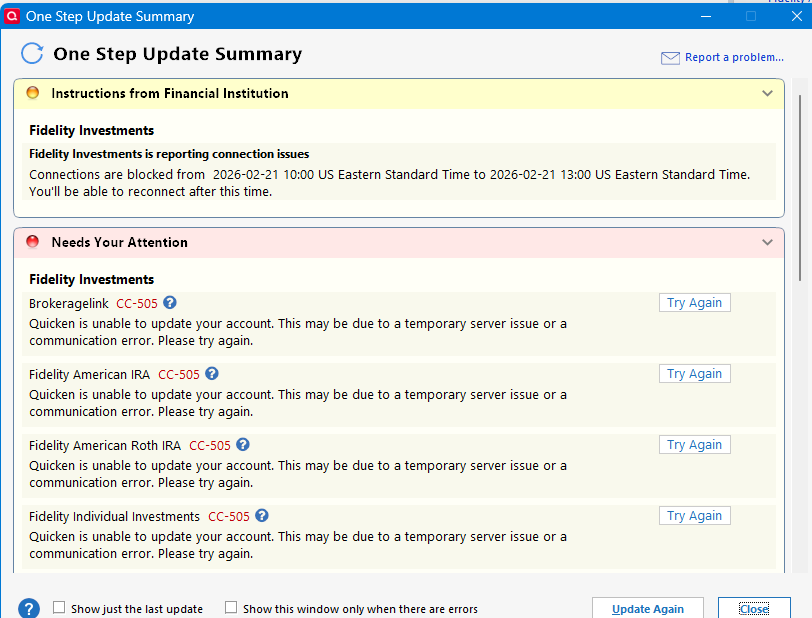
Time has now extended to 13:00 EST.
 0
0 -
Hello All,
Thank you for the updates and for sharing your experiences with the Fidelity connection this morning.
Please be advised that this issue has been confirmed to be on Fidelity’s end. They are aware of the problem, and our teams are monitoring it as well. The connection issue should be resolved between today and tomorrow.
If you continue to experience CC-505 or the “connection issue” error message by Monday morning, please let us know so we can investigate further.
Thank you for your patience!
-Quicken Anja
Make sure to sign up for the email digest to see a round up of your top posts.1 -
Just tested and the connection problem seems to be resolved, at least for me. Thanks.
Quicken Classic Premier (US): R66.28 on Windows 11 Pro
0 -
No connection error messages, but no transactions for February 20, either. 😕 It appears that I will need to manually enter the trades I made that day.
0 -
Same here. It's 11:24 AM PST. Still not resolved yet.
0 -
I just tried for the third time. Connection was successful, but only one of five transactions (from 3 different accounts) downloaded. I manually entered the other four.
The last time I had a connection error with Fidelity, I had similar results. A few transactions did not download, and they never downloaded in future One Step Updates. This happened at the same time of the CvrShrt problem. This is the first Fidelity issue I have had since then.
0 -
I just updated at 3:50 EST, all updated fine.
1 -
same here
1 -
I ran l OSU on the file for a club where I'm the Treasurer at 4:02pm CST.
The club's file uses the "Show Cash in a Checking account" feature, and a deposit came down properly, and was reflected in the pseudo-checking account.
BUT, when I accepted the txn in the checking account, the red flag in the associated brokerage account didn't also clear … which is new behavior.
There were no other downloaded txn and it several attempts at "clicking around" to get the flag in the brokerage account to clear.
Business & Personal R66.11
[EDIT] I updated to R66.12 and restored a backup and re-downloaded … the flag in the brokerage account remained stubborn, only clearing after several attempts. [/EDIT]
Q user since February, 1990. DOS Version 4
Now running Quicken Windows Subscription, Business & Personal
Retired "Certified Information Systems Auditor" & Bank Audit VP1 -
I tried another download at 3:30 MST, and this time the transactions for February 20 appeared.
Which is good, because there were about a dozen of them across two accounts. 👍️
1 -
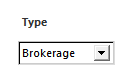
UPDATE: I just solved my issue: I had to identify my IRA accounts as Brokerage accounts in Quicken when re-activating and that did the trick:
Original Post:
I have 4 accounts at Fidelity: two brokerage and two IRA accounts. The brokerage accounts are now updating properly again. But no matter what I try, I cannot get the IRA accounts to update the last week or two of transactions. I sent a sanitized data file to Quicken via the Report a Problem option. I'm on Windows running Quick Classic Deluxe, latest version (R65.29, build 27.1.65.29).
0 -
Interestingly, I tried to log on to Fidelity NetBenefits website this AM to get prices for my non-listed funds which did not download on 2/20, and the website returned a technical difficulties message and wouldn't log on at all. NetBenefits having difficulties for a few days again…
Update: Clearing the browser history and cache resolved that problem :)
0 -
Same issue here. The update completes without errors, but I don't see any of the transactions for this past week. (I only update once a week on the weekend.) [2/22/26@8:45 MST]
0 -
It is still not working. I did report a problem via Quicken
0 -
Fidelity Investments? Or, Fidelity NetBenefits?
And, what exactly IS happening? "still not working" doesn't give us much to try to diagnose your issue.
Q user since February, 1990. DOS Version 4
Now running Quicken Windows Subscription, Business & Personal
Retired "Certified Information Systems Auditor" & Bank Audit VP0