Midfirst bank connection problem error FDP-107

Best Answers
-
Thank you for the follow-up,
The issue is still open and ongoing. Since the financial institution has not stated an intention to stop supporting Quicken, I assume it should be fixed in the future. We do not have an ETA.
Thank you!
Quicken Kristina
Make sure to sign up for the email digest to see a round up of your top posts.
-1 -
Thank you for your reply,
The 409 conflict error you're seeing in the logs is helpful. Please backup your Quicken file, then follow these steps based on our article on 409 conflict errors:
First, deactivate the accounts
- Go to Tools>Account list.
- If the option is visible at the bottom left, select Show hidden accounts. If the option is not visible, that means you do not have any hidden accounts.
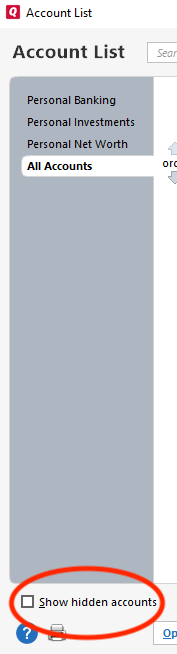
- Click the Edit button next to the account name.
- Click on the Online Services tab.
- Click on Deactivate.
- Do this on each account with this financial institution.
Second, reactivate the accounts using the same connection method
- Navigate to Tools>Add Account.
- In the Add Account window, search for the financial institution.
- Follow the prompts.
- On the Add/Link screen, carefully link the accounts with the correct nickname in Quicken.
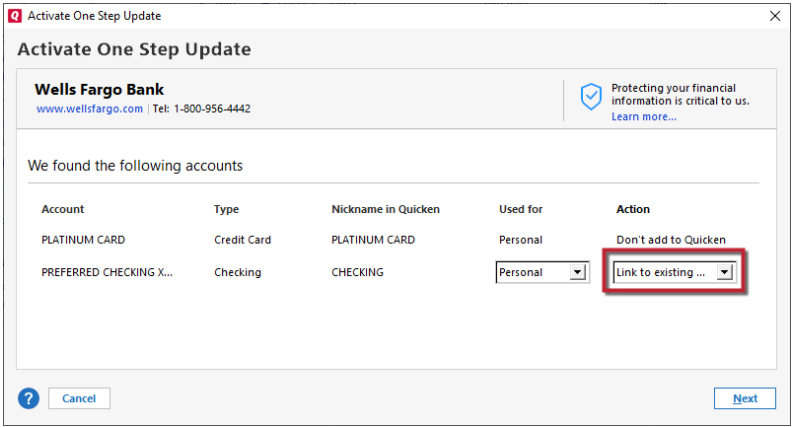
Please let me know how it goes!
Quicken Kristina
Make sure to sign up for the email digest to see a round up of your top posts.
0 -
Thank you for the follow-up,
I'm glad to hear that all 5 accounts are updating!
If you need further assistance, please feel free to reach out!
Quicken Kristina
Make sure to sign up for the email digest to see a round up of your top posts.
0

Answers
-
[Edited - Fixed Link]
0 -
Hello @garyb78137,
Thank you for reaching out! Normally, the link @recursor1 provided is what I'd recommend to start troubleshooting. However, this issue with MidFirst Bank is a known issue. If you haven't already done so, I recommend that you bookmark the Community Alert linked below, so that you will be notified of any updates, once available, and know when the issue is resolved:
Thank you!
(Ticket #11889880/CTP-13309)
Quicken Kristina
Make sure to sign up for the email digest to see a round up of your top posts.
0 -
According to Midfirst last week - until all customer accounts are converted to their (Midfirst's) new system no one will have access to Quicken. Who knows when that will actually happen…
0 -
Yes, they told me that also, but a few weeks ago I talked with MFB and they are now saying the problem is with Quicken!! Which doesn't make sense to me, since MFB changed their online banking software and that's when it stopped working… Being able to connect and download transaction sure saved me alot of time… I hope they get it fixed.
0 -
This issue has been going on since June and MFB has had inconsistent messaging from the start. I have called, and written multiple time with numerous deadlines promised. Then MFB finally got smart in October and stopped promising dates in October. I have been told the update was thoroughly tested and this issue did not show up. Most recently I was promised Friday, by a very nice and sympathetic phone rep that I should be getting a phone call from a manager due to my manual download and updates stopped working. We will see. I too have heard the bs "it's a quicken issue." When MFB realized in June there was a problem they should have sent an email warning of the potential issue. The transition taking 7 months is ridiculous, unless there are other issues with the update outside of the Quicken issue. I encourage everyone to bager the bank weekly with calls and emails letting them know the inconvenience they have caused and gthe lack of any respect to the people it has affected. I would change banks if my loan was not discounted due multiple accounts. I really feel they just do not care.
1 -
I just spoke with a MidFirst representative. The issue of MidFirst not connecting with Quicken is still not resolved. The MidFirst representative is going to look into it and call me back.
1 -
Hello @mstrohs,
Thank you for sharing! Please share any updates the representative is able to provide!
Thank you!
Quicken Kristina
Make sure to sign up for the email digest to see a round up of your top posts.
0 -
This is just crazy, I am really disappointed in both Quicken and MFB.
0 -
Has this issue been resolved. Midfirst is telling me I should be able to update my accounts through Quicken, but I still cannot. Is there something in my Classic version I need todo to regaion access? QUICKEN PLEASE ANSWER?
0 -
Guess it's time to move banks. MFB making a change that caused a 7 month issue for their customers is pathetic.
0 -
Quicken just a few weeks ago released a new version (R65.29 Dec 2025) that had a ton of fixes and updates, I got sooo excited, but none of them fixed this problem!!
0 -
Can anyone with Quicken tell me if this problem is ever going to be fixed?
[Edited - Readability]
0 -
Thank you for the follow-up,
The issue is still open and ongoing. Since the financial institution has not stated an intention to stop supporting Quicken, I assume it should be fixed in the future. We do not have an ETA.
Thank you!
Quicken Kristina
Make sure to sign up for the email digest to see a round up of your top posts.
-1 -
It's fixed for me on my checking account. Still doesn't work on the VISA account. At least I see progress.
0 -
Jim, did you have to do anything new to get it to work with the checking account? I did the update, but it still gave me the error.
[Edited - Readability]
0 -
Is there any udate to the MidFirst issues. Yes I can now update my accounts through Quicken, but there still are issues with some transactions not updating correctly. Neither the bank nor Quicken is forth coming with information if the issue is being addressed. The issues with Midfirst are nearing eight months what is going on. I do get the Quicken support news letter, but this issue is never addressed.
0 -
I was able to reconnect to MidFirst back and updated all my accounts except the Visa Credit card account. The first time I connected I didn't link the MidFirst accounts to the account names I had in Quicken, so it just added all the MidFirst account names as NEW accounts!!! So I had to delete the new accounts, then relinked the account to my existing names in Quicken, success!!! Yay!!! . I will just have to manually update the Credit card account. Any ideas on when that might be fixed??
0 -
Still having issues with MidFirst. Now I can update my accounts, but hand writtten checks are being downloaded from MidFirst as deposits/income. I do not write many checks, but the process to match and correct the issue is a two step 4 clicks process, so even writing about five checks a month this is annoying. Also some entries there is no status once the download iscompleted. When I enter the transaction there is the usual orange pencil, after downloading the status is stripped no blue pencil or dot. Please do not tell me to check the digest for the most recent updates, I have never seen any Midforst issues addressed in the digest. TIME FRAME!!!! That is all I need.
1 -
I am having this issue with handwritten checks downloaded from MidFirst being labeled by Quicken as deposits. I have started a new thread here to try to get more attention for the issue:
0 -
Well after 6 months or so of not being able to do the one-step update, it worked for about a week. Now i am getting a new error, CC-601 Quicken can't find any account that has a non zero balance. Can someone from Quicken respond about this error? Thank you.
0 -
It's back to working today!!
1 -
Thank you for the update,
I'm glad to hear it started working!
If the issue returns, please let us know!
Quicken Kristina
Make sure to sign up for the email digest to see a round up of your top posts.
0 -
Well it didn't work this morning, back to the 601 error, what is going on??? Is this a known problem and is it being worked on or am I the only one getting this error??
0 -
Thank you for your reply,
To help troubleshoot, I checked our internal tools and could see a script error message. However, I can see what looks like a successful connection today. Were you able to connect and update your accounts?
I look forward to your response!
Quicken Kristina
Make sure to sign up for the email digest to see a round up of your top posts.
0 -
Yes, it did work this morning, it seems to take a lot longer than before, but it did work.
1 -
Thank you for the update,
I'm glad to hear that it worked again this morning.
If the issue returns, please let us know!
Quicken Kristina
Make sure to sign up for the email digest to see a round up of your top posts.
0 -
I seem to still be having some problems. When I do the One Step Update, it only updates 3 of my 5 accounts with MidFirst, it skips one of my savings accounts and the MidFirst Visa credit card account. I have reset the accounts, but it comes back with an error message of "connection problem with MidFirst", with no error number. Any ideas what it could try??
[Edited - Readability]
0 -
Thank you for the update,
I can see that the alert for the known issue is still open, so it's possible you're seeing it because work is being done behind the scenes to fix it for everyone.
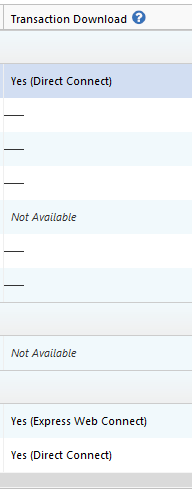
I checked our internal tools to see if any errors were showing. A script error was shown, but the next attempt, a few minutes later, was successful. Are the problem accounts currently showing as manual accounts in Quicken? You can check that by navigating to Tools>Account List and looking in the Transaction Download column next to those accounts. If it says "Yes" in that column, then Quicken thinks the accounts are connected. If not, then they're manual.
Thank you!
Quicken Kristina
Make sure to sign up for the email digest to see a round up of your top posts.
0 -
Good morning, I have done some testing and investigating of the SyncLog file over the weekend and this morning. First, all my accounts are set up to update with the "YES" in the column. If I am reading the log correctly, Quicken is requesting updates on all five accounts, but MidFirst is only returning updates on the same three accounts. If I go into accounts and reset one of the accounts that it doesn't update, it will find it and link it to the correct Quicken account, and then it will automatically do a One-Step-Update, and that time it will update all five accounts. Don't know if this will help anybody or not, but this is what I have found so far.
[Edited - Readability]
0 -
Thank you for the follow-up,
It’s interesting that resetting one of the problem accounts allowed you to reconnect and update all five accounts. To clarify, have all five accounts continued to update successfully, or was this only a temporary fix?
Thank you!
Quicken Kristina
Make sure to sign up for the email digest to see a round up of your top posts.
0
Categories
- All Categories
- 6 Product Ideas
- 34 Announcements
- 249 Alerts, Online Banking & Known Product Issues
- 19 Product Alerts
- 266 Welcome to the Community!
- 301 Before you Buy
- 1.5K Product Ideas
- 55.8K Quicken Classic for Windows
- 16.9K Quicken Classic for Mac
- 1K Quicken Mobile
- 834 Quicken on the Web
- 129 Quicken LifeHub