Just fyi. If you have updated to 66.12, check your backup frequency preferences

Just an FYI. I recently updated to version 66.12 and noticed I was not getting prompted to backup before I exited quicken. I checked and found that it was set to remind me every 5 times for automatic and manual vs every 1 time, which is my preference. Might be worth checking your setting.
Comments
-
You're right. My Backup Preferences were messed up, too (reset to 5 from 1)
Somebody stuck a bug into the R 66 fixes.
0 -
Hello All,
Thank you for taking the time to visit the Community to report this issue, though we apologize that you are experiencing this.
We have forwarded this issue to the proper channels to have this further investigated. In the meantime, if you haven't already done so, we request that you please navigate to Help > Report a problem and submit a problem report with log files attached and (if you are willing) a sanitized copy of your data file in order to contribute to the investigation.
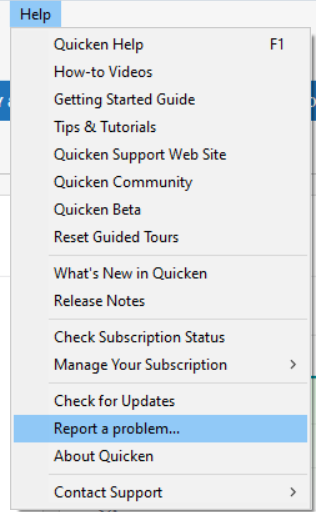
While you will not receive a response through this submission, these reports will help our teams in further investigating the issue. The more problem reports we receive, the better.
We apologize for any inconvenience!
Thank you.
(CTP-16412)
Quicken Kristina
Make sure to sign up for the email digest to see a round up of your top posts.
0 -
I just submitted a problem report. However, I could send a sanitized version as it was too big.
1 -
Thank you for your reply,
Thank you for sending the problem report with log files. It will help our teams investigate the issue.
Thank you!
Quicken Kristina
Make sure to sign up for the email digest to see a round up of your top posts.
0 -
I also noticed this problem yesterday. On one hand it is annoying, perhaps inexcusable, that user settings should change with a software update, but what really frustrates me is that Quicken has never seemed to comply with my settings. I believe I had the maximum number of local backups set to 20 and yet I have 48 now. I fully expect that the new setting that was set for me (5) will be ignored as well.
1 -
I am seeing the same issue with R66.12. I downloaded and installed the update from the manual update page.
Auto backup settings were changed from my preferred every 1 time / 10 copies to every 5 times / 5 copies
Manual backup reminder setting was changed from every 1 time to every 3 times.
As far as I know those are the only settings that were changed by this update but time will tell …
QWin Premier subscription1 -
Thank you for your reply,
Thank you for letting us know you're also seeing this problem. I added you to the ticket.
For the additional issue with Quicken never complying with your settings, please start a new discussion, so we can troubleshoot this with you.
Thank you for letting us know you were also affected by this issue. I added you to the ticket.
Thank you!
Quicken Kristina
Make sure to sign up for the email digest to see a round up of your top posts.
0



Categories
- All Categories
- 6 Product Ideas
- 34 Announcements
- 249 Alerts, Online Banking & Known Product Issues
- 19 Product Alerts
- 266 Welcome to the Community!
- 301 Before you Buy
- 1.5K Product Ideas
- 55.8K Quicken Classic for Windows
- 16.9K Quicken Classic for Mac
- 1K Quicken Mobile
- 834 Quicken on the Web
- 129 Quicken LifeHub