Why are reminders automatically appearing in register without category?
Answers
-
Hello All,
Thank you for contributing to this thread.
If you would like to aid in the investigation of this issue, you can submit log files by going to Help>Report a problem>Send to Quicken.
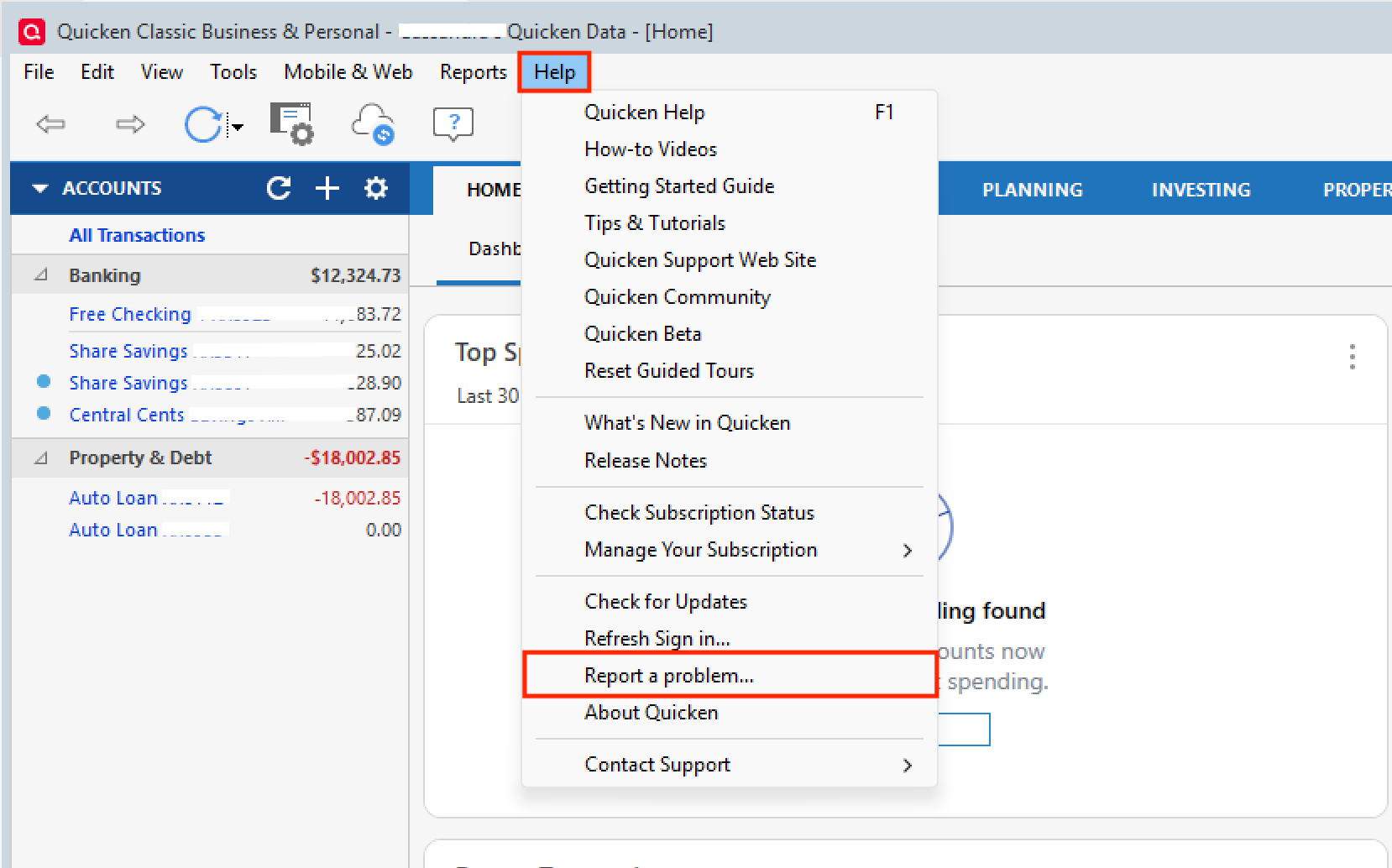
If you do send log files, please let us know so we can add them to the ticket.
Thank you.
[CTP-16297]
Quicken Alyssa
Make sure to sign up for the email digest to see a round up of your top posts.
0 -
I just received an update to Quicken for Windows, and I saw some entries in the release notes pertaining to pending transactions. So, I'm cautiously hopeful that somehow they relate to the issue we've been discussing, and we'll see some improvements.
Specifically, the release notes said:
- FIXED Fixed an issue where pending transactions could be duplicated.
- FIXED Fixed an issue where a posted transaction could be missing after a pending transaction was removed.
- FIXED Fixed an issue where editing a pending transaction could leave blank lines in the register.
The third one on this list seems the most related to the issue in this thread.
0 -
Those notes were for release R66.11. I'm now on R66.18 and still have the same issue…
Quicken Classic - R66.28, Windows 11 PRO current on updates
My data file is NOT being synced nor backed up.
0 -
So, this is no longer an assumption it is occuring on accounts that don't have pending transactions turned on. As long as pending transactions are turned on globally, it doresn't matter if you turn accounts on or not, reminders still appear in register without category…
Quicken Classic - R66.28, Windows 11 PRO current on updates
My data file is NOT being synced nor backed up.
1 -
I think it's safe to assume that the changes mentioned above are the changes that made the issue worse, meaning they occur even when the account is NOT set to show pending transactions…
[Edited-Readability]
Quicken Classic - R66.28, Windows 11 PRO current on updates
My data file is NOT being synced nor backed up.
0 -
I have turned off pending transactions globally. I will leave them off until Quicken can resolve the issue. It's really too bad this issue has not only remained, but gotten worse after a "Fix" was applied… It's a great feature if it would work correctly.
Quicken Classic - R66.28, Windows 11 PRO current on updates
My data file is NOT being synced nor backed up.
0 -
Hello All,
Thank you for adding to this discussion.
The escalation ticket is still open and active. Our team is investigating the issue. We do not have an ETA as to when it will be resolved.
If they request more information or share any updates, I will post it in this thread.
Thanks again!
[CTP-16297]
Quicken Alyssa
Make sure to sign up for the email digest to see a round up of your top posts.
0 -
they might start by backing out the changes they put in for release 66.11, it just made things worse.
Quicken Classic - R66.28, Windows 11 PRO current on updates
My data file is NOT being synced nor backed up.
1 -
This is happening to me as well.
0 -
I just sent logs for this.
1 -
Hello All,
Thank you for adding to this discussion.
This issue is still being investigated. @Randy 415, thank you for submitting new log files. I have added them to the escalation ticket.
If anyone else wants to contribute to the investigation by submitting logs, you can follow the steps outlined here:
Thanks again!
Quicken Alyssa
Make sure to sign up for the email digest to see a round up of your top posts.
1

