Having trouble downloading one of several accounts at SchoolsFirst FCU

I have 4 accounts (checking, savings, money market & mastercard) under one member ID at SFFCU and 2 accounts (checking, savings) under another at SFFCU. The problem is Quicken only sees ONE of the two under the second ID. It keeps asking if I've closed the account. It used to download just fine. I've tried deactivating and re-adding but it doesn't help. I can log into the bank website and see everything just fine. Any clues?
Answers
-
Hello @Tominator,
Thank you for reaching out! To help troubleshoot this issue, please provide more information:
- When did you first notice this issue?
- Was the account previously connected and downloading into Quicken?
- Are you seeing any error codes along with that error message?
- Which of the two accounts is Quicken not seeing?
- Have there been any transactions, other than automatic interest payments, in the problem account within the last 90 days?
- Is the problem account a sub-type of another account?
- Are you the primary account holder?
I look forward to your response!
Quicken Kristina
Make sure to sign up for the email digest to see a round up of your top posts.
0 -
Since about 2 days ago, I cannot download transactions from SchoolsFirst FCU. The update runs fine, runs through 2-step verification, and completes the process, but downloads nothing. (Yes, I have several new transactions to download) I tried resetting the account but that didn't help. Is this a known issue? Thanks!
0 -
The issue is still occurring for me today. Are there any updates or temporary solutions available?
0 -
Thank you for letting us know you're encountering issues. When I check our internal tools, I can see that both of you are getting a CC-506 (account mismatch) error. The issue has been forwarded to the proper channels for further investigation and resolution. To contribute to the investigation, if you haven't already done so, please navigate to Help>Report a Problem and send a problem report with log files attached.
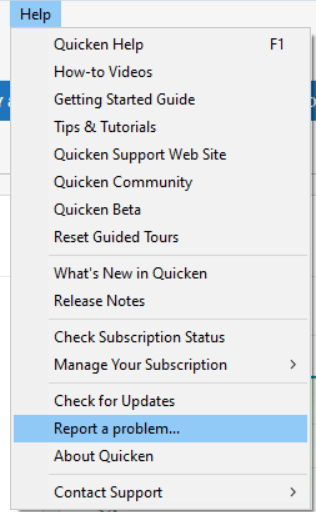
Please let me know once you have submitted the problem report, so I can add you to the ticket.
Thank you!
(CTP-16470)
Quicken Kristina
Make sure to sign up for the email digest to see a round up of your top posts.
0 -
Hi Kristina! Problem report submitted with logs. Thank you!
1 -
Thank you for your reply,
Thank you for sending the problem report. It will help our teams investigate the issue.
Also, a Community Alert just came out for this issue. To be notified of updates, once available, and know when it is resolved, please bookmark the alert linked below.
Thank you!
(Ticket #12263236/CTP-16470)
Quicken Kristina
Make sure to sign up for the email digest to see a round up of your top posts.
0 -
Hello All,
Our teams posted an update saying that the issue was a temporary one, and you should be able to connect your accounts now. If you're still having issues connecting, please let me know!
Thank you!
Quicken Kristina
Make sure to sign up for the email digest to see a round up of your top posts.
0

