Issue with Scotiabank

Running Quicken Classic Business & Personal v.R65.20 on Windows 11, Quicken software is up to date.
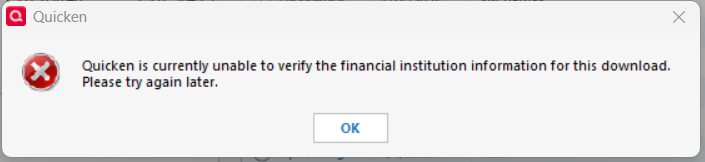
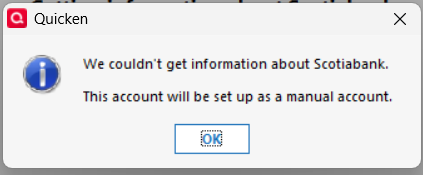
I do not use One Step update as it has never worked properly with Scotiabank. I download the QFX file from the banking website and load it into Quicken, this has worked just fine for years until Monday. Now I get a message stating "Quicken is currently unable to verify the financial institution information of this download". I have deactivated my Scotiabank accounts and when I try to reactivate them I get the following message "We couldn't get information about Scotiabank. This account will be setup as a manual account".
Is there a resolution to this? Or do I have to go back to entering everything manually (nuisance)?
Best Answers
-
You've demonstrated that the problem is not your data file, but either the Quicken App has become corrupted somehow, Quicken can't access the internet, or some other similar issue. It is not a bank issue or a datafile issue.
I highly recommend that, at this point, you avail yourself of Quicken's phone support. Be sure to log into your Quicken account to obtain the toll free number.
With a problem like this, I expect you will get to a resolution faster by getting help from Quicken, but once resolved, please do post back here what was the resolution!
Good luck!
1 -
Turned out to be a very simple fix.
please try to go:Edit > Preferences > Quicken ID & Cloud accounts > Sign in as a different user > Type "yes" on the bottom > Sign out > Then try to sign back into Quicken.
Once I signed back in I was able to import the .QFX downloaded files.
I don't really know why that worked but no matter, it is fixed now!
Thanks for your help troubleshooting!
1

Answers
-
Hi @PSClaughton,
Thank you for providing detailed information about the issue. I’m happy to help you troubleshoot further.
To better understand what might be causing the problem, I have a few questions:
- Where is your Quicken data file located?
- To check, please open Quicken and go to File. At the bottom of the menu under Recent Files, the file with the check mark next to it is the one currently open. Please let me know the full file path shown there.
- Is your file being backed up/ synced by any third-party services like Carbonite, OneDrive, or Backblaze?
- Are you using a VPN, firewall, or antivirus software? If so, please let me know which one(s).
- How are you connected to the internet (wifi, Ethernet, hotspot)?
- Do you have any pending Windows updates, or did you install a Windows update around the time the issue began?
- Have you tried restoring a backup from a date prior to when the issue started?
Your answers would be very helpful. I'll look forward to your response!
Quicken Laura
Make sure to sign up for the email digest to see a round up of your top posts.
0 -
Open the downloaded QFX file with Notepad and look at the header records. There should be one labeled <INTU.BID>
What's the bank ID number shown there?0 -
00025
0 -
00025
0 -
It should work. Here is the entry from the FIDIR.TXT:
00025 00025 00025 Scotiabank https://www.scotiabank.com/ca/en/personal.html 1-800-4-Scotia https://www.scotiabank.com/ca/en/personal.html ACTIVE BANKING,CREDIT&WEB-CONNECT BANKING,CREDIT,ACCOUNTINFO&EXP-WEB-CONNECT NOT_QBP NA
0 -
Yes, but …
does the installed FIDIR.TXT file (or is it FIDIR-C.TXT for the Canadian version?) in @PSClaughton 's computer contain this entry? This file should be located in C:\ProgramData\Quicken\Inet\Common\Localweb\Banklist\2019\fidir.txt and can be viewed with Notepad.
AFAIK, the FIDIR file is refreshed / downloaded from the server when Quicken starts for the first time in a day.
It's also refreshed when one runs One Step Update for the first time in a day.
Another refresh occurs when you start a Tools / Add Account process.I suggest @PSClaughton try starting a Tools / Add Account process. You may stop it when the list of banks appears. This should have downloaded a fresh FIDIR file.
After that's done, restart Quicken and try importing the QFX file.P.S.:
Community Superusers and Moderators may want to review this Lounge discussion: Question about refreshing the fidir.txt file — Quicken0 -
The filename is the same (FIDIR.TXT) for the Canadian version but it is located in a different file folder - not the one @UKR referenced. I’m not at home presently. I’ll have to look up the path later when I’m at home and paste it to this post.
0 -
I tried the add account step and then restarting Quicken - did not help, got the same error message
I did find the FIDIR.TXT file in the location you advised but it does not have 00025 listed in it. I did a search for 00025 and it said not found. I searched Scotiabank and all it came up with was ScotiaConnect which is 68884.
Also the FIDIR file states last modified 7/7/2025
0 -
The FIDIR.TXT that you found in the referenced folder is for the USA version of Quicken. As I mentioned earlier, the Candian FIDIR.TXT is located in a different folder. I will post that path later today from home.
0 -
1 - D:\_QUICKEN CURRENT_Daily Use file\CLAUGHTON 2024_current
Please note - D drive is an external 4TB drive
3 - No - I have Quicken set to remind me to do a manual backup every 5 times it is opened. I backup to OneDrive
4 - No VPN, firewall Windows Security, antivirus is Bitdefender Total Security and it is current
5 - Wifi - home network
6 - There was a pending update that I did this morning but it did not help. Prior to that, the most recent update was 2 weeks prior to the issue and Quicken had been used several times in that time period with no problem
7 - No, not yet
0 -
found it in C:\ProgramData\Quicken\Can\Inet\Common\Localweb\Banklist\2019
and it has a listing for 00025 so I am guessing it should work just no idea why it isn't
the line reads as follows
00025 00025 00025 Scotiabank https://www.scotiabank.com/ca/en/personal.html 1-800-4-Scotia https://www.scotiabank.com/ca/en/personal.html ACTIVE BANKING,CREDIT&WEB-CONNECT BANKING,CREDIT,ACCOUNTINFO&EXP-WEB-CONNECT NOT_QBP NA
0 -
Yes, that is the FIDIR.TXT for the Canadian version of Windows.
As a test, edit the QFX file by changing the 00025 to 00015, which is RBC. Does it import an "RBC" file or does it produce the same error?
0 -
It produces the same error
0 -
I also have a CIBC Mastercard. I just downloaded that file and tried to import it and I get the same error. Now I am wondering if my Quicken file is corrupted and if I will need to restore from a backup prior to the start of this issue.
0 -
Try two things:
- Run a One Step Update - even if you have no Express Web Connections
- Create a brand new Quicken file as a test and try to import the QFX file.
What happens?
0 -
- One Step Update doesn't even open up - no matter how I try to access it
- Created a new Quicken file - tried to import the QFX file and got the same error message
0 -
You've demonstrated that the problem is not your data file, but either the Quicken App has become corrupted somehow, Quicken can't access the internet, or some other similar issue. It is not a bank issue or a datafile issue.
I highly recommend that, at this point, you avail yourself of Quicken's phone support. Be sure to log into your Quicken account to obtain the toll free number.
With a problem like this, I expect you will get to a resolution faster by getting help from Quicken, but once resolved, please do post back here what was the resolution!
Good luck!
1 -
Turned out to be a very simple fix.
please try to go:Edit > Preferences > Quicken ID & Cloud accounts > Sign in as a different user > Type "yes" on the bottom > Sign out > Then try to sign back into Quicken.
Once I signed back in I was able to import the .QFX downloaded files.
I don't really know why that worked but no matter, it is fixed now!
Thanks for your help troubleshooting!
1

