Bank of America and other accounts duplicate and delete the past history

Hi there,
Quicken lately is full of flaws. It's creating duplicates of Capital one, Bank of america and other accounts but while doing so it's erasing my complete history of my account. One in particular I've had for a very long time - I don't appreciate that BA is erasing the history of my accounts - and they go back far. How do I get it back? The banks only keep a certain amount of years - I want all of it back. Is there a way to retrieve it? Do I have to create a new quicken file with an older backup and then rehook the accounts up again? Or will it do the same thing - erase the many years I had in each account?.
Comments
-
Hello @RonaEdwards,
Thank you for letting us know you're encountering this issue. To clarify, is this happening when you need to reauthorize and/or reconnect an account?
If that is when the issue is happening, then I suspect the accounts are getting added as new instead of linked to the existing account. The new accounts would have only as much history as the financial institution makes available for download, but the original accounts would still have all the history. To check for this, navigate to Accounts>Hide and Show Accounts.
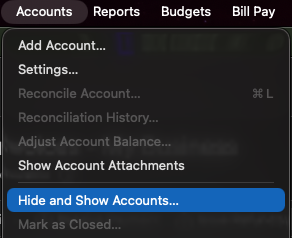
In the window that comes up, review the listing of your accounts and confirm if there are any duplicate accounts.
If there are duplicate accounts, there are a couple ways to resolve the issue.
First, backup your Quicken file. Then, depending on your preference, follow the steps from one of these options:
Option 1 - If you want to keep the newly added accounts
- Determine how much history is missing from the newly added account.
- Go to the original account.
- Select the historical transactions that are missing from the newly added account.
- Drag and drop those transactions into the newly added account.
- Review to ensure all the history you need is in the new account and everything is correct.
- Once you have confirmed the new account is good, delete the old account.
- Repeat this process for each duplicate account.
Option 2 - If you want to keep the original accounts
- Delete the newly added duplicate accounts.
- Deactivate all accounts with the problem financial institutions.
- Navigate to Accounts>Add Account and follow the prompts.
- When you get to the Add/Link screen, carefully link the accounts to the existing account in Quicken.
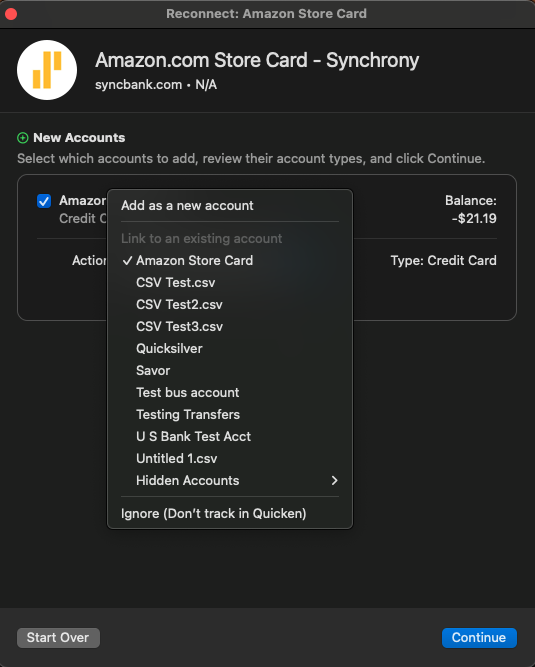
- Repeat steps 3 & 4 for each financial institution this issue happened with.
Please let me know how it goes!
Quicken Kristina
Make sure to sign up for the email digest to see a round up of your top posts.
0 -
I will have to work on this another day But yes - Bank of America and Capital One seem to be the culprits - and were duplicating accounts - I would delete the duplicates which erased the older transactions. And then when I would update the account, I assigned it to each BA account (or Capital One account). So it did connect but still did not have the older transaction years.
One thought, can I open two Quicken files (the recent one and the one from December 25) and copy and paste transactions across to see if that may work? It's a little bit crazy some of the older transactions from the account are not categorized correctly - and because of some of the age (11/24), I can't find out what it is in my BA account online - they don't go back that far except in the statements - but the statement doesn't explain what a mobile deposit was exactly - doesn't let me see the check. But I always download each account and go over it, changing categories and notating those kinds of deposits. Not sure why they're not in the backup, however? 🤷♀️
[Edited - Readability]
0 -
No one has answered the above for me yet?
0 -
Thank you for your reply,
Sorry for the delayed response. I didn't receive any notification of your first reply.
To answer your question, there isn't a direct way to copy/paste transactions between Quicken files. Are you able to recover the data by restoring a recent file from before you deleted the accounts? If you are, that would probably be far easier than going back and re-entering all those transactions.
I hope this helps!
Quicken Kristina
Make sure to sign up for the email digest to see a round up of your top posts.
0 -
I have an older backup - i just want to make sure I have time to do this properly - but then after I do that, I have to download the more recent transactions - will it erase what I have?
0 -
Thank you for your reply,
If you restore an older backup, anything that was entered or downloaded after that backup was created would not be in that newly restored file.
Most financial institutions make about 90 days worth of transactions available for download, so you can expect that much should redownload into your file. Downloading more recent transactions should not erase anything already present in your file.
Any manual entries would have to be re-entered.
Thank you!
Quicken Kristina
Make sure to sign up for the email digest to see a round up of your top posts.
0 -
Ok - I think. can use a quicken file from December and then just go through and download and get everything.
I will try that this weekend. Thanks.
0 -
Thank you for the follow-up,
Please let me know how it goes!
Quicken Kristina
Make sure to sign up for the email digest to see a round up of your top posts.
0 -
It made it worse - it created duplicate files - and had a negative amount for all of last year as it didn't download any deposits, and pretty much erased most everything from last year 2025 except for a few payments. That was from 4 accounts with Bank of America. Capital One, the same thing, and also happened with Chase. I don't want to mess with the others. It's ruined my whole accounting records. Including all of the last years' tax reports.
[Edited - Readability]
0 -
I disconnected the accounts for BA and then reconnected - I connected it to the account listed not a new one as that didn't work at all. It still didn't work and like I said previously, it seems to have a negative in the checking account and has pretty much erased 2025. I knew Quicken was as reliable as it used to be but this is really outrageous.
0 -
Should say Quicken wasn't as reliable as it used to be. Not "as reliable."
Basically what I can deduce is that it lists only two transactions throughout 2025 - mortgage and a life insurance policy - no deposits and no other deductions - that's why it's in the negative - when I try to connect and download from Bank of America - nothing happens. The register remains the same. I've tried different quicken backups - and they all seem to have the same issue and now it's saying it isn't connected to the cloud. So not sure what that is about - it wants me to reset the cloud which I'm loathe to do as it may erase transactions and I can't see myself manually entering every account from 2025. I've been a long time user of Quicken but this is the biggest mess up ever!
0 -
Also in an earlier message from you - you stated that if I restored an older back up - that the newer transaction would not be there - yet I'm seeing some but not all transactions and like I stated above, 2025 in particular is gone with the exception of two transactions (probably because they are recurring)?
Should I delete all of those and see if it populates when I connect? Because when I do try to download - nothing from 2025 which even in the backups from 2025. Which is odd, because it's always been there. And nothing downloading from 2026 - my last backup was in March, and that's when I noticed the issue.
Before that the registers worked fine. I'm concerned as I back up Quicken at least once a month if not more and now I don't know where to begin, I can't lose my info from 2025 for tax purposes should I ever be audited, it would be horrific. I count on Quicken to back me up.
[Edited - Readability]
0 -
Thank you for your replies,
It made it worse - it created duplicate files - and had a negative amount for all of last year as it didn't download any deposits, and pretty much erased most everything from last year 2025 except for a few payments.
What do you mean by duplicate files? Did you end up with duplicate accounts again?
no deposits and no other deductions
Do you have any filters active in those account registers?

Also in an earlier message from you - you stated that if I restored an older back up - that the newer transaction would not be there - yet I'm seeing some but not all transactions and like I stated above, 2025 in particular is gone with the exception of two transactions (probably because they are recurring)?
Anything that happened after the backup was created should not be present in the newly restored backup. If you have scheduled transactions/reminders set to auto enter, those may automatically enter into account registers. Once you run One Step Update, history the financial institutions make available should be able to redownload into the accounts.
You may find it beneficial to contact Quicken Support directly by phone. They have access to a screen share tool which may allow them to better assist you, since (if you permit it), they'll be able to see what is happening and provide assistance in real time. The Quicken Support phone number can be found through this link here. Phone support is available from 5:00 am PT to 5:00 pm PT, Monday through Friday.
I hope this helps!
Quicken Kristina
Make sure to sign up for the email digest to see a round up of your top posts.
0
