Discover One-Step Update Failure

I just did the latest Quicken release (2/26/26) and now my Discover will not update. It said it failed, had me re-do everything through a sign-on with Discover, said it was successful, and continues to fail. When I try to manually re-set the one-step update, "Set Up Now…" it goes to a blank screen titled "Add Account" and just freezes there with nothing in the window. Back and Continue buttons are dimmed out.
Comments
-
Hello @CLoveCSCO,
Thank you for letting us know you're encountering this issue. To clarify, how is your Discover failing? For example, are you seeing any error messages/codes? If not, then what is happening?
When I try to manually re-set the one-step update, "Set Up Now…" it goes to a blank screen titled "Add Account" and just freezes there with nothing in the window. Back and Continue buttons are dimmed out.
Instead of using "Set Up Now…", please follow these steps:
- Backup your Quicken file.
- Deactivate all of your Discover accounts.
- Navigate to Tools>Add Account.
- Follow the prompts.
- When you get to the Add/Link screen, carefully link your accounts to the correct nickname in Quicken.
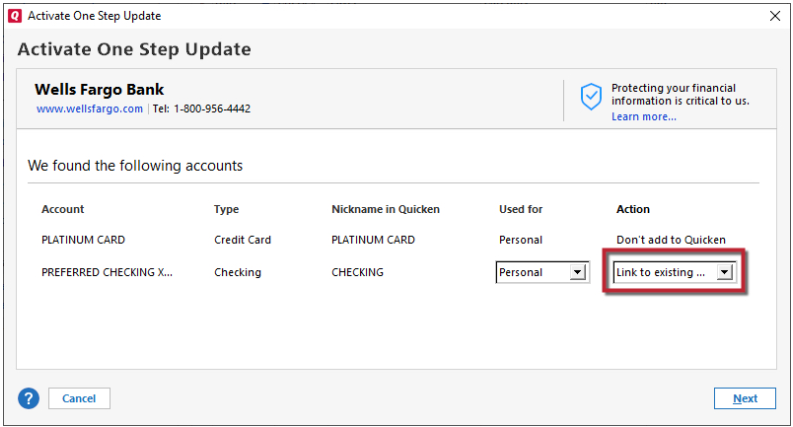
I look forward to your reply!
Quicken Kristina
Make sure to sign up for the email digest to see a round up of your top posts.
0 -
Hello @CLoveCSCO,
We haven't heard back from you in a while. Do you still need assistance?
Check back and let us know! Thank you.
Quicken Kristina
Make sure to sign up for the email digest to see a round up of your top posts.
0

Categories
- All Categories
- 6 Product Ideas
- 34 Announcements
- 248 Alerts, Online Banking & Known Product Issues
- 19 Product Alerts
- 265 Welcome to the Community!
- 301 Before you Buy
- 1.5K Product Ideas
- 55.8K Quicken Classic for Windows
- 16.9K Quicken Classic for Mac
- 1K Quicken Mobile
- 834 Quicken on the Web
- 129 Quicken LifeHub