Rocket Mortgage - Connects but shows zero balance

For the last week (I've tried twice), I was able to get Rocket Mortgage to connect, but even though on the setup screen it shows my current balance (-XXXXXX), once it finishes it shows a zero balance in Quicken and when I go to details it says the loan is paid off. Has anyone else seen this issue?
I was excited that the connection finally worked, but now it's another issue. Sigh.
Comments
-
Hello @Mitch104,
Thank you for letting us know you're seeing this problem. To help troubleshoot, please provide more information:
- Was the account originally with Mr. Cooper?
- Was the account previously connected and updating correctly?
- If it was, which connection option was it using?
I look forward to your response!
Quicken Kristina
Make sure to sign up for the email digest to see a round up of your top posts.
0 -
I have the same problem. Account originally with Mr. Cooper but transferred to Rocket Mortgage. It used to work with Mr. Cooper. Then there was a period where Rocket Mortgage wouldn't connect. Now, just like Mitch, I can add the account and during set up I see the correct balance. I also see the correct balance on Rocket Mortgage website. But when the account setup process finishes, the real balance "vanishes" and the newly set up account in Quicken shows $0 balance and "loan paid off". That would be nice…but it's not real.
0 -
Hello @Ron Paulus,
Thank you for letting us know you're also encountering this issue. The issue has been forwarded to the proper channels for further investigation and resolution. To assist with the investigation, please navigate to Help>Report a Problem and send a problem report with log files attached.
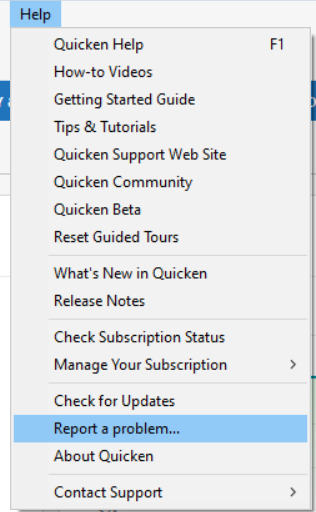
Please let me know once the problem report is sent so I can add you to the ticket!
Thank you!
(CTP-14708)
Quicken Kristina
Make sure to sign up for the email digest to see a round up of your top posts.
0 -
I have sent the files and reported the problem.
1 -
Thank you for the follow-up,
Thank you for sending the problem report. I added you to the ticket.
A Community Alert has been created for the issue. Please bookmark the alert linked below to be notified of any updates and to know when the issue is resolved.
Thank you!
(Ticket #12263346/ CTP-14708)
Quicken Kristina
Make sure to sign up for the email digest to see a round up of your top posts.
0 -
I have the same issue.
0 -
Hello @DanZindler,
Thank you for letting us know you're also seeing this issue and for sending the problem report with log files attached. It will help our teams investigate the issue.
Thank you!
Quicken Kristina
Make sure to sign up for the email digest to see a round up of your top posts.
1 -
Is anyone working on this?
0 -
Thank you for the follow-up,
Yes. It is a known issue that our teams are working to resolve. If you haven't done so already, I recommend bookmarking the Community Alert linked below to be notified of any updates, once available, and to know when the issue is resolved:
Thank you!
(Ticket #12263346/ CTP-14708)
Quicken Kristina
Make sure to sign up for the email digest to see a round up of your top posts.
0 -
Can I please have an update on the Rocket Mortage issue—showing $o loan balance when this is not correct?
0 -
Hello @Bradzo6,
Thank you for reaching out! I checked the ticket, and there are no new updates yet. If you haven't already done so, please bookmark the Community Alert for this issue to be notified of updates as they become available and when the issue is resolved.
Thank you!
(Ticket #12263346/ CTP-14708)
Quicken Kristina
Make sure to sign up for the email digest to see a round up of your top posts.
0
