Problems with having Jackson National data display properly

I am now able to download investment data from Jackson National, but the Simple display of all securities on individual accounts does not include all of the data that has been downloaded. I can look up the data on an individual security within Quicken, but this same information does not show up on the Simple summary. Of the seven accounts I have, only one shows all of the security data, the others vary from showing 1 of 10 - 14 securities in an account to showing less than the total number of individual securities showing. Bottom line is that the Simple summaries are only showing 70% of the total value of my accounts. I am using the Quicken Classic Premier software on a Windows machine. Any thoughts on what might be happening?
Comments
-
Hello @Normal,
Thank you for sharing your experience with us.
You said you can see this data when viewing an individual security, but not when viewing individual accounts.
If possible, can you please provide screenshots of what you are seeing? If needed, please refer to this Community FAQ for instructions on how to attach a screenshot. Alternatively, you can also drag and drop screenshots to your response if you are not given the option to add attachments.
Thank you!
Quicken Alyssa
Make sure to sign up for the email digest to see a round up of your top posts.
0 -
Let me start this over. After digging deeper, I am finding that the transfer of information between Jackson National and Quicken is spotty. On some of my seven accounts, the data is being picked up, some of the price data is zeroed out, and some is not being picked up at all. This is inconsistent between the different accounts. I am not seeing a pattern of how or why. In this condition the data is not usable.
The process of printing screen prints showing all of the different issues is more than I want to tackle.
0 -
Thank you for following up.
That is totally understandable. In this case, please reach out to Quicken Support directly so they can screenshare with you. They can also look at your log files to see how this information is being sent over by the bank and process an escalation if that ends up being needed.
Thanks again!
Quicken Alyssa
Make sure to sign up for the email digest to see a round up of your top posts.
0 -
I am having similar problems with Jackson National Life Simple download. My account downloads all of the securities but my wife's account seems to download only the one security from her portfolio. If I watch her account in my Quicken, it seems to flash the screen several times but only posts the one security. I would be happy to share my screen and log files, if that would help you diagnose the issue. Rad Yates
0 -
PS. The first time I downloaded the JNL securities, both of our accounts showed all the securities. It was only on subsequent downloads that my wife's securities failed to load.
0 -
Hello @ryates,
Thank you for reaching out! To help troubleshoot, I checked our internal tools, and I see that you're getting a CC-502 error. That error might be the reason you're seeing incomplete updates. To troubleshoot, please follow these instructions from our article on CC-502 errors:
Refresh your account information
- Open the transaction register for the account with the error message.
- Click the Gear Icon in the upper right of the register and select Update Transactions.
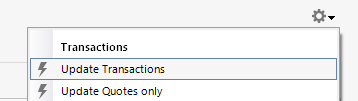
- Follow the on-screen instructions to complete the update.
- Repeat these steps for each account with this error.
If refreshing your accounts does not resolve the issue
Try waiting one business day. This error message is typically caused by maintenance on your bank's website. You can try updating again in a few hours or the next business day. If the issue still occurs after one business day, try the steps above again.
If the issue persists
Please Contact Us so we can help you fix this issue.
Please let me know how it goes!
Quicken Kristina
Make sure to sign up for the email digest to see a round up of your top posts.
0


Categories
- All Categories
- 24 Product Ideas
- 34 Announcements
- 248 Alerts, Online Banking & Known Product Issues
- 19 Product Alerts
- 265 Welcome to the Community!
- 301 Before you Buy
- 1.5K Product Ideas
- 55.8K Quicken Classic for Windows
- 16.9K Quicken Classic for Mac
- 1K Quicken Mobile
- 834 Quicken on the Web
- 129 Quicken LifeHub