Add Account - new interface - list doesn't scroll

Hi - when I try to add an online account using the new interface and choose the "connect to existing account", the list of accounts is long, so it extends off the bottom (and top?) of my screen. There's no way to scroll this list - scroll on my mouse doesn't work and if I go to the bottom of the list it doesn't scroll. Has anybody experienced this and found a workaround? Thanks!
Comments
-
Hello @pennster,
Thank you for sharing your experience.
I have not seen or experienced this issue before. I have some follow-up questions for you.
- Is this a new issue?
- Were you able to go through this process without this being a problem before?
- If so, how long has this been happening?
- Were you able to go through this process without this being a problem before?
- Are the accounts listed all valid options?
- Only accounts that are not hidden, kept separate, or closed should be listed.
- Which bank are you trying to link accounts for?
- Where is your data file located?
- You can check this by going to File and looking near the bottom of the menu. The first file listed will be the one you are currently using. The file path is listed there, and that's what we are looking for.
- Is your file being backed up/synced by any third-party services like OneDrive, Dropbox, or Backblaze?
Additionally, screenshots of what you are seeing may be helpful. If needed, please refer to this Community FAQ for instructions on how to attach a screenshot. Alternatively, you can also drag and drop screenshots to your response if you are not given the option to add attachments.
Looking forward to your response!
Quicken Alyssa
Make sure to sign up for the email digest to see a round up of your top posts.
0 - Is this a new issue?
-
Are you using View / Use large Fonts or a Windows setting to increase text size beyond 125%?
If so, either turn off Use large Fonts temporarily or reduce the Windows setting to 100 or 125%1 -
Hi Quicken Alyssa:
This is a new issue. It started with the software update from Quicken which updated the interface for adding an online connection to an account.
The list shows invalid options: all hidden accounts also show in the list.
This is for Bank of America credit cards.
My data file is located on my OneDrive. However I doubt this issue is related to the file location, as it's clearly a software interface error that was triggered by the recent update to the Quicken application.
Brian
0 -
Thank you for following up!
This issue has been escalated internally and is now being investigated. If you would like to contribute to the investigation, you can go to Help>Report a Problem>Send to Quicken and submit your log files.
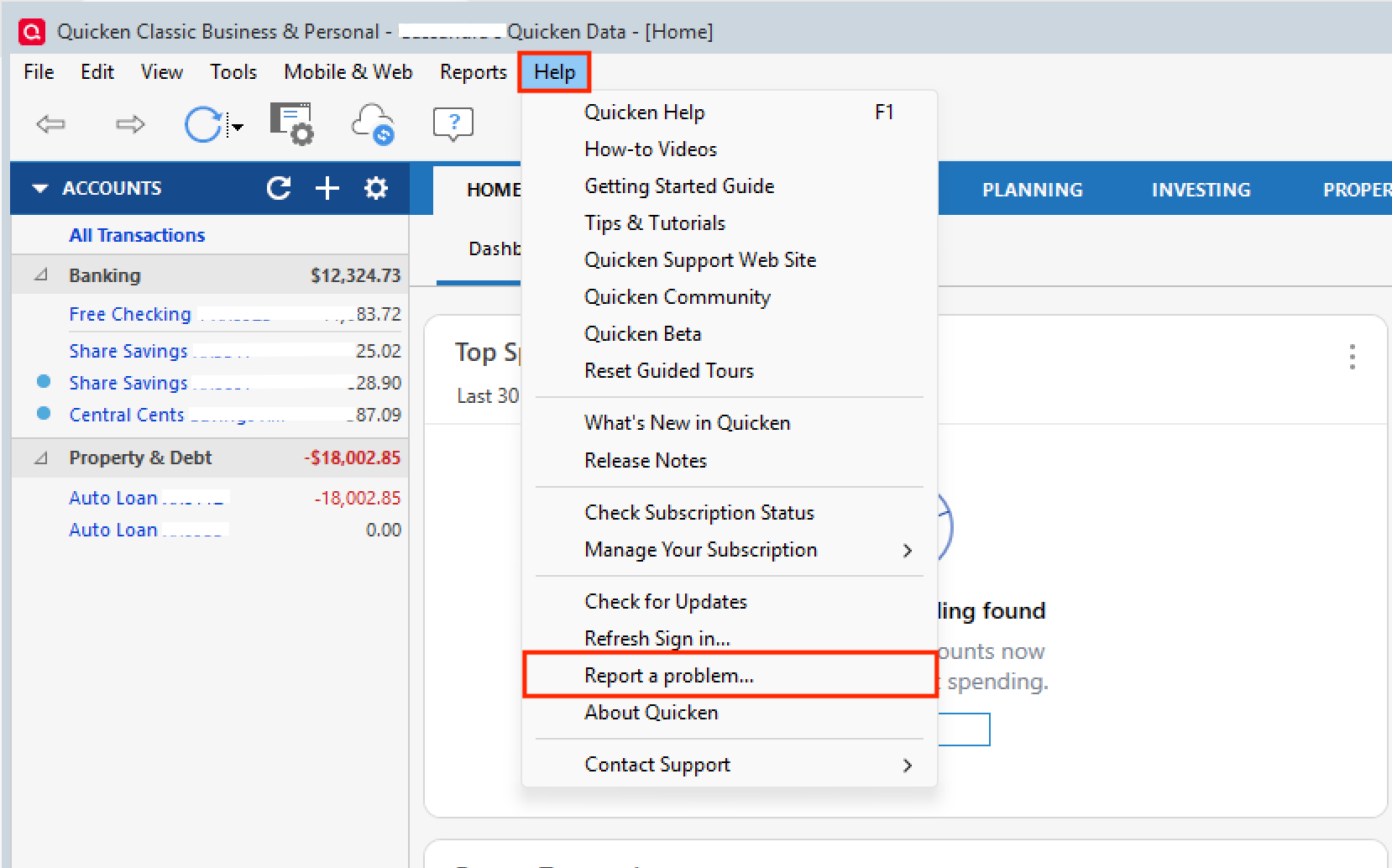
If you decide to send them over, let us know so we can add them to the ticket.
Thank you!
[CTP-16544]
Quicken Alyssa
Make sure to sign up for the email digest to see a round up of your top posts.
0 -
I am experiencing the same issue using Quicken Classic Deluxe for Windows.
I am not able to scroll through my accounts list to link existing accounts (to their corresponding financial institutions) unless they are displayed in the popup list. That popup list includes hidden accounts, and I can see about 39 accounts with my display settings. I cannot view the rest of my accounts. I have decades of account history and close to 60 unhidden active accounts. All relevant active accounts have functioning downloading relationships with Quicken. My Quicken data and backup files are stored on my local drive and synced with the cloud.
It would help if hidden accounts were not displayed by default (or if an option were presented to hide them from view), but that does not address the issue of not being able to scroll (or query) to see all active accounts, beyond a couple dozen in the popup list. I don't recall having this issue in the past and I cannot recall with certainty when I started experiencing it, or whether it started with the most recent Quicken updates. I do recall initially attributing the problem to what I hoped was a transient glitch that would resolve with subsequent Quicken updates. However, this is now a persistent problem.
I have just submitted the above info to Quicken Help.
What prompted the need to link previously working links has been some recent inconsistency in Quicken downloads from financial institutions. Without any obvious pattern, Quicken sometimes fails to pick up activity in spite of having valid credentials that had been working. My fix was to deactivate and then re-establish online access for those accounts. Today it was for Citibank credit cards (that fortunately appeared on the non-scrolling list of accounts). Those two accounts use separate sign-on credentials. Last week I had an issue with one money market account with my credit union. Six other accounts at that institution, which use the same credentials as the money market account, downloaded activity to Quicken successfully. The problem in this last paragraph is entirely separate from the account list scrolling problem, which is the main focus of this post.
0 -
Thank you for adding to this discussion.
You are correct in thinking that this was not an issue before. It seems to be a bug and has been reported. If you would like to participate in the investigation of the issue, follow the steps outlined here to do so.
Let me know if you submit your log files so I can add them to the ticket.
Thanks again!
Quicken Alyssa
Make sure to sign up for the email digest to see a round up of your top posts.
0 -
I am having a variant to this issue. When I tried to download yesterday (March 14), I found all my linked accounts were not showing in my One Step Update (OSU) list. When I opened my account list, ALL accounts had their transaction download flipped to off.
When I try to reconnect the accounts, I found three different types of behavior:
- With my Fidelity accounts, I was able to connect to Fidelity and select all my active accounts but when I attempted to link them in Quicken, none of my accounts showed in the list, and I experienced the same inability to scroll as all my old and hidden accounts were populating (including old inactive Fidelity accounts).
- I was able to reconnect my active Bank of America and Schwab accounts.
- Whn I tried to connect any of my credit card accounts (AMEX, Chase and CapitalOne were the ones I tried), I received a sign in failed response ("sign in failed due to a time out or connection failure").
I reported the problem yesterday via the Report a Problem link along with the related files.
1 -
Hello @lmwhitman,
Thank you for letting us know you encountered these issues and for sending the problem report. It will help our teams investigate.
To troubleshoot the other issues you mentioned, please start a new discussion.
Thank you!
Quicken Kristina
Make sure to sign up for the email digest to see a round up of your top posts.
0



Categories
- All Categories
- 6 Product Ideas
- 34 Announcements
- 248 Alerts, Online Banking & Known Product Issues
- 19 Product Alerts
- 265 Welcome to the Community!
- 301 Before you Buy
- 1.5K Product Ideas
- 55.8K Quicken Classic for Windows
- 16.9K Quicken Classic for Mac
- 1K Quicken Mobile
- 834 Quicken on the Web
- 129 Quicken LifeHub