Changing the currency code for a foreign currency

I am using Quicken Subscription for Windows, and I am updated to the latest version (today).
A while back (a few years, actually), I added a couple of accounts in a foreign currency (UAE Dirhams) to my file. It seems that by mistake, while adding the new currency, the "Currency Code" was somehow assigned as USD.
Now this currency is completely wrong - it is not truly UAE dirhams nor is it truly US dollars.
Quicken won't allow me to delete this currency because it is being used in multiple accounts (and they contain hundreds of transactions, literally).
I thought about creating new accounts with the correct currency and manually moving the transactions. But that will be impossibly hard to complete because they contain transfers to different currencies at different points in time with different exchange rates.
The peculiar thing is that now every time I want to create a USD-based account with online access (or enable online updates for a USD-based account), Quicken automatically changes the account's currency to this foreign currency. And, of course, Quicken does not allow manually changing the currency of these accounts to fix this back.
Is there any way I can fix this?
The ultimate and most straightforward fix is to be able to change the currency code for this currency.
Another fix would be to be able to change an account's currency.
Has anybody faced a similar problem?
Thank you
Answers
-
Quicken Classic supports multiple currencies, and you can freely create new accounts in any supported currency. Your home currency stays USD unless you explicitly change it (which affects the entire file and is rarely appropriate). You cannot convert an existing account from USD to another currency. There is no setting inside the account to switch it. If you need an account to continue in a different currency, the cleanest method is:
1. Create a new account in the desired currency. Set its opening balance to 0.
2. Choose a cutoff date. Most people pick the end of a month or year.
3. Transfer the balance. Enter a single transfer transaction from the old account to the new one.
When prompted for an exchange rate, enter the appropriate rate (often 1.00 if you’re not revaluing).4. Move any uncleared transactions. Checks not yet cashed, pending charges, etc., can be manually re‑entered in the new account.
5. Update scheduled reminders. Point them to the new account.
6. Optionally close or rename the old account. Many users rename it “Old XYZ” and mark it hidden. This avoids corrupting reconciliations and preserves historical accuracy.
1 -
Thank you for this wonderful suggestion. I have been using this workaround for a while now to manage things.
However, this doesn't solve my main problem:
"Every time I enable the online connection for a USD-based account, Quicken automatically changes the account's currency to this foreign currency."
Because the file contains 2 different currencies with the currency code "USD", it seems that something gets confused during setting up the online updates mechanism, and it automatically switches existing accounts that were originally created with the correct US Dollar currency to the foreign currency that was corrupted with the incorrect code.
I need to somehow change the code for this corrupt currency to remove this confusion.
Deleting the corrupt currency won't work because there are now multiple accounts associated with it. Two days ago, I was restoring the online connection for my Bank of America account in response to the latest S/W update. When the process was done, the account's currency was automatically switched to the corrupt currency. I cannot simply delete the account and recreate it; it contains transactions from more than 10 years. Also, if I recreate the account (with the correct US Dollar currency) its currency will get switched automatically if I try to enable its online connection.
0 -
Hello @bsoudan,
Thank you for taking the time to visit the Community to report this issue, though we apologize that you are experiencing this.
We have forwarded this issue to the proper channels to have this further investigated. In the meantime, we request that you please navigate to Help > Report a problem and submit a problem report with log files attached, a screenshot of the problem currency in your Quicken (Tools>Currency List, click the Edit button for that currency), and (if you are willing) a sanitized copy of your data file in order to contribute to the investigation.
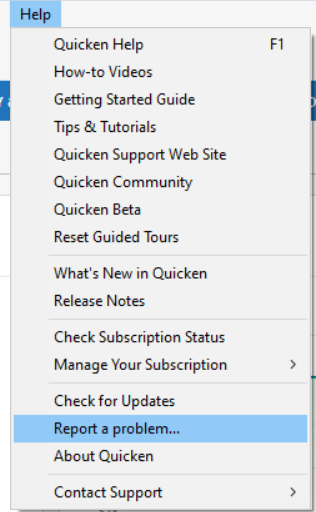
While you will not receive a response through this submission, these reports will help our teams in further investigating the issue. The more problem reports we receive, the better.
We apologize for any inconvenience!
Thank you.
(CTP-16499)
Quicken Kristina
Make sure to sign up for the email digest to see a round up of your top posts.
0 -
Has anyone figured out how to change a "Currency Code"?
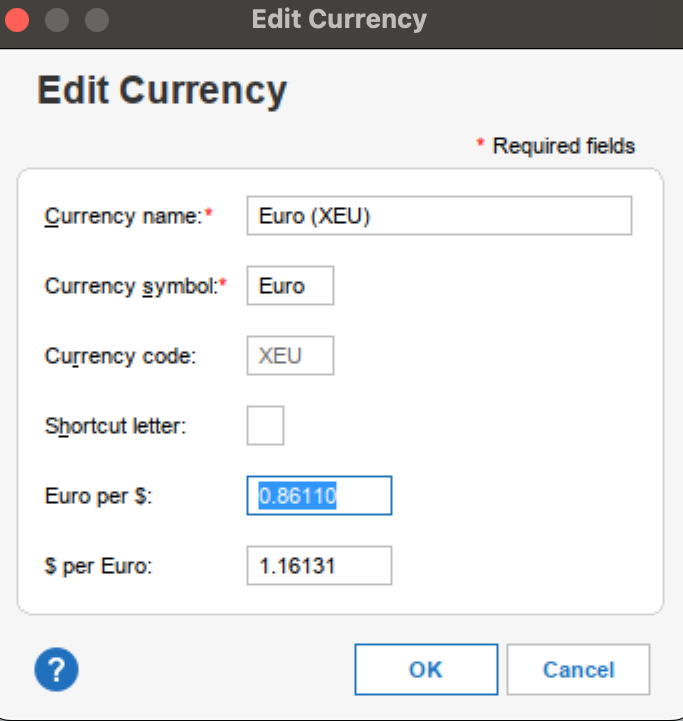
I have a few accounts in "Euros" with the "Currency Code" set as "XEU" instead of "EUR", and of course, the exchange does not update and I cannot change it!
 0
0 -
Hello @BoaHancock79,
Thank you for reaching out! I notice that your screenshot looks like it was taken on a Mac. Are you using Quicken for Mac or Quicken for Windows?
The option to edit the symbol is greyed out in the US version of Quicken. Per our help article on selecting currencies, if you haven't entered any transactions other than the opening balance in the account, you should be able to change its currency. Since your screenshot shows Euro (XEU), you may be able to switch to Euro.
I look forward to your response!
Quicken Kristina
Make sure to sign up for the email digest to see a round up of your top posts.
0 -
Thanks for the response! @Quicken Kristina
I am using the latest (R66.28) version of Quicken for Windows. Indeed, the “Currency code” is greyed out, which is quite problematic. It seems that in the Quicken Canada version it can be changed… so not sure why it’s locked here.
The issue I experience is that I have already quite a few accounts with this XEU currency, with hundreds of transactions. Sadly, when I opened accounts in Euros in quicken, that was the Euro currency in the currency list. I realized that the exchange rate would not update for my “euros” but would update for other currencies. In researching that issue, I saw that (same as other users) that was “XEU” and “EUR” is the one that is updated.
There doesn’t seem to be an easy fix for this basic issue! I can create a new currency with EUR but cannot change the multiple existing accounts. I cannot change XEU → EUR either as it’s grayed out.
Help!!! Please 😊0 -
Thank you for your reply,
I added you to the ticket so our teams know you're affected as well.
Our teams are aware of the issue, but they do not provide ETAs, so I can't guarantee when it'll be fixed.
Unfortunately, there isn't an easy workaround for this. If you'd rather not wait for a fix, then since the currency code can't currently be edited in the US version of Quicken, you would need to change the currency instead.
To do that, you need to create new accounts with the currency you want to use assigned to them. Then backup your Quicken file and move the transactions from the original accounts to the new ones (you can do this by using regular keyboard shortcuts to bulk-select the transactions, then right-click and select Move Transactions). Once the transactions are moved to the correct accounts, review everything to ensure it is correct, then back up your file and delete the old accounts.
If the accounts are connected accounts, then, after you've followed the process above, connect the new accounts by navigating to Tools>Add Account, following the prompts, and making sure to carefully link the accounts to the correct nicknames in Quicken.
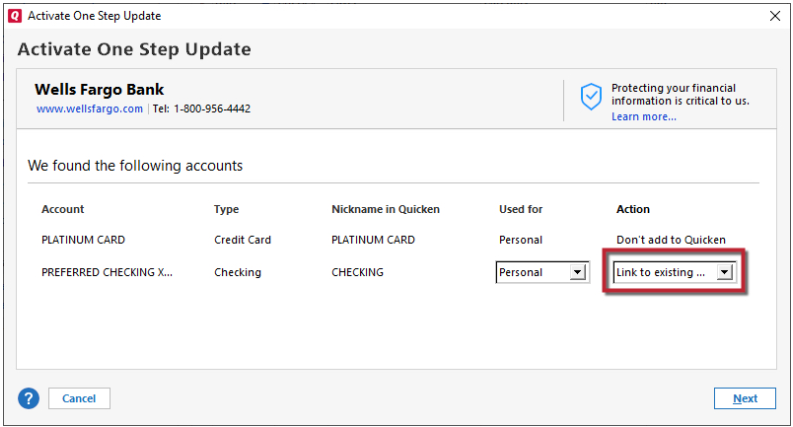
There is a risk of duplicate transactions when you first connect the accounts. Please review and delete any duplicates as appropriate.
I hope this helps!
Quicken Kristina
Make sure to sign up for the email digest to see a round up of your top posts.
0 -
Thank you @Quicken Kristina — I appreciate the response.
- how can I track the progress on the bug? Any link?
- the workaround is not really practically useful, because when there's transfers between accounts of different currencies, and one end is moved, it takes an incorrect exchange rate for the transfer…
Net-net, a quick solution is needed.
Thanks!
0 -
I've had the same situation with an old Euro currency record in my Currency List, dating back to around the introduction of the Euro (using Currency Code XEU) and a corrected Euro currency record (using Currency Code EUR).
When I detected that XEU wasn't downloading exchange rates and I couldn't update the Currency Code,- I created the new Euro currency record,
- created new EUR accounts,
- transferred the XEU balance into new EUR account registers at a rate of 1:1,
- changed all XEU reminders to point to the new EUR accounts
- closed the old accounts and
- started using only the new accounts.
(And, no, I did not move or copy transactions between old and new accounts. I just left old transactions where they were.)
One of these days, when I get a round tuit, I'll have to do some cleanup and get rid of these old, long closed accounts.
Reports showing EUR transactions work fine for me, as long as I remember to not mix and match accounts with different currencies in one report.
To answer your question:
Use new account registers using EUR for new transactions only. Stop using the old Euro registers and, over time, phase them out.
When creating reports select accounts of one currency only, either old or new Euro or US$. If you combine accounts of different currencies, Home currency or the currency selected in the report's customization dialog determines how to display and convert amounts.If the old Euro exchange rate is off because it doesn't download, edit the entry in the Currency list and set it to the same exchange rate as last downloaded for the new Euro currency record.
Quicken US does not maintain an exchange rate history similar to stock prices.0



Categories
- All Categories
- 23 Product Ideas
- 34 Announcements
- 247 Alerts, Online Banking & Known Product Issues
- 19 Product Alerts
- 265 Welcome to the Community!
- 300 Before you Buy
- 1.5K Product Ideas
- 55.8K Quicken Classic for Windows
- 16.9K Quicken Classic for Mac
- 1K Quicken Mobile
- 834 Quicken on the Web
- 128 Quicken LifeHub