Get error OL-220-B when downloading Simplii account info into Quicken

When I download from my Simplii account into Quicken Classic, I get the above error message as well as: Quicken is currently unable to verify the financial institution information for this download. Please try again later. I've been trying since yesterday. Never experienced this before.
Comments
-
Hello @BrianLynda,
Thanks for reaching out! The OL-220 error typically means Quicken is not able to process the file being sent by the financial institution for transaction download.
A few important things to note:
- You may still be able to log in to the Simplii website successfully and still receive this error in Quicken. That’s because the issue is often with the specific file format being sent to Quicken, not your credentials.
- If you’re using a VPN, try disabling it and then attempt the update again, as VPNs can sometimes interfere with the connection.
- First, check Tools > One Step Update Summary to confirm Simplii is the institution producing the error.
- Then open the account register, click Account Actions (gear icon) > Update Now to attempt a manual refresh.
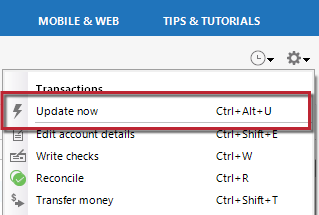
If that does not resolve it, the next step depends on your connection type:
- Go to Tools > Account List and check the Transaction Download column to see the connection method.
If the account is using Direct Connect, you will need to contact Simplii directly. With Direct Connect, Quicken communicates directly with the financial institution’s OFX server, and Quicken does not have access to modify or correct issues on their server. You may need to ask for an online services or OFX specialist and request escalation if front-line support cannot assist.
Thank you!
-Quicken Anja
Make sure to sign up for the email digest to see a round up of your top posts.0 -
@Quicken Anja This is the "All Things Canadian" forum area and Simplii is a Canadian bank, and the OP has tagged Canadian issue, and there is zero (absolutely Zip, zilch, zippo, nada, diddly-squat, goose egg) Direct Connect support for Canadian financial institutions and the Canadian version of Quicken. It simply can't be Direct Connect. However, it could be Web Connect, in which case the guidance you provide would not be applicable.
@BrianLynda are you using Web Connect or Express Web Connect (aka One Step Update) to download transactions?
0


Categories
- All Categories
- 6 Product Ideas
- 34 Announcements
- 248 Alerts, Online Banking & Known Product Issues
- 19 Product Alerts
- 265 Welcome to the Community!
- 301 Before you Buy
- 1.5K Product Ideas
- 55.8K Quicken Classic for Windows
- 16.9K Quicken Classic for Mac
- 1K Quicken Mobile
- 834 Quicken on the Web
- 129 Quicken LifeHub