Correcting entries from 2022 paycheck corruption issue

I just recently discovered the paycheck corruption issue where Quicken replaced prior paycheck entries with incorrect info. The last backup that I can find prior to that defect is from May 2020. Is there a way for me to export only paycheck entries from that backup and import it into my current version to avoid hours (days) of manual entry? I see that I can specify which accounts I want to export, but nothing on the transaction level. The QIF export is in a readable format, so maybe I could open that in Notepad and delete the non-paycheck entries, then resave. I assume that I would probably need to delete the affected paycheck entries in my current version before trying to import the backed-up versions to replace them. I have about 13yrs paychecks to update, so 300+ entries.
Answers
-
Hi @ranman14,
Thank you for reaching out and explaining what you’re trying to accomplish. I’m happy to help clarify.
Yes, what you described is possible. If you open the file in Notepad (or another plain text editor) and delete the specific transactions you don’t want, you can then import the edited file. Quicken will only bring in the transactions that remain in the file.
Alternatively, you can:
- Create a new account in your current file.
- Import the full transaction file into that new account.
- Move only the paycheck (or desired) transactions into your existing account.
- Once everything is in the correct place, delete the temporary account.
Both methods will work; the second option is often safer since it avoids directly editing the original import file.
I hope this helps! Let me know if you’d like step-by-step guidance for either approach.
Quicken Laura
Make sure to sign up for the email digest to see a round up of your top posts.
0 -
Thanks Laura!
That 2nd option definitely looks a little easier.
One question I have is about flex account deductions from my paycheck. They currently show as deductions from my paycheck in the split transaction window, and then will show up as deposits in the various flex accounts. However, when I import the transaction file, any flex spending deductions are not listed. I do see them listed in the QIF file when I open it in Notepad (attached), so is there anything special that I need to do to process them?
Thanks, Randy
0 -
Hi @ranman14,
Thank you for coming back. You’re right; I just tested importing a split transaction with transfers, and the transfers did not import.
I’ll continue researching to see if there is a way to have the transfers included during the import. In the meantime, I would recommend trying the second method, as that one should move your transfer accounts as well.
Please let me know how it goes!
Quicken Laura
Make sure to sign up for the email digest to see a round up of your top posts.
0 -
I was wondering if maybe I need to import the related transfer transactions from those flex accounts in addition to the paycheck entries from my checking account.
0 -
Hi @ranman14,
That’s a great idea! However, it would likely duplicate your balance. The import brings in the total paycheck amount, so if the related transfer transactions are imported as well, those transfer amounts, already included in the paycheck, would be added again.
Quicken Laura
Make sure to sign up for the email digest to see a round up of your top posts.
0 -
When you mentioned in the 2nd paragraph to try the 2nd method, that is what I was doing initially where I found this issue, where I imported the full checking account transactions from the backup into a new account.
0 -
Hi@ranman14,
Thank you for your follow-up, and I appreciate you pointing that out. You’re absolutely right; I overlooked the fact that importing the QIF file into the same data file would lead to the same issue you described.
A good alternative would be to export the selected account using a QXF file, which will transfer the full set of split categories. Please note that the category containing the name of the transfer account (for example, [Checking]) will not be preserved exactly. Instead, those transfers will appear as [External Transfer].
After importing the file, you can simply change the category back to the original account name. Doing this will not create duplicate transactions; it will only move the transfer into the correct account.
Steps to Export a .QXF File
- Select File > File Export > Quicken Transfer Format (.QXF) File.
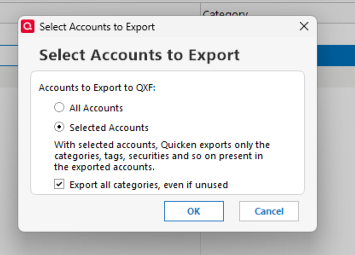
- In the Select Accounts to Export window, choose one of the following:
- All Accounts – Exports every eligible account in your data file.
- Selected Accounts – Allows you to choose specific accounts to export.
- If you choose Selected Accounts, select the account(s) you would like to export.
- Check the option Export all categories, even if unused, then click OK.
- In the Export to Quicken Transfer File (.QXF) dialog, confirm or enter the file name and location.
- Click OK to create the file. A confirmation message will appear once the export is complete.
Steps to Import a .QXF File
- Go to File > File Import > Quicken Transfer Format (.QXF) File.
- Enter the name of the QXF file you want to import, or click Browse to locate it.
- Click Continue to begin the import.
During the import process, Quicken will create a new account by default. From there, you can move the transactions into the appropriate account and adjust the categories for your split transactions as needed.

I hope this helps, and please let me know if you have any questions!
Quicken Laura
Make sure to sign up for the email digest to see a round up of your top posts.
0 -
@ranman14 you might want to try the processes suggested by @Quicken Laura on just a few of your 13 years of paychecks to test out the processes before committing to trying with the full set of paychecks. Easier clean up with just a few paychecks. Also making frequent backups before, during, and after the experiments would be prudent.
Quicken user since Q1999. Currently using QW2017.
Questions? Check out the Quicken Windows FAQ list0 -
Thanks for your persistence in trying to resolve my issue, but I ran across another one. I imported my checking account that had the paycheck entries as a QXF file as mentioned, and I do see the split transactions listed as External Transfers. The issue I have now is that when I try to edit the accounts that those transfers should go to, all of the ones under Pre-Tax Deductions (401k, insurance, and flex spending) are all identified as 401k Deductions instead of the more generic Pre-Tax Deduction, and I don't see any way to change that designation. As a result, the options available in the Account dropdown menu are only investment accounts, where I have the flex accounts set up a bank accounts and cannot be selected.
0 -
Hi @ranman14,
Thank you for following up. It’s been a pleasure working through this with you.
At this time, I was not able to replicate the issue you described. When you have a moment, could you please attach a screenshot of the dropdown menu that only showed the 401(k) Deductions option for the transfer?
If needed, please refer to the Community FAQ for instructions on how to attach a screenshot. Alternatively, you may drag and drop the image directly into your response if the attachment option is unavailable.
I look forward to your response. Thank you!
Quicken Laura
Make sure to sign up for the email digest to see a round up of your top posts.
0 -
Laura,
I ended up manually replacing the bad entries with corrected ones so I don't have a screen shot to share. Again, thanks for your help. While we weren't able to resolve my issue in a more automated way, I appreciate the knowledge that you shared to give me better awareness of some of the functionality available.
0 -
Hi @ranman14,
Thank you for sharing how you resolved the issue; I really appreciate you taking the time to follow up.
I’m sorry we couldn’t arrive at a simpler solution in this case, but I will continue to investigate further on my end.
Please feel free to reach out if you have any additional questions!
Quicken Laura
Make sure to sign up for the email digest to see a round up of your top posts.
0



Categories
- All Categories
- 6 Product Ideas
- 34 Announcements
- 248 Alerts, Online Banking & Known Product Issues
- 19 Product Alerts
- 265 Welcome to the Community!
- 301 Before you Buy
- 1.5K Product Ideas
- 55.8K Quicken Classic for Windows
- 16.9K Quicken Classic for Mac
- 1K Quicken Mobile
- 834 Quicken on the Web
- 129 Quicken LifeHub