Crowdsourcing a Payee Renaming Rule and Memorized Payee

My wife bills clients using one of the online credit card processors. The processor recently changed something and the payee name is now random for each transaction and doesn't contain the processor name. The only constant I can find is the name starts with a T followed by a space. So here are some samples:
T Fy G
T Sp Qa
T Wp Btas
I want to create a rule in the memorized payee list, but there is not an option for the Payee that "starts with". The renaming rule, I can do a "contains" on the "T " but that might rename any payee that contains a T followed by a space. I could then set up the memorized payee rule and only categorize deposit above a specific amount to the account they are deposited in. However testing this with finding transactions containing a T followed by a space Quicken is ignoring the space and returning every payee that starts with the letter T. Any suggestions? She usually bills once a month so if I have to do this manually it is not a big deal.
Always the latest version
Best Answer
-
I saw this thread and got a bit interested in it, so I decided to check it out.
Quicken Name is definitely not going to be what you want because it is the server trying to guess the right name, which never is going to be able to do in this case.
One thing I'm also not sure about from the description of the problem is that the same payee will get the same random characters. If they are the same random characters, then you would just treat it like any other name, as in put in enough characters to separate it out. But I take that the real problem is that the characters are all random after the T and not the same for the same original payee.
Given that the next fall back should have been what @Jim_Harman suggested and a single T should have worked (with the assumption that all T transactions get the same category.
As he said the "contains" is misleading. Quicken's renaming rules are "token based" meaning a renaming rule of T (the token to find) finds T (either lower case or upper case) in a payee like "T XXX YY" or "T" or "XXX T YYY", it doesn't find t in this payee "test payee".
Note for the same reason "adding a space after the T does nothing. If I have a Payee renaming rule of "T Y" it is looking for the token T followed by the token Y.
I should clarify what a token is. All of these are the same token. "T", "T ", "T,", "T." You can sort of think of it as "find words", punctuation separates tokens, but isn't included in that token. It is important to understand Quicken treats these different "T Y" and "Y T" searches for Quicken Rename rules.
Now for my tests and the strange results I have gotten (which looks like a bug in Quicken).
The first three lines I imported with no matching renaming rule.
Then I changed the dates and added the T renaming rule and I added a new transaction to import. This is the original CSV file that I converted to QFX and imported.

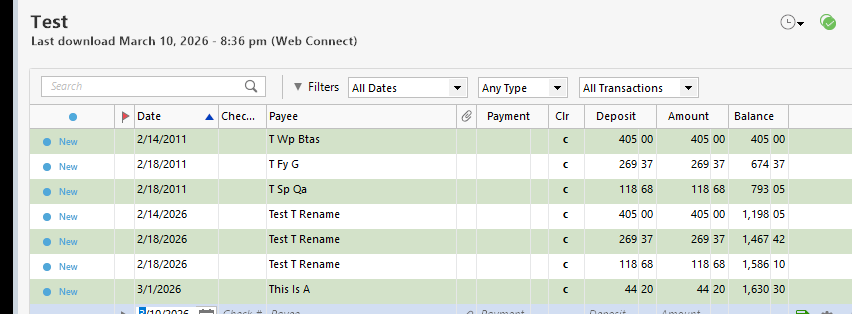
This did "almost" what I expected. The second set of three transactions all got renamed. The added fourth and you can see the strange result, a truncated payee, but notice it didn't rename it like the three before it.
Checked the QFX file and the conversion is correct, so this is a Quicken bug.
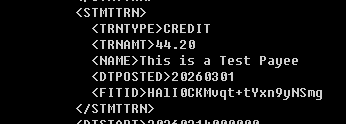
Tried again with the last transaction having a new date, same result. Tried with different date and deleting the renaming rule, same result. So, whatever the problem is, it isn't the renaming rule it is just something about the payee that Quicken is messing with….
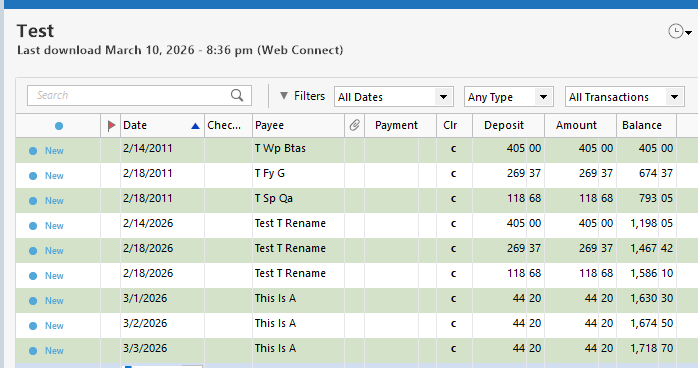

I have a guess, as in Quicken is guessing.
Deselecting this and trying again.
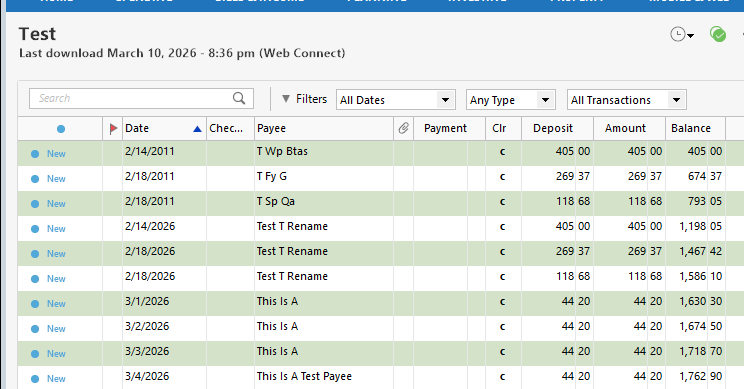
That was it, no bug.
Anyways as you can see a renaming rule of "T" will not match just any t in the payee's name. It has to be a T that is all by itself. For instance, this will match:

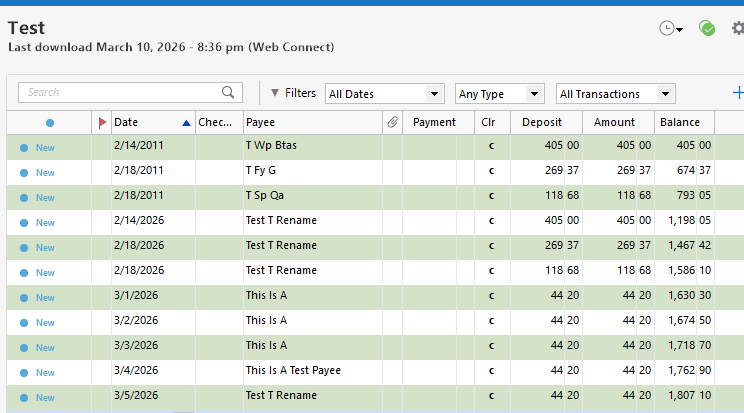 1
1

Answers
-
Try the "Quicken Name Is" choice instead.
-splasher using Q continuously since 1996
- Subscription Quicken - Win11 and QW2013 - Win11
-Questions? Check out the Quicken Windows FAQ list0 -
Thanks. I looked at that option, but it doesn't suggest a name during download. Also the names aren't constant. The only constant I can find is they start with "T " but quicken doesn't recognize the space when it is part of a filter so I can't create the renaming rule. Quicken also seems to include " as part of the value to search for so I can't escape the "" and do something like "T " to get it to search for the space.
Quicken for Windows Premiere
Always the latest version0 -
The "Contains" in Renaming Rules actually matches whole words, not substrings as you might expect
So assuming you want the rule to match to T followed by a space, Contains T with no quotes or space should do it.
Please let us know if that works for you.
QWin Premier subscription0 -
If "Quicken name is …" doesn't cut it, you may have no other alternative but to create one Renaming Rule for each merchant name that needs changing.
Quicken can help you build Renaming Rules for you if you turn off "automatically accept downloaded transactions", either globally for all accounts or for this specific account. Then, when a new transaction lands in the Downloaded Transactions tab area, select it. Edit the Payee Name in the new transaction line in the register. Quicken should guide you through building a Renaming Rule, to change "T Fy G" to "Fy G", for example.
Lather, rinse and repeat 😉 for all other "T …" payee names, one at a time.0 -
Thanks for the suggestions. I will try a contains T search with just the T and no space. If that doesn't work I will turn off accepting downloaded transactions for this account
Quicken for Windows Premiere
Always the latest version0 -
Searching for just the T and no space after it Quicken returns any Payee with an upper case or lower case T anywhere in the name. If I search for a T followed by a space it does the same thing. I guess I will have to turn off accepting transactions for that account, or just every month recategorize them.
Quicken for Windows Premiere
Always the latest version0 -
I saw this thread and got a bit interested in it, so I decided to check it out.
Quicken Name is definitely not going to be what you want because it is the server trying to guess the right name, which never is going to be able to do in this case.
One thing I'm also not sure about from the description of the problem is that the same payee will get the same random characters. If they are the same random characters, then you would just treat it like any other name, as in put in enough characters to separate it out. But I take that the real problem is that the characters are all random after the T and not the same for the same original payee.
Given that the next fall back should have been what @Jim_Harman suggested and a single T should have worked (with the assumption that all T transactions get the same category.
As he said the "contains" is misleading. Quicken's renaming rules are "token based" meaning a renaming rule of T (the token to find) finds T (either lower case or upper case) in a payee like "T XXX YY" or "T" or "XXX T YYY", it doesn't find t in this payee "test payee".
Note for the same reason "adding a space after the T does nothing. If I have a Payee renaming rule of "T Y" it is looking for the token T followed by the token Y.
I should clarify what a token is. All of these are the same token. "T", "T ", "T,", "T." You can sort of think of it as "find words", punctuation separates tokens, but isn't included in that token. It is important to understand Quicken treats these different "T Y" and "Y T" searches for Quicken Rename rules.
Now for my tests and the strange results I have gotten (which looks like a bug in Quicken).
The first three lines I imported with no matching renaming rule.
Then I changed the dates and added the T renaming rule and I added a new transaction to import. This is the original CSV file that I converted to QFX and imported.
This did "almost" what I expected. The second set of three transactions all got renamed. The added fourth and you can see the strange result, a truncated payee, but notice it didn't rename it like the three before it.
Checked the QFX file and the conversion is correct, so this is a Quicken bug.
Tried again with the last transaction having a new date, same result. Tried with different date and deleting the renaming rule, same result. So, whatever the problem is, it isn't the renaming rule it is just something about the payee that Quicken is messing with….
I have a guess, as in Quicken is guessing.
Deselecting this and trying again.
That was it, no bug.
Anyways as you can see a renaming rule of "T" will not match just any t in the payee's name. It has to be a T that is all by itself. For instance, this will match:
1 -
@David Green Since you seem to be seeing different renaming results than what @Chris_QPW reports for a Payee that begins with "T" by itself, I wonder if you are doing something different.
Are you working with Renaming Rules, Find/Replace, or perhaps the new "And also change Payee name to" option in the Memorized Payee List setup? These all work differently.
QWin Premier subscription0 -
The characters after the T are all random.
I was using the Find/Replace and not the renaming rule. This definitely does not work with Find/Replace. I will back the file up and try a renaming rule searching for the T by itself.
Quicken for Windows Premiere
Always the latest version0 -
I was using the Find/Replace and not the renaming rule.
Aha. We were confused because your title says "Renaming Rule."
Note that Renaming Rules only work for new transactions. They standardize the downloaded Payee name so that it can match an entry in your Memorized Payee List.
To correct transactions that are already in your register, you should be able to use Edit > Find/Replace and set the condition to Payee / Starts with / T. To avoid getting a long list of matches, which will display very slowly, you can click on the plus sign to add another condition and set a date range. You can also add a condition to restrict the search to one account if you want.
The list returned with Find/Replace will also contain any other transactions with Payees that start with T. It has a check box before each entry so you can select only the ones you want to change.
Be sure to back up your data before making any bulk changes, in case the result is not what you expected.
QWin Premier subscription0



Categories
- All Categories
- 6 Product Ideas
- 34 Announcements
- 249 Alerts, Online Banking & Known Product Issues
- 19 Product Alerts
- 266 Welcome to the Community!
- 301 Before you Buy
- 1.5K Product Ideas
- 55.8K Quicken Classic for Windows
- 16.9K Quicken Classic for Mac
- 1K Quicken Mobile
- 834 Quicken on the Web
- 129 Quicken LifeHub