PNC Bank not downloading since February 23, 2026 (QMac)

This discussion was created from comments split from:
PNC Bank not downloading since February 23, 2026
.
Comments
-
I am having the same issue. No transactions downloading since Feb 23, 2026. No errors displayed in quicken.
I see transactions on the PNC bank website that have cleared and should have downloaded into quicken, but they do not download.
Quicken Classic Premier on macOS 26.2
Version 8.4.2 (Build 804.59835.100)
1 -
Hello @rmmoore70,
Thank you for letting us know you're seeing this issue. To troubleshoot, please follow these steps from our article on missing transactions/transactions not downloading:
Be sure to follow these steps in order:
1. In the affected account, click the Settings icon in the bottom right corner of the screen. Go to the Downloads tab and, under Transaction Downloads, confirm Download all available transactions is enabled.
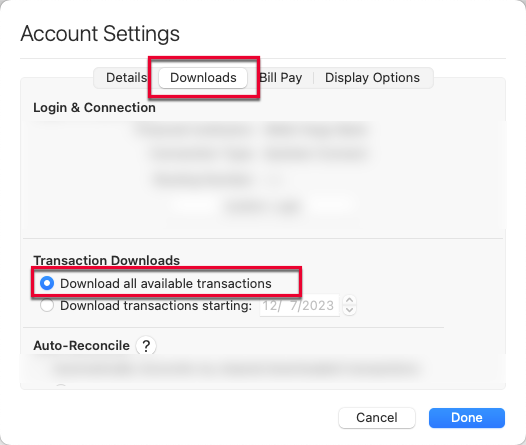
2. Refresh your online account information by clicking on the Update Icon, located on the upper left-hand side of Quicken. Follow any on-screen instructions to complete the account update.
3. Confirm that the Sort Order in your account is by Date; just click the top of the Date column in your account register. It's possible the transactions are in your register, but not where you thought they'd be.
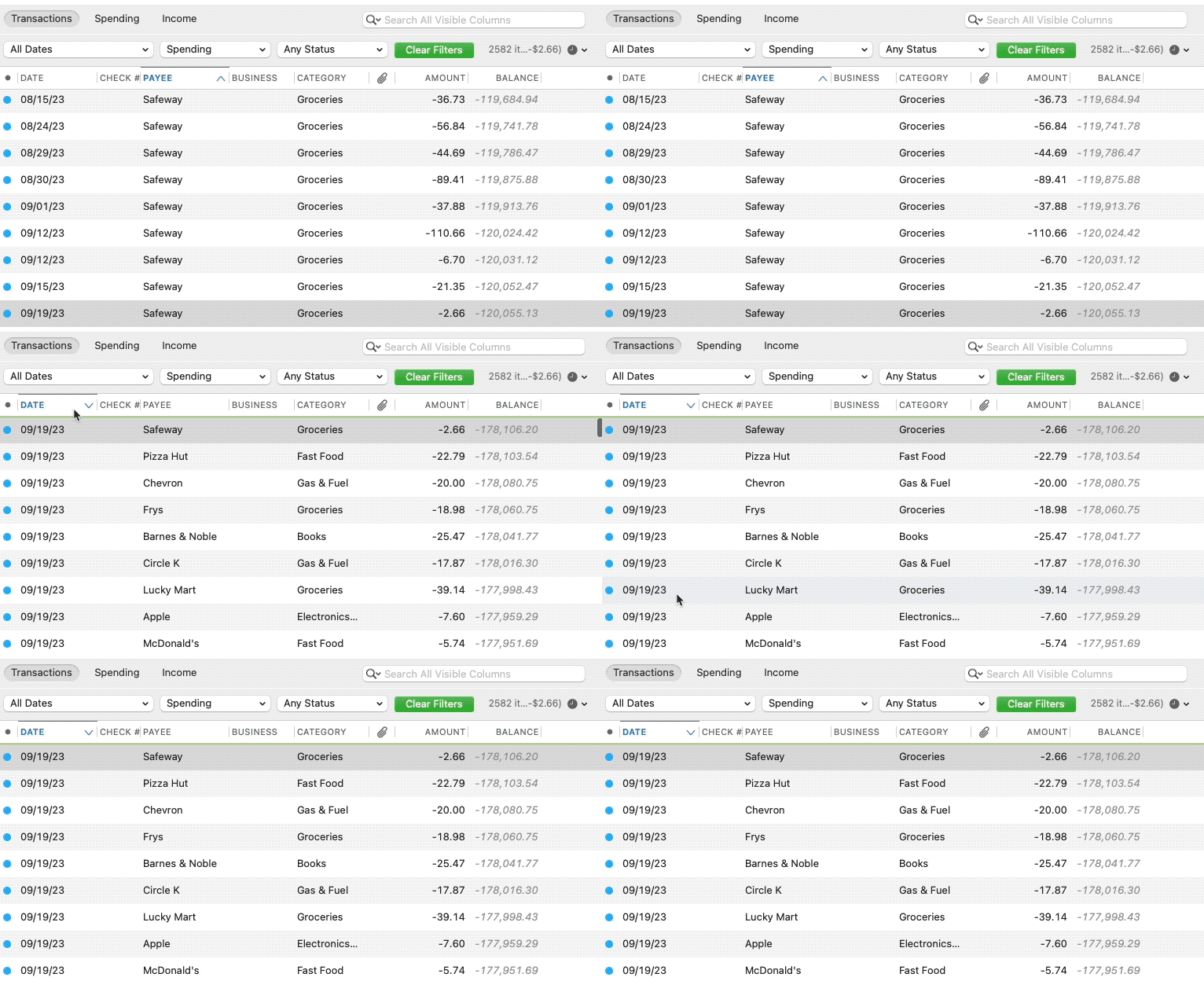
4. Click the Clear Filters button to the right of the account register’s filter dropdowns. This will confirm that there is no filtering in your account register.
5. Click Columns in the bottom right of the register, then check the Statement Payee box. This will allow you to search for the downloaded Payee name to confirm that a transaction was not renamed unexpectedly.
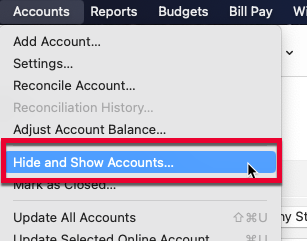
6. Go to Accounts > Hide and Show Accounts…. You can confirm if missing transactions have been downloaded into a hidden account by unchecking the Hide In Lists box next to the account that is marked as hidden.
If you need further assistance
If the issue isn't resolved and this is not a one-time event, please reach out to Quicken Support.
I hope this helps!
Quicken Kristina
Make sure to sign up for the email digest to see a round up of your top posts.
0 -
Hello All,
We have forwarded this issue to the proper channels to have this further investigated.
If the troubleshooting in my earlier post does not resolve the issue, then please navigate to Help > Report a problem and submit a problem report with log files attached, at least 3 transactions that should have downloaded but did not (date, payee, and amount), and screenshots showing the transactions in the account activity with the financial institution & showing that they have not downloaded into Quicken in order to contribute to the investigation.
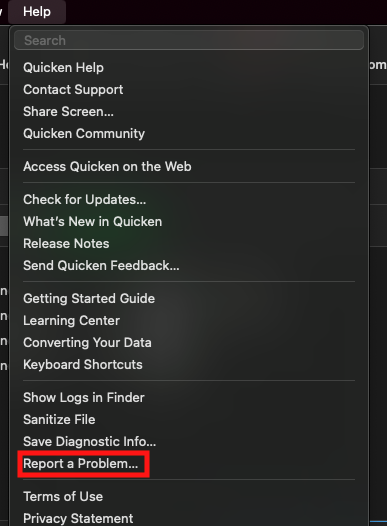
While you will not receive a response through this submission, these reports will help our teams in further investigating the issue. The more problem reports we receive, the better.
We apologize for any inconvenience!
Thank you.
(CBT-1062)
Quicken Kristina
Make sure to sign up for the email digest to see a round up of your top posts.
0 -
I tried the troubleshooting steps, but no resolution. Cleared transactions are still not downloading into Quicken from PNC bank. I have reported a problem as you instructed.
0 -
Thank you for the follow-up,
Thank you for sending the problem report with logs and screenshots.
It will help our teams investigate the issue!
Quicken Kristina
Make sure to sign up for the email digest to see a round up of your top posts.
0 -
I have also experienced this problem since February 25th on QMAC. Sync completes normally with correct online balance, however, no transactions are downloaded. I am still able to pay bills through PNC.
I have noticed when you log into PNC through the webpage that there is a 10 second countdown time while the account is verified. This is new and may or may not be associated with the issue.
1 -
Hello @Doug Blakeley,
Thank you for letting us know you're also encountering this issue and for sharing the information about the change to PNC's website. I added you to the ticket and forwarded that information to our teams, in case it is relevant to the issue.
Thank you!
Quicken Kristina
Make sure to sign up for the email digest to see a round up of your top posts.
0 -
I too am having problems having any transactions download since February 233, 2026. I tried to the troubleshooting suggested not the discussion page and it did not work. I do not see that this issues has been resolved. Is there a solution?
0 -
I am having the same problem with Direct Connect. I WAS able to have PNC create a Quicken OFX file of the missing transactions that I subsequently imported using "Import transactions from Bank Website" chosen from the dropdown of the settings (gear) icon within the account I have for PNC Direct Connect in my Quicken file. HOWEVER, using this approach led to the creation of a new account in Quicken called "Checking at PNC Bank - Web Connect". The transactions were successfully download to this new account. Is there any way to get them into the correct account in Quicken?
Do we have any idea at all when the Direct Connect with PNC will start working again? Thanks.
0 -
Hello @JDK Dunlap,
Thank you for letting us know you're also affected by this issue. I added you to the ticket.
The transactions were successfully downloaded to this new account. Is there any way to get them into the correct account in Quicken?
You should be able to backup your Quicken file, then copy/paste the transactions from the newly added account into the existing account. Once you confirm that all the transactions you need have been successfully copied to the correct account, you can delete the new one.
Do we have any idea at all when the Direct Connect with PNC will start working again?
Unfortunately, our teams do not give ETAs. Since this issue occurs on a Direct Connect connection, it's likely that this issue is happening on PNC's servers.
I hope this helps!
Quicken Kristina
Make sure to sign up for the email digest to see a round up of your top posts.
0 -
Glad I looked here. I thought it was just me. Very disappointed thought to know there are yet again problems. I have been fully functional for 5 days total since November. I just I start more hours of phone calls trying to get someone to fix it again.
Hint for everyone: You can delete the connection, switch to express web connect, download transactions, delete connection, activate accounts again with direct connect and then sent payments. Huge pain and waste of time, but i just did it. Be careful to make backups in case something goes wrong.
0 -
I opened checking/savings accounts with Regions Bank last week and will fully move my banking over to them later this month. If Regions Bank is in your area, you might take a look. My quicken direct connect works fine with the accounts I recently opened. Just make sure you enable Quickbooks/Quicken in your Regions Bank logon profile and then the direct connection from quicken works fine.
Late last year when PNC did their "upgrade", I didn't experience any problems. My Mother, who also used Quicken with PNC had all sorts of problems. Her quicken wouldn't connect and she couldn't even access the billpay area on the "upgraded" PNC website. She went back and forth multiple times with PNC support but they were very slow to help and ultimately provided no help at all. She moved her banking over to Regions since PNC wasn't resolving the problems and she's had no issues using quicken since.
Suffice to say, when this latest issue cropped up for me, I already had the thought of changing banks to resolve it. I had been a PNC customer dating back to BBVA and Compass. I've been a quicken user since the early 1990's (back when you dialed into a Compuserve number to download transactions and send payment instructions).
0 -
Hello @Paul99,
Thank you for letting me know you're also seeing this issue. I added you to the ticket.
Thank you!
Quicken Kristina
Make sure to sign up for the email digest to see a round up of your top posts.
0 -
Hello All,
We now have a Community Alert that you can bookmark to be notified of any updates and to know when the issue is resolved:
Thank you!
(Ticket #12281409/ CTP-16554)
Quicken Kristina
Make sure to sign up for the email digest to see a round up of your top posts.
0 -
Quick update:
Transactions still not downloading from my PNC checking into quicken. Billpay is still working because I see payment instructions sent from quicken eventually showing up on PNC website checking register on the instructed payment date.
Two transactions from yesterday in my PNC savings downloaded into quicken. But PNC savings transactions between Feb 23 and yesterday still not downloading into quicken.
0 -
Update: Two most recent transactions dowloaded from PNC checking into quicken this morning. Still the ones between Feb 23 til today have not downloaded.
0


