Quicken Classic Accounts Not Updating in Quicken LifeHub

This discussion was created from comments split from:
Comments
-
I am having a similar problem. I have Windows Quicken Classic and LifeHub. It has been several weeks since Quicken has updated my accounts in QLH. I thought this was suppose to be an "automatic" process? There does not appear to be a way of updating my QLH accounts with Quicken manually.
0 -
Hello @cromaney,
Thank you for sharing your experience.
Yes, your accounts should ideally update automatically. However, if they don't, you can tell Quicken to send the information by going to Edit and selecting Preferences.
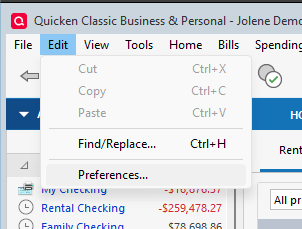
It should open on Startup, and to the right, you should see a Resend button.
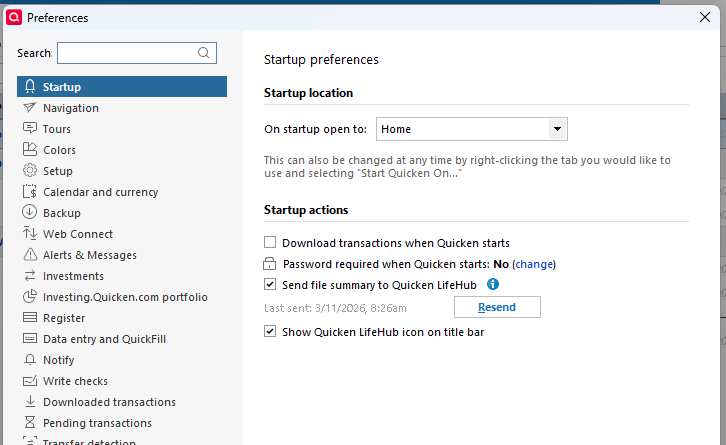
Click that, and then log in to Quicken LifeHub.
Let us know how it goes!
Quicken Alyssa
Make sure to sign up for the email digest to see a round up of your top posts.
0 -
I attempted the QLH "Resend" suggestion several times using Quicken, Edit, Preferences, Start UP, Resend. It DID NOT up date QLH!
0 -
Thank you for your reply,
Do you have a VPN, anti-virus, or firewall that may be blocking communication? If you do, please try pausing them and resend again.
If the issue persists, please try refreshing your login in the Quicken application. To do that, in your Quicken for Windows file, navigate to Help>Refresh Sign in….
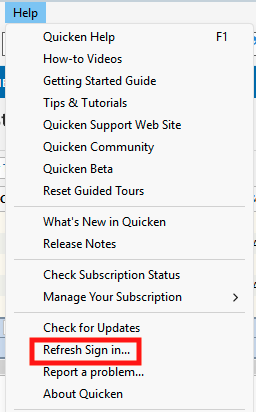
Follow the prompts, then test to see if the issue is resolved.
If you haven't restarted your computer since the issue began, I recommend restarting it.
I hope this helps!
Quicken Kristina
Make sure to sign up for the email digest to see a round up of your top posts.
0 -
This problem continues to persist after your suggestion of refresh sign-in and verifying that there is not VPN or anti virus preventing the QLH update. In addition, for the past several months Quicken has been "hanging up" and "not-responding" when performing a cloud sync. Since a cloud sync is what is used to update QLH, resolving this cloud sync issues needs to be addressed.
0 -
Thank you for your reply,
It is quite likely that the cloud sync issue is causing the problem you're seeing with Quicken LifeHub. To help troubleshoot the cloud sync issue, please provide more information:
- When did you first notice the issue?
- Is your Quicken file located directly on your local hard drive?
- You can see the file location by navigating to the File menu option. The file paths for your most recently accessed files will show just above the Exit option. The file in the #1 spot is the one you're currently in.
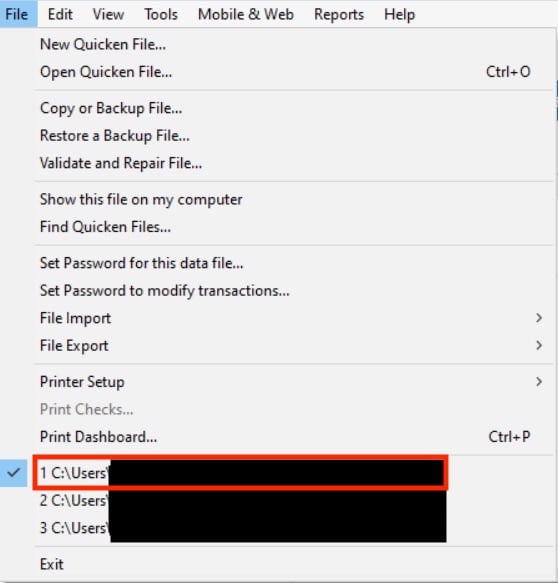
- You can see the file location by navigating to the File menu option. The file paths for your most recently accessed files will show just above the Exit option. The file in the #1 spot is the one you're currently in.
- Is the file synced with any cloud service, such as OneDrive, iCloud, or DropBox?
- If it is, you should see the service name listed in the file path.

- If it is, you should see the service name listed in the file path.
- When Quicken hangs or stops responding, do you have to force-close the program using the Task Manager?
Thank you!
Quicken Kristina
Make sure to sign up for the email digest to see a round up of your top posts.
0 -
Just checking in, we haven't heard back from you in a while.
Do you still need assistance?
Thank you!
Quicken Alyssa
Make sure to sign up for the email digest to see a round up of your top posts.
0


