What does this checking account transaction mean?

Today I got this transaction entered in my checking account transaction register when I did one step update:

I did not enter this transaction myself. This transaction is in the account called Premier Checking and it resulted in a $1,277.26 debit from that account (I am not showing the balance here.) So what does it mean that the category is "[Premier Checking]" which makes it look like a transfer to itself. There is no transaction on the bank's web site in the amount of $1,277.26. Nor can I find any set of recent transactions that total that amount.
What in God's name is this transaction? What does it mean? Where did it come from?
Thanks
Jim
Answers
-
@jdparker225 Hi Jim, just a fellow user. It looks like during the "One Step Update," Quicken downloaded the bank's online balance and compared it to the running balance in the software's register. It noticed the register was higher than the bank's balance by $1,277.26 and made an adjustment transaction.
I would just delete the transaction and go back through your statements until you find the missing entries, and your register matches your online balance. That should take care of it.BTW, I believe you control the behavior in the Auto-Reconcile settings for each account, in this case, checking.
0 -
@Scott BJ came up with the right cause of this transaction. I would look first at the Opening Balance of this account. Quicken has a nasty habit of changing that transaction if you are using QMobile/QWeb or reconnecting an account for One Step Update.
Once you get this straightened out, add the opening balance amount in that transaction's memo field for future reference. I'd do it to all of your accounts just for good measure.
-splasher using Q continuously since 1996
- Subscription Quicken - Win11 and QW2013 - Win11
-Questions? Check out the Quicken Windows FAQ list0 -
@splasher, I am aware of Quicken's nasty habit of changing opening balance. It happend to me in October to this same account. See
I fixed that and recorded all my opening balances. That did not happen in this instance. I do not have QMobile/QWeb. I did have to deactivate and activate online services on 3/6/2026 for the FI for this account and for my Merrill Lynch (ML) accounts because no transactions were downloading and there were no error messages to indicate that there was anything wrong. I have had this happen on numerous occassions with financial institutions connected via EWC or EWC+. Never happened with the one financial institution I still have connected via Direct Connect. This is the first time some spurious transaction was added after having deactivated/activated. ML is on EWC+ while this bank (Mid-Atlantic Federal Credit Union) is on EWC. I have been intending to post that issue on another thread.
As to the response by @Scott BJ: I don't get it. First, the online balance is actually higher than the balance in the Quicken register because of uncashed checks. So if Quicken were to decide to make an adjustment, why a debit rather than a credit? Second, I have Quicken Classic Premier for Windows Version R66.23 Build 27.1.66.23. The "Reconcile using online balance" check box in Online Services tab of account details is not and never has been checked. If you do check that box, a reconcile dialog is popped up when you access the account after one step update. No such dialog popped up in this instance so I have no idea what "Auto-reconcile" setting you could be talking about.
Anyway, thanks for your help. Anyone have any other ideas?
Jim
0 -
The entry itself is what is usually referred to as a "self-referring" or "one-sided" entry. It's an entry that can be made in a Quicken Account to adjust the balance in the Account without affecting any other Account or Category in your file. The effect shows up only when you run a balance sheet report as an adjustment to your Net Worth.
It sure reads like a Placeholder sort of entry, but Quicken doesn't use Placeholders in checking Accounts so I have no idea or clue as to why it's there.
One of the problems with all the versions of Express Web Connect downloading is that I don't think anybody in here actually understands it very well, at least at the down and dirty nitty-gritty level.
I'd pick up the phone to speak to Official Quicken Support and make them explain where in the world that came from.
0 -
@Tom Young, what do you mean by "run a balance sheet report"? Do you mean Reports→Net Worth & Balances→Net Worth or Reports→Net Worth & Balances→Account Balances? (I have never done either.)
Also weird is that this transaction appeared with no notifcation or prompt. Where I do have placeholder transactions it was as the result of my response to a prompt from Quicken. Also there is nothing in any log that explains it.
Also my experience with support is that they only know how to fix the immediate problem to get you up and running again (which at best in this situation would be to delete the transaction) or perhaps how to gather information if the problem can be reproduced or straighten you out if you are doing something wrong. This is not a knock on Quicken support or even support in general, that's just what they do.
Thanks
Jim
0 -
Guys,
instead of making unwanted changes to the Opening Balance transaction, Quicken now adds an Adjustment Transaction when reauthorizing accounts. You may have missed it, but this change was announced in R 66.11, as per the Release Notes.I still say that this Adjustment Transaction or any changes to the Opening Balance should not be made when reauthorizing / reconnecting an existing account.
Only when an account is activated for the first time into an empty register should Quicken be allowed to create an Opening Balance transaction based on the sum of downloaded transaction amounts and today's Online Balance.The Adjustment can be deleted, but you still need to make sure that no duplicate transactions were downloaded or other errors introduced while getting transactions after account connection.
My advice is to turn off "Automatically add downloaded transactions to registers" temporarily before reauthorizing / reconnecting accounts. This way you can catch duplicates or other problems and delete them from the downloaded transactions tab before they hit the registers.
1 -
My advice is to turn off "Automatically add downloaded transactions to registers" temporarily before reauthorizing / reconnecting accounts. This way you can catch duplicates or other problems and delete them from the downloaded transactions tab before they hit the registers.
That will not fix this problem, just like the bug with the Opening Balance all of this is done behind the back of the user.
It seems that the Quicken developers can't get that through their heads that people want to be "asked to change the Opening Balance or any kind of adjustment!"
0 -
As a follow up to what I said. The proof is in the transaction:
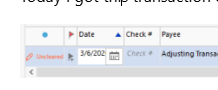
You will notice the status is "Uncleared" this is the status for a manually entered transaction, not one that will go through the Downloaded Transaction tab if it is turned on.
Downloaded transactions with automatic transaction entry on have the status of "New" or "New Match".
They have bypassed the "download review/accept" system completely.
This is a bit better than the old Opening Balance bug in that with the changing of the Opening Balance which has the status of R/Reconciled, you would never see this change as a transaction in the reconcile. You would only see it as a change in the Cleared Balance.
With this new change at least, you will now see an uncleared transaction in the reconcile window.
0 -
One more thought. Really a wild guess. Why wouldn't they just prompt the user? Maybe because it is being done at a low level during One Step Update and if they try to prompt the user, they might mess up other processing that is going on a that the time.
0 -
@UKR Wow!
From the releaase notes:
"IMPROVED
During account connection migration, Quicken now adds an adjustment transaction instead of changing the Opening Balance transaction."
Agree that this should not happen when reconnecting to an existing account.
My initial thought on connecting to a new account is that this should not happen without some kind of prompt to explain why the adjustment is being made and asking permission from the user to do it. And the explanation better be a good one and I would insist on being one of the judges deciding whether the explanation is a good one or not.
Since, it appears, that Quicken does not consider this a bug, does someone want to add something to "Product Ideas" about this? I'm thinking that we probably want an adjustment transaction to be added under some circumstances as directed by the user (perhaps as part of a reconciliation requested by the user) and only with the explicit permission of the user. It would take some thought to come up with a good proposal for the product ideas. Maybe someone has already given it that thought.
Thanks
Jim
0 -
You can always suggest a product idea to be voted on by going to the Home page on this forum and selecting New Post → New Idea.
0 -
@Chris_QPW, @UKR, @Scott BJ, @Tom Young
I have posted the new idea. Invite all to review, comment, and vote.
Thanks
Jim
0 -
Hi Jim,
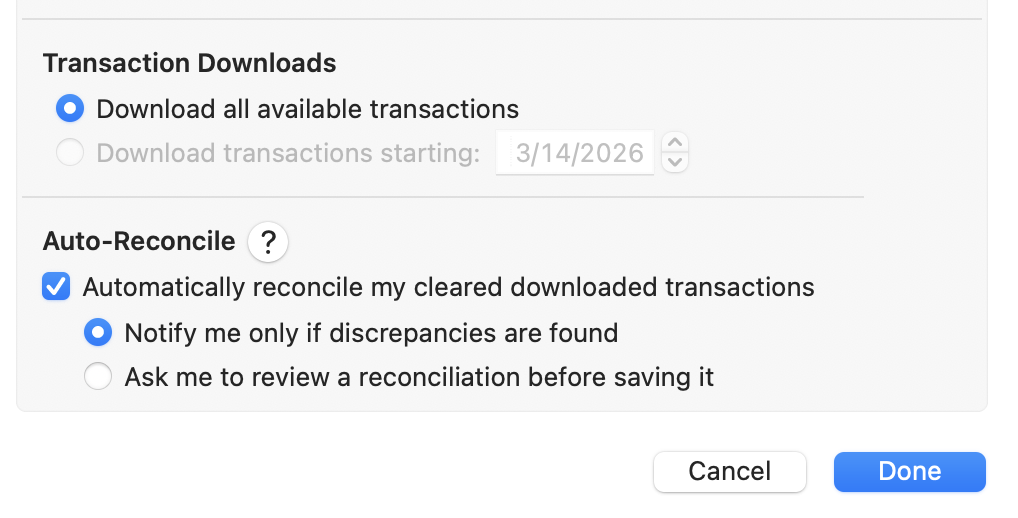
Earlier, I was referring to the Auto-Reconcile settings in the account options. I’m curious if your current settings affected whether that Adjustment Transaction was created automatically, or if it would have triggered anyway because your online balance didn't match your register during the reconnection.
I suspect that if Auto-Reconcile were turned off, your balances would have remained mismatched, but no Adjustment Transaction would have been created without your input. Then, when manually reconciling, you would have been prompted to decide how to handle the discrepancy.
Quicken’s documentation notes that when a balance doesn't match:
'If you select Finish and your account is not reconciled, you will be prompted to either Finish Later or Add Adjustment. If you select Add Adjustment, an adjustment transaction with a payee of Reconcile Adjustment will be added with an amount that will bring your register difference to 0.'
This is the specific setting I’m looking at. I’m on a Mac, but I expect the Windows version has a similar toggle:
Sorry if none of this applies to your situation, you might just be looking at a Windows bug. I didn't experience any problems when reconnecting my accounts, but I had manually added my missing transactions to the accounts beforehand.
~ Scott
0 -
You need to ask this question in a Quicken Mac thread/category. Quicken Windows and Quicken Mac reconciles are quite different.
0 -
Hi Chris, I wasn’t asking a question, just responding to Jim since he brought me into the conversation. See the beginning of the thread.
0 -
See my March 7 post. The closest thing to what Scott suggests that I have with my Windows version is the "Reconcile using online balance" check box in Online Services tab of account details which is not checked. If it were checked, then a reconcile dialog would be popped up on every one step update. The good news for me is that I was getting that reconcile dialog with every one step update for another account and I didn't know why until I started poking around as a result of this issue and discovered it and turned it off for that account. I don't know how it got turned on but I checked all my accounts and it was the only one with it on and now none of them have it turned on.
This now makes me wonder: Why are the settings for Quicken for Mac so differnt from settings for Quicken for Windows? I know that Mac and Windows are different and that might result in the need for some platform-specifc settings. But this is not one of them.
Thanks
Jim
0 -
Maybe @Scott BJ can fill in the gaps I don't know for Quicken Mac, but I will give how Quicken Windows works and some of the differences I know about Quicken Mac.
Quicken Windows:
Has two ways transactions get into the register which does affect how the reconcile is done or at least should be done.
If transactions go through the Downloaded Transactions tab. One should be looking at each transaction and making sure it is correct including the category before accepting it into the register. The CLR column will be set to c. The "Status" column will either not be shown or ignored.
Reconcile can either be to the online balance or manually entered. If the reconcile is done using the online balance it is also possible to have it do automatic reconcile. If the reconcile balances the reconcile window will not show, and the transactions that were in the c/clear state in that date range will be marked R/reconciled.
If the reconcile doesn't balance the reconcile window will come up and the user has to figure out what went wrong. I don't use automatic reconcile (which I will point out way later) so I haven't checked this in some time, but as far as I know it will not automatically put in a balance adjustment. The user would have to select to finish the reconcile even though it isn't balanced and then Quicken ask if you want a balance adjustment.
Quick note if the transaction is at the beginning of the register this isn't a reconcile adjustment, this an "opening balance adjustment". There is a long-standing bug with the Opening Balance where at times Quicken would change this Opening Balance transaction when it shouldn't have. Recently it looks like they changed it so that it puts in a new transaction after the Opening Balance to do this, which in my opinion is still wrong, but at least it is easier to see and it will show up in the reconcile as a cleared transaction instead of being just a changed amount on the Opening Balance transaction which is marked R/reconciled and as such is very hard to notice other than the Cleared Balances is wrong.
If the user has selected the option to have transactions go directly into the register, then they now should be relying on the Status/Blue Dot column, to check for New/New Match transactions and reviewing them. The user can right click on the status for a transaction to mark it reviewed or mark all of the transactions reviewed.
Quicken Mac only has the mode where the transactions directly into the register, so it is very similar, but there are some differences. And one of them how that status column it treated.
In Quicken Windows if you reconcile some transactions the status field will be set to reviewed/cleared. In Quicken Mac it doesn't touch the status field, it has to be changed using "reviewed actions".
In Quicken Windows a flow like this makes sense. Review transactions and make sure the categories are correct and then kick off the reconcile to not only do the reconcile/maker CLR field with R, but also to mark the status fields as reviewed/cleared.
Now we finally get to automatic reconcile mode. Automatic reconcile triggers when the download is complete. When using the Downloaded Transactions tab that is after then user finishes doing accepting all the transactions into the register, but in the mode where the transactions go directly into the register it triggers after all the downloading. Which is before the user interacts with the system. Note that reconciling is to the amounts, it knows nothing about your payees, categories, or tags. I think they shouldn't allow automatic reconcile with automatic transaction entry mode for this very reason. If that reconcile fires off before you review the transactions you will have no way of knowing which transactions are new that you need to check for payees, categories, and tags.
Because Quicken Mac's reconcile doesn't touch the Status field it doesn't have that problem.
I have never seen in a Quicken Mac post of what the automatic reconcile does when it doesn't balance. So, I don't know if it puts in a balance adjustment or prompts the user in some other way.
The other major difference I know of is Quicken Mac has a reconcile history, and system to work with it. Quicken Windows has no reconcile history. The most you can do is print a reconcile report right after a reconcile. And it is important to do it at that time because it is just reporting the current state. If you run the report later even if you have not reconciled again, you will get a different result.
0 -
Lot to digest there. FRom quicke read, two obervations:
- I send transactions through the Downloaded Transactions tab. Wasn't even aware there was an alternative. I don't look at them very carefully. Just accept them and then make changes if needed.
- The differences between Mac and Windows versions are greater than I expected. Makes me wonder why and just what is the state of Quicken's software develpment team.
Will look more carefully and respond again later.
Thanks
Jim
0 -
One thing to understand is that there isn't a "development team", there is at least two, Windows and Mac, and probably one for the online products. And the Windows and Mac development groups aren't even in the same country from what I understand.
They try to keep things aligned, but the goal isn't to have Mac be a clone of the Windows product.
0 -
I don't understand that. It would seem to me that they could save money in or do a better job at software developement and maintenance if they were clones of each other. There are cross platform computer languages that should allow them to do that.
Anyway, still digesting.
One thing I have done is a long overdue reconciliation of the account. As of the time the adjustment was made (03/06/2026) there was $891.68 worth of uncashed checks, some (but not all) quite old, and $210 worth of transaction errors in Quicken that I discovered during the reconciliation and that made my balance appear to be $210 greater in Quicken that it should have been. That's a total of $1001.68. So where did the $1,277.26 adjustment debit come from. And where did the almost $4000 increase in opening balance done in Oct '25 come from? If Quicken is going to make adjustments to your balance, why don't they come up with numbers that make sense?
Thanks
Jim
0 -
First off, both products have long histories that prevent this, and one can't just rewrite legacy applications willy nilly.
Second off, one of the design goals of the total rewrite of Quicken Mac was to provide a "Mac product" not a "Windows Clone" like it was before. The other main reason was because Apple obsoleted the APIs that the old Quicken Mac was using. And note that it was impossible to use Quicken Windows low level code. For instance, it is pretty much known that Quicken Windows uses a database that has long since stopped being supported and is Windows only. And Quicken Inc doesn't have the resources to rewrite Quicken Windows. Quicken Mac's rewrite started in 2007 and isn't completely done to this day.
As for the reconciling.
And where did the almost $4000
increasein opening balance done in Oct '25 come from?
The bug of changing the Opening Balance, which it seems has just been changed to putting in an adjustment transaction right after the opening balance comes from doing an operation at the wrong time.
When you create a new account and the financial institution doesn't send all of the transactions since that account was created the opening balance of zero is wrong. When Quicken gets the transactions, it also gets the current online balance. It uses this to back calculate what the opening balance should be for that point in time. Note getting this right assumes that the financial institution sent the right current online balance, which isn't always the case.
The bug is that Quicken is doing this at the wrong time, usually when people reset the account connection or maybe switch to a new connection method. I'm not sure if the reason it feels it needs to change this, given that even if it is doing it at the wrong time, it should calculate out the right amount and not matter. It could be that there are transactions in the register that have yet to clear the financial institution or the financial institution is sending the wrong online balance or both.
I have yet to see any indication that Quicken Windows' reconcile has calculated wrong, but one has to understand its rules, and what it is doing and how you can or information from the financial institution can mess it up (and the bug I have already stated).
If you are reconciling to the Online Balance, you need to make sure that Online Balance and its date are correct. It shouldn't include any pending transactions. Certain financial institutions don't send the correct online balance. In some cases, it will be right at sometimes and wrong at others.
When in doubt reconcile to a known balance and date manually entered.
For a reconcile to balance you have to match the "Cleared Balance". The Cleared balance is the sum of every reconciled transaction in the register even if it is past the date entered for the statement balance. On the other hand, cleared transactions that are past that date will not be included. All uncleared transactions on or before the statement date will also be shown in the reconcile window but not included in the Cleared Balance.
So, basically if you are sure of the Statement balance and date and the Cleared Balance doesn't match what you expect there is one or more transactions in the register that aren't correct (or they could be missing).
When a transaction is removed, or if a reconciled transaction is added or changed, the only indication of that would be that the Cleared Balance doesn't match what it should be. And note unless you use the password locking of changing transactions by date, you can accidentally delete transactions without knowing it (but there is a warning about deleting reconcile ones). And note that Sync to Mobile/Web can change transactions if there is a bug in it and the transaction password or anything else will not stop it and there will be no indication of this other than reconciling failing.
Note reconciling for long periods of times makes it really hard to pin down where a problem is. One can try an adjustment, but you have to make sure that you don't have any transactions that aren't currently accounted for like a check that hasn't cleared yet.
0 -
I take back I have seen a case where Quicken "calculation" is wrong (sort of). At times people have reported corrupted transactions in their register, and that could certainly throw things off.
0 -
Let's agree to disagree about the differences between Mac and Windows versions. The only thing I'd add is that I don't care if the Mac version is a clone of the Windows version, or the Windows version is a clone of the Mac version, or they come up with a comon version that has the best of both worlds. I am used to the Windows version but I could adapt.
Still digesting but I noticed an error in my analysis of my account. (The account itself is fine.) Got mixed up between debit and credit errors. The total delta was less than $1001.68 making the adjustment numbers that Quicken came up with even worse. Haven't straighted it out completely yet.
Thanks
Jim
0 -
@UKR I took another look at the release notes for R 66.11 which you pointed to in your March 11 post. Also in those release notes is this:
Fixed an issue where reactivating a deactivated account could add an incorrect balance adjustment.
Well, it appears that wasn't fixed because that is exactly what happened. The real issue is that Quicken should not add a balance adjustment at all when reactivating a deactivated account. The only time I think an adjustment should be added to an account is when a reconciliation is ended (not canceled) and the account is not balanced and then only if the user requests/authorizes it.
Thanks
Jim
0 -
OK, I think I have digested what you've said and I've redone my account analysis.
Basically you proivded me with new options I was not aware of, but I did understand how reconciliations are supposed to work. The questionj is: what is Quicken doing when it was/is calculating the opening balance change or amount of the adjustment. More on that later.
I had $891.68 in uncashed checks. None of them were cleared so they should not have affected any reconciliation. During the reconciliations I performed I discovered one missing debit ($100.00) that was an automatic deduction that never was downloaded during any one step update but was reflected correctly in the bank statement and 2 sets of garbled transactions that resulted from bank errors that the bank corrected and correctly reflected in the statements but were not reflected correctly in the transaction register even though everything was cleared so they didn't get downloaded correctly into Quicken. Those 2 sets of transactions resulted in my balance in Quicken being too high by $110. So the total adjustment that resulted from doing all the reconciliations amounted to a lowering of my Quicken balance by $210.00.
I did my reconciliations using the "Use paper statement" option entering the "Ending statement date" and "Ending balance" from the statements using the "Prior balance" field as supplied by Quicken. I did the reconciliations in cronological order and everything went as expected and I was able to easily catch the missing garbled transactions and make corrections. Everything is reconciled through 02/28/2026 and there is nothing online that is different from what is in Quicken between 03/01/2026 and 03/06/2026 (or 3/19/2026).
We have no idea what Quicken was doing when it came up with either the +$4000 (approximately) opening balance change in Oct '25 or the -$1277.26 adjustment on 03/06/2026. I think we are guessing at this point that it was doing some kind of reconciliation using the "Use online balance" option. But what values were input to that reconciliation? Presumably the ending date would be the current day and the ending balance would be the online balance from the bank. What about prior balance? If the prior balance were the opening balance and this special reconciliation included everything cleared or reconciled, it should work and give you a valid adjustment. But we don't know whether what it was doing or, if it was a reconciliation, what that data was because nothing was displayed to show that. Nothing was displayed that showed it was even doing anything - the adjustment just appeared in the transaction register unannounced. I also looked in the logs and could find nothing. And, of course it added the adjustment without giving you the option of searchiing for and correcting the errors. And, if it was a reconciliation it was doing, it didn't mark any transactions as reconciled (fortunately because that surely would have really messed up my reconciliations).
Thanks
Jim
0


