Mortgage (Q Mac)

I called Quicken and was told that Quicken can't track the correct mortgage balance due to the principal and interest changing every month. Is there no way, other than manual entry, to correctly track a mortgage balance? That seems so basic.
Comments
-
I don't know what question you asked that led to that answer, but certainly Quicken Mac does offer mortgage tracking. You start by adding a new account t for your mortgage loan. You do not need to connect it to your loan provider, although you can with some lenders. After specifying that this is a mortgage loan, you'll be able to enter the original and current balance and terms of the loan (interest rate, number of payments).
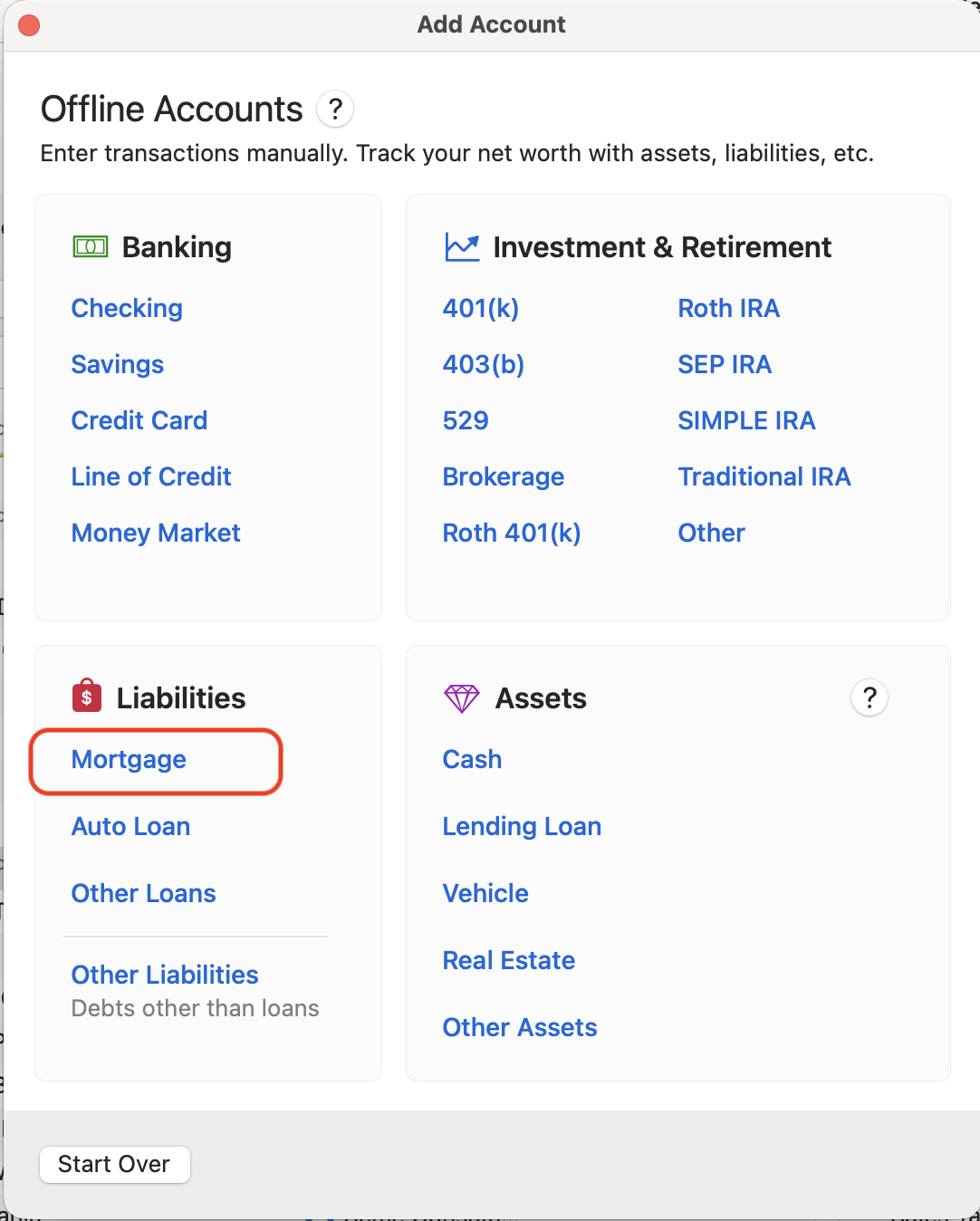
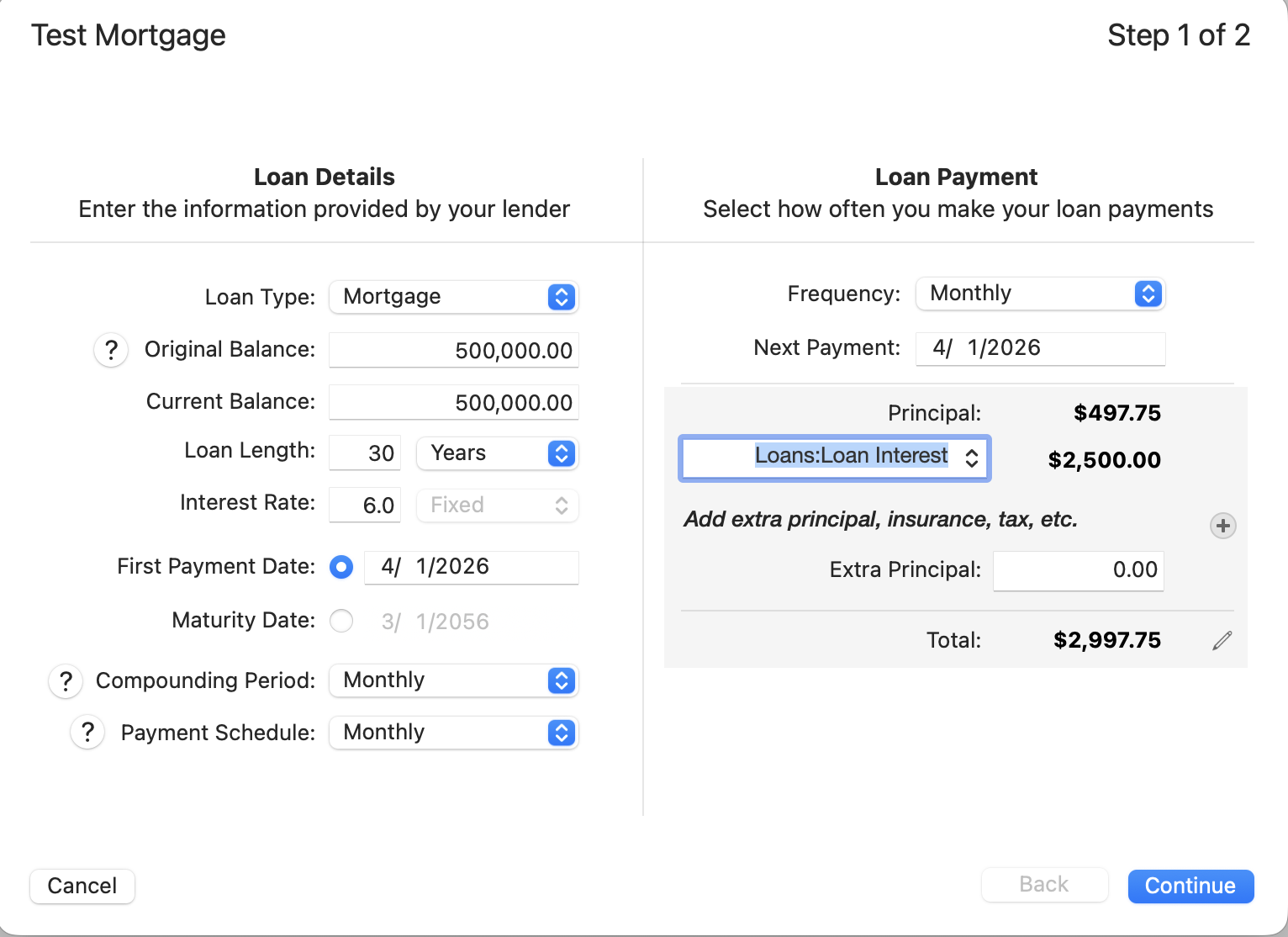
You can then specify to have Quicken create "Detailed Reminders", which will create a split transaction for each monthly payment: a transfer to reduce your loan principal and interest expense. You can also add an escrow account in the setup, and the monthly escrow transfer will automatically be an additional split on your monthly payment.
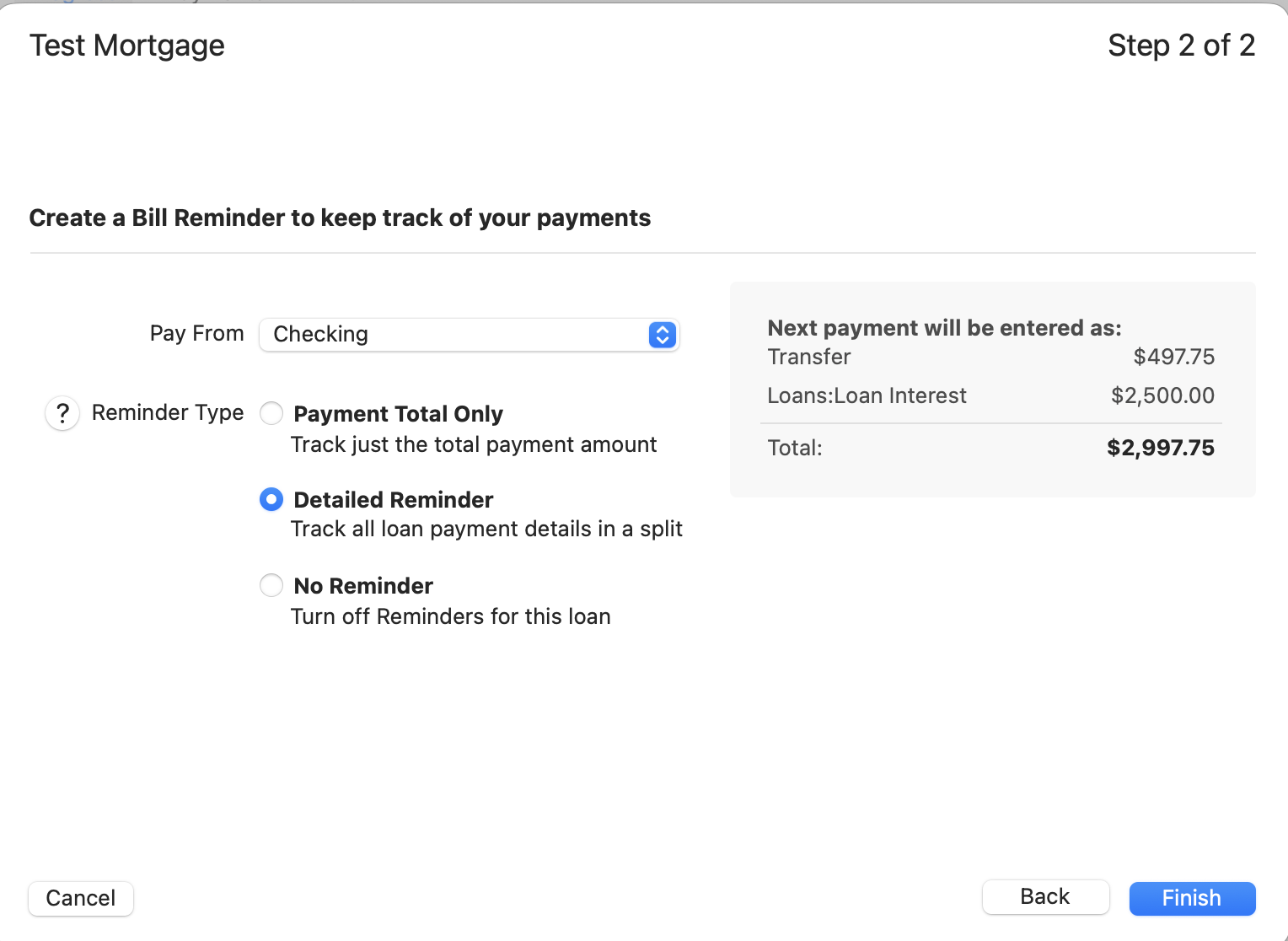
(If you set it up as a manual account, you may find you need to occasionally tweak the values if your loan institution's calculations are slightly different than Quicken's, but this takes only a few seconds monthly or less frequently.).
Are there specific questions you have about tracking your mortgage in Quicken Mac?
Quicken Mac Subscription • Quicken user since 19930 -
@jacobs - If the mortgage/loan is connected to the lender for downloading, does QMac still allow you to track the details of it (i.e., PITI)? In QWin, connected loans download only the total amt of the loan payment and not any details of that.
Quicken Classic Premier (US) Subscription: R66.23 on Windows 11 Home
0 -
@Boatnmaniac I can't answer definitively, as I have never had a connected mortagage account. (And it's not something I can test without such an account. 😉)
Quicken Mac Subscription • Quicken user since 19930 -
Hi everyone,
Quicken for Mac works similarly to the Windows version when it comes to mortgages.
If you link your loan to an online account, Quicken will download the current balance from your lender, but will not download individual payment transactions or the detailed split between principal, interest, and escrow.
For full tracking of your mortgage payments, it’s best to use a scheduled payment in Quicken with the appropriate splits for principal, interest, and escrow.
You can find more detailed information about managing loans here:
I hope this helps!
Quicken Laura
Make sure to sign up for the email digest to see a round up of your top posts.
1 -
I'll just add some additional comments regarding QWin that I think might also be applicable to QMac. If I'm mistaken about this, then I apologize for any confusion the following might cause.:
Connected loans in QWin are similar to investment accounts that are set up for Simple Tracking in that they do not have an account register and tracking of PITI details in them is not possible. It is only the total payment amount that gets downloaded. This might be fine for those who do not wish to nor care to track the loan payments details.
But for those who want or need to track the loan payment details, QWin SUs usually recommend setting up loans as manual accounts, not connected accounts. Manual loan accounts do have registers and will generate a recurring Loan Reminder with a split category that does allow for tracking PITI details. Then each month enter the Loan Reminder prior to the posted loan payment being downloaded from the checking account so when it is downloaded it will be matched to that Reminder.
For manual loans, QWin calculates what the monthly amounts are for principal and interest but it is not perfect and the calculated principal and interest amounts will vary some from what the actual amounts are. Perhaps this is what the Quicken Support person was referring to?
To resolve this, each month after the loan payment has been downloaded to checking, check the lender's website to see what the actual principal and interest amounts were. Then the transaction of the posted payment transaction in the checking account register can be manually edited to match it.
If this is not how it works with QMac please let me know and I will remove this content.
Quicken Classic Premier (US) Subscription: R66.23 on Windows 11 Home
0 -
@Boatnmaniac With the helpful reply from @Quicken Laura, I think your description of the situation for Quicken Windows is exactly accurate fro Quicken Mac as well.
I would much prefer to have my loan account be manual, with the scheduled monthly transaction split for principal and interest (via the mortgage loan setup as I illustrated above), and then adjust the mortgage/interest split periodically if it is slightly off from the lender's calculation. (One could do so each month, or if the difference is very small as is likely the case, perhaps every quarter or once a year.) You can either edit the split amounts in each monthly transaction, or enter a zero dollar transaction to increase/decrease the interest expense and to make an opposite increase/decrease to the transfer to the loan account (principal payment).
Quicken Mac Subscription • Quicken user since 19931


