Quicken Duplicating Scheduled Transactions

Recently Quicken started duplicating scheduled transactions. E.g., pensions deposited the 1st of the month show up four times in the same amount on the same day. Scheduled transactions that I deleted come back and appear again. I have deleted and re-entered recurring transactions that should be there and the problem happens again.
I understand this is a known issue and yet it does not seem that Quicken has addressed it yet. It's very frustrating because it messes up cash flow projections, showing income three or four times more than what it actually is. [Edited - Language]
I've followed steps recommended in other posts but it keeps happening. A permanent fix is needed. What is being done to address this?
Comments
-
Hello @Randy Schmidt,
Thank you for letting us know you're seeing this issue. To help troubleshoot, please provide more information:
- You mentioned this started recently. When did you first notice this behavior?
- Did this unwanted behavior coincide with a program/computer update or an unexpected program/computer shutdown?
- Do you keep your Quicken file directly on your local hard drive?
- Is your Quicken file synced with any cloud service, such as OneDrive, iCloud, or Dropbox?
Since the most likely cause of this behavior is a file-specific problem, I suggest that you try validating your data file. Please save a backup file prior to performing these steps.
Validate:
- File
- Validate and Repair File...
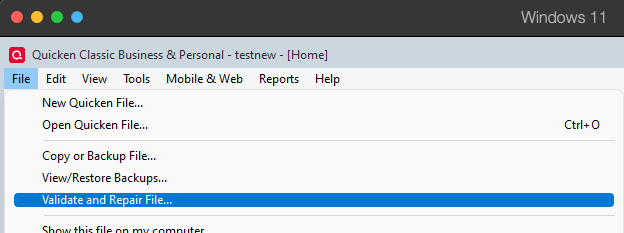
- Validate File
- Click OK
- Close the Data Log
- Close Quicken (leave it closed for at least 5 secs)
- Reopen Quicken and see if the issue persists.
Note: Validating your file is unlikely to remove existing duplicates, but it may be able to prevent the issue from happening again after the duplicates are deleted.
Please let me know how it goes!
Quicken Kristina
Make sure to sign up for the email digest to see a round up of your top posts.
0 - You mentioned this started recently. When did you first notice this behavior?
-
Hi Kristina,
I can't pinpoint when it started but it seems like it's been happening for around 2-3 weeks. I also can't determine if it coincided with a computer shutdown but I do believe one happened unexpectedly a couple weeks ago. My data file is on the hard drive but the backup is on an external drive. Neither file is sync'd with the cloud, Drop Box or OneDrive.
Last week I deleted a deposit scheduled on February 1 that was duplicated three times (four deposits instead of one). It was OK for a few days. Today, it's back again, duplicated once. A second deposit (spouse's pension) was also scheduled for February 1 and I also deleted the duplicate transaction of that deposit last week. Today, it's back. Both are duplicated on the 1st of every month now.
Another deposit is scheduled on the fifth of the month. Last week I deleted the duplicate and the original and re-entered a recurring transaction from scratch. Today, that deposit is duplicated on the fifth of every month.
A bill scheduled for January 14 that I paid and matched to a downloaded transaction also keeps returning as a scheduled transaction. Two debit card transactions that I projected to occur on the 6th of January were not needed and I deleted them last week. Today they are back as scheduled transactions on the 6th of February. They were not entered as monthly transactions.
At your recommendation, I backed up my data file, verified and repaired the file and viewed the log of repairs that were made. This included the following:
"Repaired your data file by removing a damaged category. Please check your category list for missing categories by going to Tools>Category List."
"Quicken found a damaged scheduled reminder and removed it. Please check your scheduled reminders by going to Tools>Manage Bills and Income Reminders."
"Quicken found a damaged scheduled reminder and removed it. Please check your scheduled reminders by going to Tools>Manage Bills and Income Reminders."I closed Quicken and re-launched it. All the duplicate transactions are repeated. So these steps did not solve the problem. I will delete the duplicate transactions again but I won't be surprised if they show up again afterwards. If that happens I'll ask you to escalate this issue because others have indicated that they are also experiencing it.
Thank you,
Randy Schmidt
0 -
Thank you for your reply,
To clarify, are these duplicate transactions in your register, or are they duplicate reminders?
If they are duplicate reminders, please try restoring a backup from before the problem started, and test to see if that resolves the issue.
If they are duplicate transactions, then please follow the instructions in the article linked below to troubleshoot:
Thank you!
Quicken Kristina
Make sure to sign up for the email digest to see a round up of your top posts.
0 -
They are all duplicated reminders, except for the transactions that I matched with downloaded transactions which were cleared and reconciled as well as two debit card transactions that were scheduled (as reminders) but deleted before they occurred. So far today, no duplicate reminders are showing.
0 -
I just downloaded transactions and now the problem with duplicate transactions recurred. I'm getting very tired of deleting duplicate transactions that are being created by a glitch in the Quicken application. If you can't identify the source of the errors and offer a solution, I will elevate this issue to the Office of the President or ask you to escalate to the next level.
0 -
- Are you Syncing to Mobile/Web? Is the Sync option in Edit / Preferences / Mobile & Web turned on?
AND - do you actually use the Mobile app on your smartphone or the Quicken on the Web browser-based app?
The Sync process has been suspected of a number of weird things happening with Quicken, up to and including reminders that come back after having been deleted. Could your problem be caused by Sync?
• If you answer "yes" to the 1st question and "no" to the 2nd question, turn Sync off completely. You don't need it. The Sync process should only be used in conjunction with the Quicken app for Smartphones or the Quicken on the Web browser app. It cannot be used as a replacement for backing up and restoring your Quicken data file.
• If you answer "yes" to both questions, try to Reset Sync so that the current cloud sync file is replaced with a fresh complete copy
Do note that a full Sync process may take many minutes to complete.How to reset Sync to Cloud
• Log out of your mobile app, then do this on your desktop / laptop:
• Go to Edit / Preferences / Mobile and Web
• Click the "Reset your cloud data" link and follow the instructions until it is complete.
• Sync your desktop file to the cloud
• Now log back into your mobile appHow to turn off Sync to Cloud for the current data file
• Go to Edit / Preferences / Mobile and Web
• Change the Sync radio button and set it to OFF0 - Are you Syncing to Mobile/Web? Is the Sync option in Edit / Preferences / Mobile & Web turned on?
-
I am not syncing to anything. I don't use a Quicken smartphone app. This problem does not appear to be on my end. It started about four weeks ago and had never happened before. I did a reboot for a Windows update today and upon launching Quicken afterwards, the duplicate scheduled transactions are NOT showing up at the moment. Hopefully, it'll stay that way.
0 -
Thank you for the follow-up,
I'm glad to hear that it's behaving so far.
If the issue returns, please let us know!
Quicken Kristina
Make sure to sign up for the email digest to see a round up of your top posts.
0 -
Well, good old Quicken did it again. After I reconciled today's downloaded transactions, a number of reminders are now duplicated again. A bill that I paid, downloaded and reconciled on January 14 shows up as a new past-due reminder for January 14. A bill that I paid, downloaded and reconciled from January 28 shows up as a new past-due reminder for January 28. A monthly deposit scheduled the 5th of each month is duplicated every month starting in March.
You know there is an ongoing issue that appears intermittently as I and others have brought to your attention. When will there be a fix for this frustrating problem? Please escalate and get it addressed!
0 -
Thank you for the follow-up,
Since the issue has returned, it's possible this is a file-specific problem. To troubleshoot, I suggest that you try validating your data file. Please save a backup file prior to performing these steps.
Validate:
- File
- Validate and Repair File...
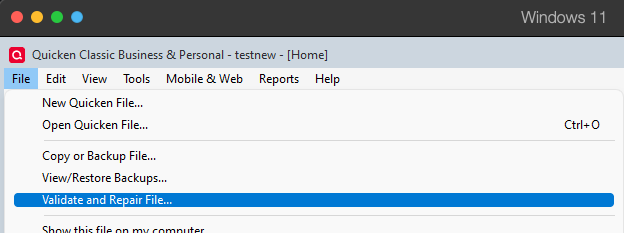
- Validate File
- Click OK
- Close the Data Log
- Close Quicken (leave it closed for at least 5 secs)
- Reopen Quicken and see if the issue persists.
If you're wanting to escalate the issue, rather than do more troubleshooting here, typically the fastest way to do escalate, especially if you can reliably replicate the issue, is to contact Quicken Support directly, since they have access to tools we can't access on the Community and they're able to escalate the issue as needed. The Quicken Support phone number can be found through this link here. Phone support is available from 5:00 am PT to 5:00 pm PT, Monday through Friday.
I hope this helps!
Quicken Kristina
Make sure to sign up for the email digest to see a round up of your top posts.
0 -
I have the same issue. I've used Quicken since 2011 with no issues. [Removed - Speculation/No Soliciting]
0 -
Kristina, I had already done the complete validate and repair thing before contacting you again. Honestly, your responses are not at all helpful. You always point the problem back to the user, when you know it's a program bug that has reported by a number of posters. Please advise when an actual fix is in the works.
Quicken Support is also not particularly useful. At the top, information is posted on known issues with Discover and Fidelity accounts but nothing else. Below that there are many radio buttons for people "getting started" and a link to FAQs that do not address this problem. At the bottom are your "featured videos" on how use the application. Finally, at the bottom, there's the section on "Do you still need help?" The options offered there are 1.) to connect with this community, 2.) to connect with a "virtual assistant" that will provide canned unresponsive answers and 3.) to "contact us," which then offers a chat ("RECOMMENDED") or "call us" (CLOSED except for Monday through Friday). This does not sound like Quicken is really interested in Customer Support.
0 -
Issue for me also. I have deleted the reminder and replaced with a new one. Seems some days it's specific to a particular transaction then today it picked up and changed 2 new reminders. This is a bug! Been going on nearly 3 weeks now.
0 -
Hello @ljkeryc,
Thank you for letting us know you're seeing this issue. To help troubleshoot, please provide more information:
- When did you first notice this behavior?
- Did this unwanted behavior coincide with a program/computer update or an unexpected program/computer shutdown?
- Do you keep your Quicken file directly on your local hard drive?
- Is your Quicken file synced with any cloud service, such as OneDrive, iCloud, or Dropbox?
- Did deleting and recreating the reminder correct the issue (for that reminder)
I look forward to your response!
Quicken Kristina
Make sure to sign up for the email digest to see a round up of your top posts.
0 - When did you first notice this behavior?
-
[Removed - Disruptive] In my case, some of the issues I've described repeatedly just recurred again after a One-Step update. Three transactions that were in the past, which were already matched to downloaded transactions and reconciled many times before are showing up again as PAST-DUE reminders.
0 -
Thank you for your reply,
The issue you describe should have been fixed in R64. I'm not able to replicate the issue in my own Quicken file.
If you haven't already done so, please try manually reinstalling the current update patch. If it did not install correctly, manually reinstalling it may correct the issue. Please use this article to download the patch:
Thank you!
Quicken Kristina
Make sure to sign up for the email digest to see a round up of your top posts.
0 -
Something similar is happening with me also. Any time I have a scheduled transaction that automatically enters a transaction in Quicken, when I look at it after the transactions have been downloaded, the same transaction appears again, with a date a day later, and with no tag. It seems to be happening only after a one step update. The issue has also been reported here
A similar issue was fixed in R64 but this is not the same issue. That issue was with scheduled transactions losing tags when entered.Barry Graham
Quicken H&B Subscription0 -
[CTP-16297] Has to do with Auto-bill reminders, AND Pending Transactions. When they match, the duplicate gets added. Turn off the "Pending" and issue goes away. (Not a fix, just an observation.).
1 -
I wish American Express DID support Pending transactions, but they don't. Just to make sure I did try turning it off for these accounts, and I will see what happens with future transactions. I have to admit that it did occur to me that it could be related to pending transactions, were it not for the fact that it is happening in accounts that don't support them.
If this does temporarily solve the issue, it's not a solution, just a workaround.Barry Graham
Quicken H&B Subscription1 -
I have been having the issue for several months. I have avoided reporting it since others have done so already and I didn’t want to be redundant. However it appears that Quicken has not seen the need to prioritize this and the problem continues unresolved. While I agree with what Randy 415 work around stated above, that doesn’t solve the problem. In the past, where issues like this haven’t gotten the attention needed, some have reported that contacting the president of Quicken directly has helped. Would someone give me that contact information and I will contact them directly myself. I am very frustrated with this issue.
0 -
Thank you for your replies,
If you are seeing the duplication issue discussed in the other discussion linked earlier, then please navigate to Help>Report a Problem and send a problem report with log files attached and, if you're willing, a sanitized data file.
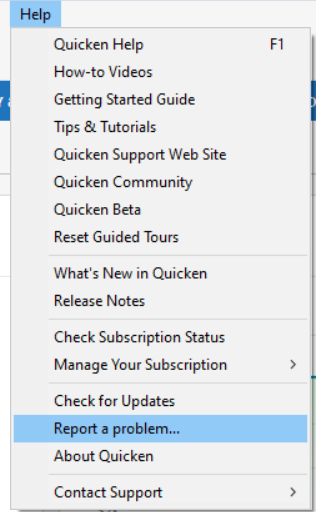
Please let me know when the problem report is submitted, and I can add you to the ticket (CBT-1067).
Thank you!
Quicken Kristina
Make sure to sign up for the email digest to see a round up of your top posts.
0 -
Sanitized file upload is too limited. Cannot upload large files. We need to upgrade the file size allowed.
1 -
Same problem for me. Definitely has something to do with pending/downloaded transactions and automatically entered scheduled transactions.
I am getting tired of Quicken breaking things with forced updates. Every time I launch Quicken and it forces an update I cringe because I know there is a good chance they are about to break more stuff. It makes me wonder what all else is breaking that I have not noticed yet.
I have been a Quicken user since 1993, so it is fair to say I know Quicken well.
Quicken, please fix this, and please stop breaking things. Your software is important and data integrity is critical.
Yes, I have done validate/repair multiple times.
No, it is not my data file. I manage finances for myself and for a family member, using two different Quicken data files. Both are having this issue.
This is a very serious bug because the duplicates are not even valid. Often the category of the duplicates, while containing the correct account name, are actually invalid. If you choose the "Go to matching transaction" option, it states that the account is no longer available. This is a huge mess and requires the user to be detective and fix it each time.
0 -
This is Randy again. The problems just keep coming back. I have verified and repaired my data file multiple times. I've modified reminders set for annual transactions to end on the next date the reminder shows. The transaction then shows as "1 remaining." Then I've entered the transaction, changed the date to today or tomorrow and deleted the transaction. That technique did not work.
I tried another method. For reminders that show up as due in the past, I've entered the transaction and entered an offsetting transaction for the following day. Then I've marked both as reconciled. That doesn't work. The next time I download transactions, the same ones show up again as past reminders.
Deleting reminders does not work. They just return with the next download. I've downloaded and installed patches from Quicken that have not fixed the problem. This issue is so frustrating that I have to spend time every day fixing things.
Why did this problem start, roughly at the beginning of the year? Why is it not fixed yet? How do I escalate it to a level that gets results?
0 -
Same problem for me too.
Posted in a different thread:
Bill Reminders Being Automatically Entered and Duplicated AGAIN — Quicken
0 -
I am not experiencing that issue and many others are not either, so I doubt it's a Quicken issue. But It does sound like a program update may have corrupted your program. I'd completely uninstall Quicken and reinstall it from scratch. Make sure that the data file is not stored in a Onedrive path. Use the recommended location for your data file. Make sure that sync to Mobile & Web is not activated.
0 -
It has nothing to do with syncing to mobile or web or stored in a OneDrive path. I have never activated those. Since there are several threads on this problem and multiple users have expressed dealing with the same issue, I'm pretty sure it must be a Quicken problem. With all due respect, the fact that some people do not experience this issue does not prove that those who do must have corrupted programs or files.
0 -
I reported the problem and sent Quicken all the log files and a screen shot.
1 -
Quicken has acknowledged this is an issue and opened a case therefore it is a Quicken issue. Some people not having the issue doesn't mean it doesn't exist.
Barry Graham
Quicken H&B Subscription0 -
Hello Quicken. Your application did it again. After today's download (which actually excluded 6 transactions from my bank), it added a reminder for a charge on January 28 that I previously entered, downloaded, matched and reconciled half a dozen times or more. No matter what I do, I cannot get your program to stop inserting bogus reminders.
[Removed - Off Topic].
I am really frustrated with your product, annual price increases, and decreasing functionality.
[Edited - Readability]
1






Categories
- All Categories
- 6 Product Ideas
- 34 Announcements
- 253 Alerts, Online Banking & Known Product Issues
- 19 Product Alerts
- 265 Welcome to the Community!
- 301 Before you Buy
- 1.5K Product Ideas
- 55.8K Quicken Classic for Windows
- 16.9K Quicken Classic for Mac
- 1K Quicken Mobile
- 834 Quicken on the Web
- 129 Quicken LifeHub