sync data is invalid, and updating after every restore, so have bad data.

I have tried to stop sync on all my accounts and turned sync off. I then restored valid data from a backup and it looks good. But within a few seconds all of a sudden a sync starts without any action on my part and I watch to balances changing to the invalid data in the sync data. This happens before I have time to reset sync data with the correct data… So, I am unable to get the valid data from the backup up to the sync data. It appears a sync is automatic right after a backup restore which is making my data invalid within seconds. Is there some way to clear the sync data?
Comments
-
Hello @jspoon,
Thank you for letting us know you're seeing this issue. If there is incorrect/invalid information in the Quicken Cloud causing this issue, you should be able to resolve it by performing a manual cloud reset before restoring a good backup.
To do that, first, create a new data file (click here to view instructions, and review the section titled: "Creating a new file."). Once the new file opens, follow the steps below to remove your main data file's cloud account.
- Go to Edit
- Preferences
- Quicken ID & Cloud Accounts
- Click Cloud accounts associated with this Quicken ID (#) (this is not a button; it is written in blue underneath the "Edit dataset name" button)
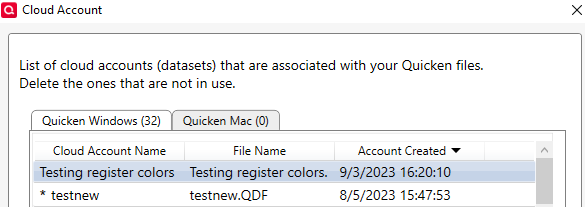
- Select the Cloud Account Name used for your main data file and click Delete
- Type Yes and click Delete
Once the cloud account is deleted, restore a good backup file and test to confirm that the issue is resolved.
Please let me know how it goes!
Quicken Kristina
Make sure to sign up for the email digest to see a round up of your top posts.
0 -
Thank you for your comment, I went through the steps and now when I go into Quicken ID & Cloud Accounts, there is no list of cloud accounts associated with this Quicken ID (#)… However, when I restore from backup, the correct data is there and then after a few seconds it is replaced with the invalid cloud data…. Even though there are no cloud accounts listed for my quicken id.
When I create the new file, should I chose use Mobile? The new file instructions just said: Select if you want to use Mobile.
At this point I have no cloud account associated with my quicken ID, but it is still updating the backup I restore after a few seconds… @Quicken Kristina0 -
Thank you for your reply,
Yes, when creating the new file, you should choose Mobile. This is because Quicken must have at least one cloud account on file for you.
If the cloud account associated with your main file was deleted, then there should not be any old or incorrect data in the cloud to mess up your accounts. Is Sync turned on in that restored file? What specific information is getting distorted? Do you have One Step Update set to run on startup? If you do, does the information get distorted when One Step Update runs?
Thank you!
Quicken Kristina
Make sure to sign up for the email digest to see a round up of your top posts.
0 -
@Quicken Kristina thank you for the reply. I called support and we discovered that I had a file with corrupted data. This was discovered when we ran validation on the data file. The latest version had corrupted data. So what I believe was happening had nothing to do with sync. I believe that quicken was loading the backup that had corrupt data and it was ignoring the invalid entries which in effect rolled back to the point where there was no corrupt data. So, I restored back to where there was no corruption, then deleted the invalid transactions identified by the validation. At that point I had no more data errors and ran the update to get the transactions between the backup and the current date. Validation of file is still good…
I recomend people to run validation on their data files on a regular basis…
0 -
Thank you for the follow-up,
I'm glad to hear that Support was able to help you fix the problem, and thank you for sharing the resolution.
If you need further assistance, please feel free to reach out!
Quicken Kristina
Make sure to sign up for the email digest to see a round up of your top posts.
0
