Quicken Duplicating Scheduled Transactions

2»

Comments

  • Quicken Kristina
    Quicken Kristina Quicken Windows Subscription Moderator mod

    Thank you for the follow-up,

    This issue is a bug that has been reported to our Development and Product teams for further investigation and resolution. Although we do not currently have an ETA, once a solution is developed, it will be made available in a future release.

    Thank you!

    (CTP-16297)

    Quicken Kristina

    Make sure to sign up for the email digest to see a round up of your top posts.

  • Randy Schmidt
    Randy Schmidt Quicken Windows Other Member ✭✭
    edited March 17

    [Removed - Off Topic]

  • Randy Schmidt
    Randy Schmidt Quicken Windows Other Member ✭✭
    edited March 17

    I discovered ANOTHER thread about this issue under the subject "pending transactions causing difficulty with transaction edits."

    [Edited - Added Link]

  • BarryGraham
    BarryGraham Quicken Windows Subscription Member, Windows Beta Beta
    edited March 17

    Do we know for a fact that this issue is related to pending transactions, and if it isn't, how is this different from CBT-1067 ?

    Barry Graham
    Quicken H&B Subscription
  • Randy Schmidt
    Randy Schmidt Quicken Windows Other Member ✭✭
    edited March 18

    Today Quicken opened a dialog box after One Step Update saying a new version is available. I updated to what is presumably the latest version, R66.28. During the OSU, Quicken again duplicated the past due reminder for January 28th. Yesterday I tried ANOTHER technique to avoid this frustrating bug — I changed the amount on the reminder to 0 and entered the transaction for the reminder date. Then I marked it reconciled. This was another attempt to deal with the problem until Quicken actually fixes it and it didn't work either.

    At the suggestion of someone who commented on another thread regarding what happened with a file called "export(83).qfx" that I exported from my bank yesterday, today I downloaded a new qfx file and renamed it just "export." Unsurprisingly, double-clicking the file caused Quicken to try to reinstall the app.

    This problem has gone on long enough and has caused a lot of users a great deal of frustration. It has made the application untrustworthy. In addition to the past due reminder creeping in with every new OSU, several future reminders also repeated again. Elevate this to the Office of the President! GET IT FIXED!

  • BarryGraham
    BarryGraham Quicken Windows Subscription Member, Windows Beta Beta

    Those of us that have written code know that bugs get fixed when the solution is discovered. Escalating it to the President won't make that happen any faster. This is frustrating for everyone and I'm sure whoever is working on this is getting it done as quickly as possible.

    Barry Graham
    Quicken H&B Subscription
  • Randy Schmidt
    Randy Schmidt Quicken Windows Other Member ✭✭

    FWIW, I previously had a case elevated to the Office of the President and it got both attention and resolution.

  • Randy Schmidt
    Randy Schmidt Quicken Windows Other Member ✭✭

    I got on another chat session with Support today and shared my Quicken screen with the agent. He walked me through an area in the application that I didn't know existed. In the process, I found out that Quicken apparently turned on sycning to mobile and/or web in my settings without my knowledge. This may have been the cause of problems for me. After doing a One Step Update while the agent viewed my screen, the problem did not recur. This may be grounds for optimism!

  • markus1957
    markus1957 Quicken Windows Subscription SuperUser, Windows Beta Beta

    Based on your last comment, you now believe contrary to your earlier comment, that the issue may be associated with cloud sync. It might be helpful if you explained what led you to believe so strongly that Mobile Sync was Off and what hidden section was revealed to you that led to a potential solution.

    Cloud Sync On/Off is a pretty straight-forward preference so I'm curious as to how you missed it being On. R66 introduced a fix for a wide variety of Bill & Income reminder issues, but only if Sync was Off. They are still working on a fix for when Sync is On. This thread and another recent thread challenged the veracity of that claim. If those affected in the other thread also mistakenly believe that Sync is Off, the reasons why you were mistaken might be helpful to verify their claims that Sync is Off.

  • BarryGraham
    BarryGraham Quicken Windows Subscription Member, Windows Beta Beta
    edited March 19

    I am not using sync with the latest release, and it is still happening. These duplicate transactions look like they are being downloaded from somewhere, the same as the original except with the tag and category missing. I don't have a cloud account for this file. From time to time I do see Quicken doing what appears to be some sort of a Sync. The first thing I checked when this started happening was whether Sync had turned itself on. Sync is not on for me. I like Quicken in the Cloud but issues it caused in the past with paychecks are not worth the risk even though I worked with Support for weeks several years ago to get it fixed.

    Barry Graham
    Quicken H&B Subscription
  • miklk
    miklk Quicken Windows Subscription SuperUser, Windows Beta Beta

    The problem for me is in a non Sync file. (I have a duplicate file with Sync on and that file does not get the dupes).

  • QknUserSince90s
    QknUserSince90s Quicken Windows Subscription Member ✭✭
    edited March 19

    I am not using cloud sync, and never have. The problem occurs even if cloud sync is off. The issue is not related to cloud sync. I hope you have your issue fixed, but I suspect it is not fixed and will happen again to you.

  • markus1957
    markus1957 Quicken Windows Subscription SuperUser, Windows Beta Beta

    Let me start with the premise that turning the Cloud Sync preference to Off, does not prevent Quicken from syncing to the cloud. Prior to R66, Sync Off basically meant you couldn't view your datafile on the web or mobile apps, but that syncing the datafile to the cloud still took place. You could look at the Cloud Sync log to see the various tables in your datafiles being synced to the cloud. R66 restricted the number of syncing operations taking place. One of the effects from the R66 changes to sync was preventing the jumbling of splits in scheduled reminders with Sync Off. They are still working on the fix with Sync On.

    While this thread's issue is a bug for certain as yet unknown use cases, it is not a universal problem for all users who have scheduled reminders in their datafile. I have dozens of them and while I was subjected to the scrambling of splits, I do not see this issue on either automatically entered reminders, manually entered reminders or those that simply sit waiting for a matching transaction.

    My experience with the scrambled splits leads me to believe this issue arises from a corrupted reminders table (the OP clearly had corrupted reminders) or a sync state that is not truly off (like the OP). Until the developers solve it, R66 may provide the means to work around the issue if the reminders table is uncorrupted and sync is truly off. Conversely, there may be some use case of reminders different from mine and others which displays the problem and cannot be resolved by turning Sync off in an uncorrupted data file.

    Validate/Super-validate will usually repair the reminders table until the next OSU corrupts it again.

    Sync Off sometimes requires additional steps beyond the Preference setting-

    1. Super-validate to make sure no reminders are corrupted.
    2. Turn Sync On and deselect all accounts, including hidden or separate accounts from sync. Zero accounts enabled is the desired state.
    3. In the Tools menu, Deselect Cloud Sync in OSU Settings (selection box only shows when sync is on).
    4. Reset Cloud file (don't select sync first option) to get a new cloud file representing your desktop file into the cloud.
    5. Super-validate again to make sure Cloud Reset did not corrupt reminders.
    6. Check reminders to verify no duplicates show up in the table or registers.
    7. Turn Sync Off in Preferences
    8. Close and open Quicken
    9. Try an OSU and see what happens

    If you are curious, after turning sync On, you might want to log in to the web app to see how it is representing your reminders in the web tables and registers. It was there that I could see and reproduce the scrambling of splits in the web reminders that ended up getting scrambled further during OSU.

  • Randy Schmidt
    Randy Schmidt Quicken Windows Other Member ✭✭

    Marcus, I have been using Quicken for many years (my data file goes back to 2008) and rarely go into the preferences settings. Until yesterday, I had not changed any preferences for well over a year. When things are working normally, I just don't review preferences. Thus, when the settings for "Mobile and Web" and "Quicken ID and Cloud Accounts" were apparently changed during some update, I didn't even know about them. I shared my screen with the support tech and he walked me through the offending settings. There were multiple test data files besides QDATA connected and sync'd to a large number of entities, like 84 of them. The tech had me delete every file except QDATA and remove all 84 entities from sync settings. Following this I ran OSU and the one "tell-tale" reminder that was always popping up was not there for the first time since early January. I ran OSU this morning and, thankfully, no bogus reminders came back. I am hopeful that the problem is resolved for my particular case. It is apparently not for others.

  • QknUserSince90s
    QknUserSince90s Quicken Windows Subscription Member ✭✭

    Thanks @markus1957 . I ran a validate and a super validate and it showed no issues. I am not too keen on turning sync on just so I could turn it back off again. I don't trust sync, nor do I like the idea of sending my data to Quicken. I don't trust them nor the sync process…too many bugs and such, and I don't want my finances in the cloud.

    The issue did not happen today, nor yesterday. But I suspect it will happen again. It does not happen every time for me…it is just a nice little surprise every once in a while. :-)

  • BarryGraham
    BarryGraham Quicken Windows Subscription Member, Windows Beta Beta
    edited March 20

    @Quicken Kristina

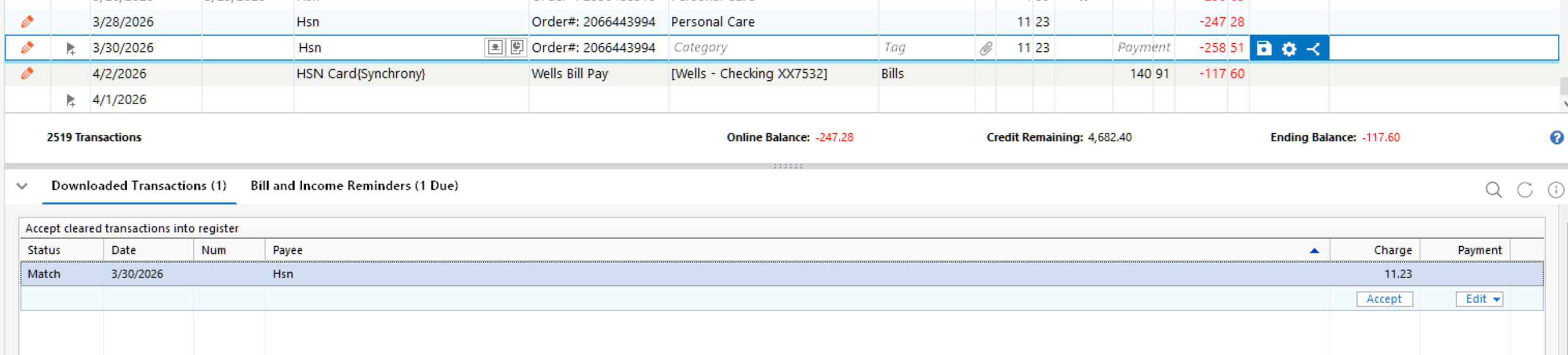
    Here ("New Match") is what I see in the banking register next to the duplicate. I had never seen this until this issue started happening.

    image.png

    When I hover over "New Match" I see

    image.png

    It's not entered manually, it's a scheduled transaction on March 21st though. Also it isn't actually matched to any downloaded transaction. It's the transaction immediately before the one it's a duplicate of.

    Interestingly, the transaction hasn't actually been downloaded yet, but it is a "processing" transaction on Bank of America's website (but not showing as a pending transaction in Quicken).

    So it looks like Quicken is copying pending transactions into the register, even when it's not set to do this, and even when those pending transactions are not listed under "Pending Transactions" in an account that supports them. As I said earlier, this is also happening in a register (American Express) that doesn't even support pending transactions.

    Barry Graham
    Quicken H&B Subscription
  • DWT
    DWT Quicken Windows Subscription Member ✭✭

    I've also had the issue of duplicate entries appearing in the register. I'd estimate that this problem began within the last few weeks.
    And Quicken Classic Premier has become so slow it is almost impossible to work with. Every time I enter a bill or income item from "BILLS & INCOME" I am waiting and waiting and waiting for Quicken to process it. Same extreme slowness when accepting a downloaded transaction. It is a miserable user experience!
    I thought perhaps this extreme slowness might be because I've used Quicken for so many years, and that therefore I should archive my old data, but I see that this is no longer encouraged (per https://www.quicken.com/support/creating-year-end-copy-end-calendar-year/ ).

  • markus1957
    markus1957 Quicken Windows Subscription SuperUser, Windows Beta Beta

    I don't use the automatically add downloaded transactions to the register feature. I review all downloads in the Compare to Register (C2R) window. Is that the use case difference between seeing and not seeing the issue? You might try turning off Automatically Add to see if that stops the behavior. Not a fix, just a potential workaround and new info for the developers to work with.

  • Bill44
    Bill44 Quicken Windows Subscription Member ✭✭✭✭

    There is another Discussion: Duplicate screen entries after downloading and while accepting entries process.

    This is very familiar to this one. This started for me near the beginning of March.

    Even if I unmatch the downloaded transacted and then manually match it the transaction still duplicates. The duplicated does not have a category or I have seen a couple of time it says missing category.

    The transactions that are downloaded and say new when I manually match them, they work. This is not that common, so I haven't done enough to 100% sure about any of this mess except all of a sudden duplicates started showing up.

    Quicken in February did a fix for duplicate transactions. Not sure for who or what was fixed but this may be causing this issue.

    Member since 1984. 
    Quicken Premier.
  • BarryGraham
    BarryGraham Quicken Windows Subscription Member, Windows Beta Beta

    No I am not automatically adding downloaded transactions.

    Barry Graham
    Quicken H&B Subscription
  • Bill44
    Bill44 Quicken Windows Subscription Member ✭✭✭✭

    Today I received a "new" transaction for my check book. It was not in the Bill and Income reminders or pre added to the register ahead of time. Yesterday I had deleted all of the memorized transactions. It WORKED!

    Later this week I will have more transactions for the check book, and I will try to see if I can nail down to what methods work or not.

    Member since 1984. 
    Quicken Premier.