Collapse all categories in report (Q Mac)

It is hard to believe after all these decades of Quicken for MAC that a simple Command click on an arrow doesn't collapse all the categories. Yes I can collapse Expenses for instance but then I do not see any categories. I hate wading thru every category and sub category just to get to the M's or P's, etc.
Comments
-
I should say I have tried every command I know and there is nothing in the menu bar either. If anyone knows of a way please share.
0 -
Hello @Leslie Jones,
Thank you for reaching out! You can expand/collapse all in a report by clicking View, then selecting the appropriate option. You can also set it to show only the top-level items.
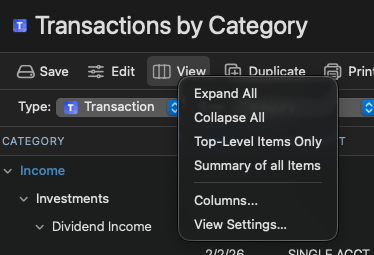
Does that meet your needs?
Quicken Kristina
Make sure to sign up for the email digest to see a round up of your top posts.
0 -
Thanks. Where do I do that?
0 -
Top Level Items…BRILLIANT!!!! Thanks
0
