Bank Of America - Credit Card Bill Issue

R66.28
Build 27 166 28
For the last six weeks, I have not been able to download my Bank of America credit card bills.
My first issue is when setting up the initial accounts: Do we use Bank of America-Quicken?
When setting up the connected account bills, I do not see Bank of America - Quicken.
After I download the accounts and try to add them, I get a message that I have already used the account name. I have removed all BOA accounts, and when I try to add the accounts again, I get the same message. I think what's happening is I have two credit cards with the same name. I called Bank of America, and they said the name can't be changed; call Quicken. This all started with the latest migration.
If you are a client of Bank of America, have you had this issue?
[Edited Readability]
Comments
-
Hi @jralyea,
Thanks for taking the time to contact the Quicken Community.
I have a couple of questions to better understand the issue:
- Can you upload a screenshot of the error message you’re seeing?
- Where is your Quicken data file located? To check:
- Go to File. At the bottom of the menu, above the Exit option, the file with the check mark next to it is the one currently open. Please let me know the full file path shown there.
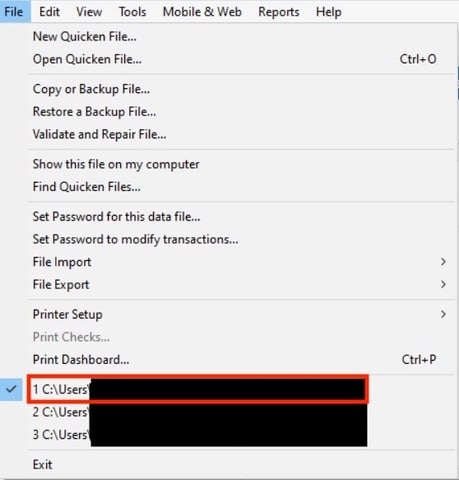
- Go to File. At the bottom of the menu, above the Exit option, the file with the check mark next to it is the one currently open. Please let me know the full file path shown there.
- When you’re trying to add the account, do you see the option to rename the account or link it to an existing account?
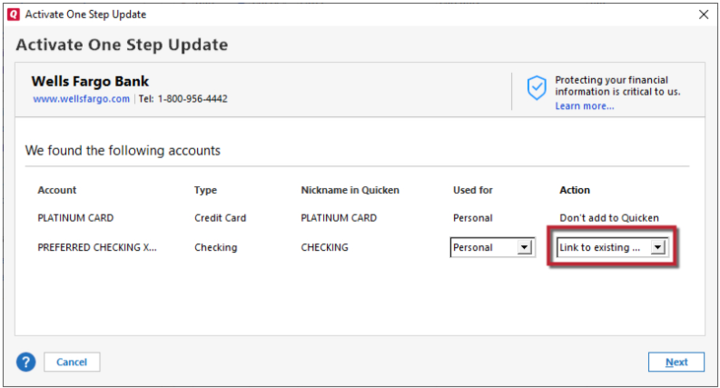
I’ll be here waiting for your reply.
Quicken Carlos
Make sure to sign up for the email digest to see a round up of your top posts.
0 -
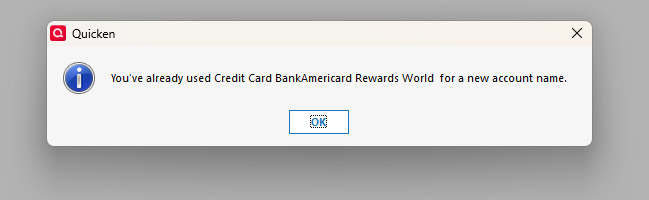
I see link to existing, but the card is not available
I have two accounts with the same account name. I have tried to remove anything related to Bank of America, but this message comes up.
My original question when setting up a Bank of America credit card account was, I used Bank of America Quicken. Is that correct??
Now, when I go to add the billers, I have to log back in to Bank of America, and it does not give me the option to select BOA-Quicken; it only gives me Bank of America, all other states.
I set up a new Quicken file, and the only way I could get Credit Cards in as billers was to use BOA All Other States.
[Edited-Readability]
0 -
Hi @jralyea,
Thank you for your reply and for sharing those details with me.
To add the accounts, you can use Bank of America.
Before we proceed with any troubleshooting steps, I recommend creating a backup.
- Select File > Copy or Backup File
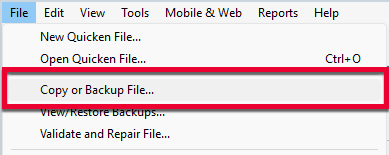
- Select Create a complete backup and click Next.
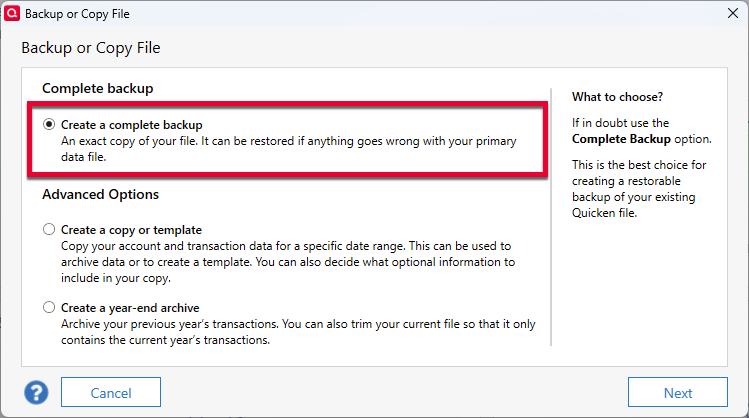
- To make it easier to identify your latest backup, you can put a check next to Add date to backup file name.
- Quicken will show you the location where your backup will be saved along with the name of the backup file (this is typically your Quicken file name followed by .QDF-backup).
- The default save location for backup files is C:\Users\[your name]\Documents\Quicken\BACKUP and we recommend to leave this unchanged.
- If you need to change this location, click Change... then select a folder to save the backup to. After making your selection, click Save.
- Click Create Backup.
I suggest updating the names of your existing Bank of America accounts, using numbers or letters to help differentiate them. Once that's done, try adding the Credit Cards as billers using the Bank of America, All Other States option.
Please let me know how it goes.
Quicken Carlos
Make sure to sign up for the email digest to see a round up of your top posts.
0 -
Hi @jralyea,
I just wanted to follow up since I haven’t heard back from you.
I’m checking in to see if you still need assistance.Quicken Carlos
Make sure to sign up for the email digest to see a round up of your top posts.
0 -
Thanks Carlos
I ended up setting up a new file to straighten out our issues. I have had to do this at least three times in the past 20 or so years. This brings up a question can we revert back to our original email as we have had to change that three times. we have no more emails to use.
Thanks
Bob and Judi
0 -
Hello @jralyea,
Thanks for your update! Could you clarify which email you’re referring to? Are you asking about the Quicken ID (the email associated with your subscription), or another email?
Also, it would be helpful to know exactly how it was changed previously so we can provide guidance on whether it’s possible to revert it.
Thanks!
-Quicken Anja
Make sure to sign up for the email digest to see a round up of your top posts.0

