Quicken reports sum the original rather than rounded numbers

Yes this is somewhat nit-picky but is anyone else bothered by the way Quicken sums numbers in reports with respect to underlying data that may have been rounded? When dollar amounts are rounded to two decimal places but the underlying values have more precision, this results in the reported column of numbers summing to a different total than Quicken gets by summing the original non-rounded values.
For example if report amounts are say
$42.35 (actually $42.354)
$10.19 (actually $10.194)
which yield the sums
$52.54 (actually $52.548)
Using the original more precise amounts Quicken would report the sum of $42.35 and $10.19 as $52.55.
Most recently I noticed a similar effect with a Capital Gains report when preparing taxes. Setting the option to not show cents in the report rounded the values properly in the Gross Proceeds column but summed the columns using the original values, whereas the tax form sums the rounded number so the two totals did not match.
It seems to me that Quicken ought to sum the reported (rounded) values and not use the underlying amounts which had more precision. For example, I have never noticed any of my investment statements summing reported numbers this way and coming up with a different total based on what one would get by adding the individual reported dollar and cent values.
Comments
-
IF Q did as you're suggesting, the sum of $52.55 (vs $52.54 which is the sum of the displayed values) would cause a universe of complaints that "Quicken can't add".
Q should base it's calculations upon what's displayed.
Q user since February, 1990. DOS Version 4
Now running Quicken Windows Subscription, Business & Personal
Retired "Certified Information Systems Auditor" & Bank Audit VP0 -
My take - your first example claiming the $42.354 as “actual” is a red herring. While a cost per share might be to a fraction of a penny, cost per share is not additive. If dollars and cents are being added, there is no fractional cent involved.
Your second case is more subtle. Without putting a lot of thought into all the possibilities, my thought would be Quicken should sum the non-rounded values and then round that true sum for the presentation without cents. That does create the circumstance @NotACPA cites where users claim Quicken can’t add.
Your opening line asks if users are bothered … . I am not.
0 -
Indeed. That is my point and it does seem to be doing just that.
I believe Quicken should base it's summary calculations, as you also suggest, upon what is displayed. When adding columns of rounded numbers, it appears to be summing the original values and then rounding that, making it appear that "Quicken can't add" in some circumstances. It is easy to observe this misbehavior with a report set to round to dollars where the actual values were at or slightly above $X.50
0 -
Sorry if I was unclear. Those values were intended as coming from internally calculated values, say from share count and price, where one or both of those components could have more than two decimals of precision. When Quicken multiplies these together to come up with an amount value, it will usually end up with an "actual" value with more than two decimals of precision as well which it then rounds when presenting in the report. However, it appears to add these non-rounded amounts together, rather than the rounded values which are displayed, making it appear that indeed "Quicken can't add" as you observe can happen with this approach.
0 -
My point was that if for example, you have 10.2 shares of a bond fund that is valued at $10.24/share. the value of your holding is $104.45, not $104.448. Quicken has not rounded up the 0.002 in presenting the value as $104.45. That is the premise behind the strong recommendation to give Quicken shares and total dollars.cents letting the price/share be what happens. If you just bought (or sold) those 10.2 shares for 104.45, you paid (or received) $10.240196/share rather than the advertised 10.24.
I can't say I have seen or identified an instance has not added a column of dollars.cents correctly. I have seen and do see instances where rounding gets in the way (selling off a lot of a security in pieces, for example) or where there is a programming error that loses or adds a penny. I just can't point to that happening in the context of adding a column of data in a report or screen view. Maybe I am not looking closely enough.
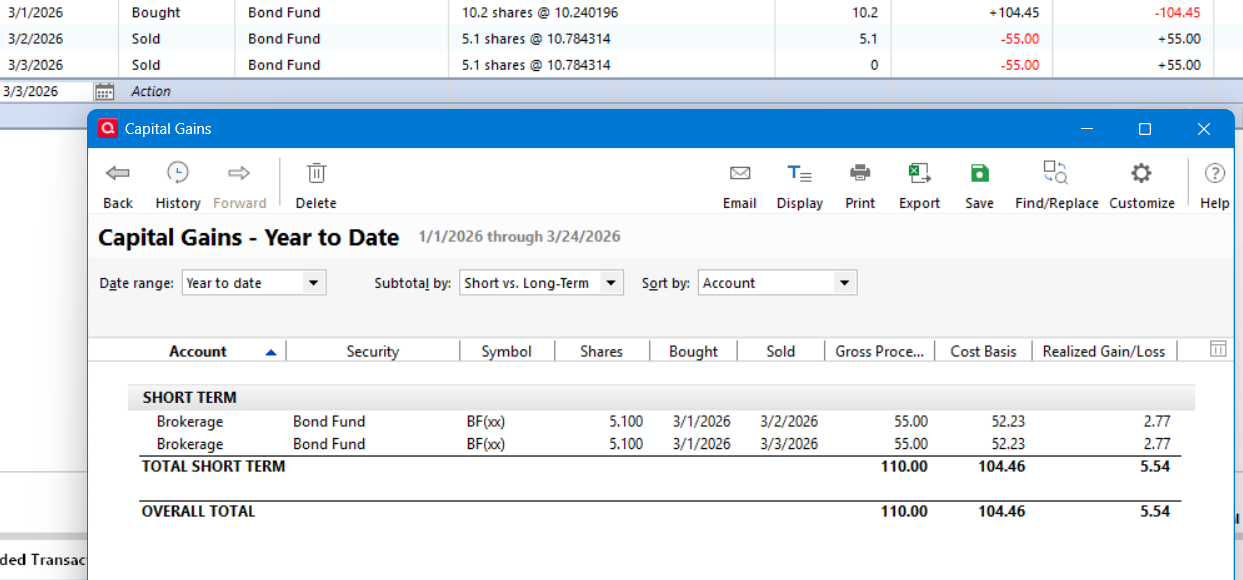
Consider the screen shot below built off of my above example. I bought 10.2 shares and then sold those shares in two separate sales. Both sales show the basis of the sold shares as 52.23 such that the total basis gets treated as 104.46 rather than the true correct total of 104.45. I do not see that as Quicken rounding both values from 52.225 to 52.23. I see that as Quicken not tracking the first sale correctly when the second sale took place. 52.23 is a perfectly valid basis fir the first sale, but the second sale should have produced a basis of 52.22.
 0
0 -
I ALMOST agree with this "My point was that if for example, you have 10.2 shares of a bond fund that is valued at $10.24/share. the value of your holding is $104.45, not $104.448."
The problem is that Q uses standard 5/4 rounding in it's value calculations, while Fidelity truncates fractional pennies. So, in your example, Fidelity would show the value as $104.44.
So, I almost always have to ignore penny differences in individual holdings which can add up to as much as 5-6 cent differences at the account level.
Q user since February, 1990. DOS Version 4
Now running Quicken Windows Subscription, Business & Personal
Retired "Certified Information Systems Auditor" & Bank Audit VP0 -
The easiest way to observe Quicken misbehaving with summing rounded values is with the aforementioned round to dollars settings in a report.
Here is an example just with the purchase of 6 securities and the Portfolio Value report.
Not being party to Quicken internals, I can only speculate about what it is doing, but it appears to me that it might have computed the Balance column by summing the non-rounded values obtained by multiplying Shares by Price (where the rounding overage accumulates to 0.03) and then computed the Gain/Loss total as the difference of the Cost Basis total from it. Clearly this report shows a sum of the all 0.00 Gain/Loss column as 0.03 and the horizontal sum of the TOTAL Stock line does not agree with the vertical sum of the Balance column. Indeed "Quicken can't add", at least in these circumstances.
Note also that the TOTAL Investments line has the expected dollar/cents values, the magical gains having mysteriously vanished at that point. So at least sometimes "Quicken can add"!
Incidentally, I also happen to see penny differences with total account investments as well, although in my case it happens more often with Vanguard. While unfortunate, that is certainly understandable behavior when different rounding algorithm are in use.
0 -
I don't view it as a problem at all … just differing philosophies, both of which are defensible.
Q user since February, 1990. DOS Version 4
Now running Quicken Windows Subscription, Business & Personal
Retired "Certified Information Systems Auditor" & Bank Audit VP0
