As I try to continue reconciling Q Classic Cda to Excel

Is there a way to see the breakdown by Account and Items of increases or losses overall per day.
My separate calculation shows a difference and even using Portfolio Value reports for the day does not show a figure that is produced by the program but matches my Excel??? calculations
Answers
-
Hello @Tealeaf3,
Thank you for reaching out! If you're wanting to see the day gain/loss per account, you can do that in your Quicken in the Investing tab, Portfolio tab.
Select Accounts from the dropdown.

If Day Gain/Loss isn't already visible, click the Customize button and add that column.
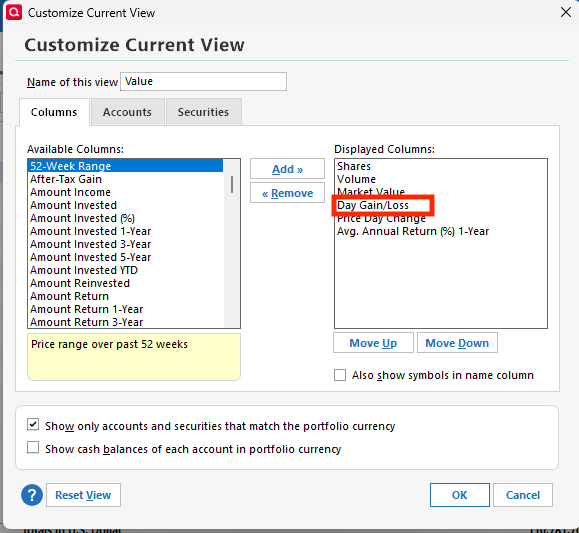
You can use the Export option to export to your clipboard or Excel, if needed.
I hope this helps!
Quicken Kristina
Make sure to sign up for the email digest to see a round up of your top posts.
0 -
Well it helps but does not lead to any reconciliation.
The total of the separate accounts does not match the overall total by some, in this case, 386.55.
I had one transaction closing that day which bears no resemblance.
What kind of check can I run? Validation shows nothing.
I reinstated an old back up and then ran an update but it seems to only download quotes from the last week???!! so I have lost data for over 2 months. The prior file that I closed to get that old one disappeared unless you can tell me how to recover it. It shows in Quicken as recently used, but I cannot see the location on my PC, Yikes!! Using Q Cda 27.1.65.20 on Windows 11
0 -
Interesting or not, I found or should say I was able to download the latest file but it does not appear on my PC at C:\Users\"myName" as indicated by Quicken but at C:\Users\Downloads folder, so Quicken was not helpful that way.
Now back to solving my original problem
0 -
Thank you for your replies,
Well it helps but does not lead to any reconciliation.
The total of the separate accounts does not match the overall total by some, in this case, 386.55.
I had one transaction closing that day which bears no resemblance.
What kind of check can I run? Validation shows nothing.
To clarify, individual account totals are not matching the overall total shown in Quicken? Is the total you're referring to on the account sidebar, in a report, or somewhere else?
One possible cause is if you have hidden accounts. Those would impact the total on reports, even though they're not visible on the account sidebar. For more information, see this article: .
To check for hidden accounts, navigate to Tools>Manage Hidden Accounts.
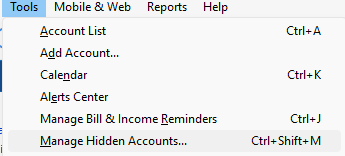
The window that comes up will list all your accounts in alphabetical order. If an account is hidden, you will see a check in the applicable checkbox.
Thank you!
Quicken Kristina
Make sure to sign up for the email digest to see a round up of your top posts.
0 -
Hello @Tealeaf3,
We haven't heard back from you in a while. Do you still need assistance?
Check back and let us know! Thank you.
Quicken Kristina
Make sure to sign up for the email digest to see a round up of your top posts.
0 -
Now I made sale last Friday, March 20 that closed March 23, for that matter the sale occurred March 23 in one Investment account. How may I create a report of that account to see the effect of the sale on the value in account which in turns reflects in my overall portfolio of accounts?
I am unable to reconcile the overall portfolio change as a result of this sale?
The use of Quicken as a reliable source of information is becoming extremely dubious as I continue to monitor with Excel spreadsheets as a back up. Thanks Kristina
0

Categories
- All Categories
- 23 Product Ideas
- 34 Announcements
- 248 Alerts, Online Banking & Known Product Issues
- 19 Product Alerts
- 265 Welcome to the Community!
- 301 Before you Buy
- 1.5K Product Ideas
- 55.8K Quicken Classic for Windows
- 16.9K Quicken Classic for Mac
- 1K Quicken Mobile
- 834 Quicken on the Web
- 129 Quicken LifeHub