SLOW LOADING DATA FILE WITH R66.28

After opening Quicken the first time after R66.28 installed, it balked at loading my data file. So I closed the program and restarted it. The data file loaded, but it took 25 seconds to display the data after the QUICKEN splash screen comes & goes. This is probably 5 times longer than it did before R66.28.
Anyone else seeing a much longer startup time when opening Quicken Classic Deluxe?
chetjunior
Comments
-
Same here. Quicken Deluxe R66.28 on Windows 11. The first time it happened, it was slow enough for panic to set in, which was followed by a giant "whew" when it finally did.
1 -
The program software installation routine was probably doing some update housekeeping when attempting to launch for the first time. I don't remember it happening to me, but it could have. However, after the first launch, your data file should load quickly, say within five seconds.
0 -
Yes. Yes. I have seen the same thing under the exact same circumstances as AnnieOne.
1 -
Hello All,
Thanks for taking the time to report this issue!
We will be forwarding this issue to the proper channels to have this further investigated. However, we request that you please navigate to Help > Report a problem within your Quicken program and submit a problem report with log files and screenshots attached in order to contribute to the investigation.

It would also aid the investigation to include a sanitized file when submitting the problem report. A sanitized file is a data file that removes personally identifiable information so you can comfortably share this file with the Quicken team.
While you will not receive a response through this submission, these reports will help our teams in further investigating the issue. The more problem reports we receive, the better.
Please let us know that is done, and we apologize for any inconvenience in the meantime! Thank you.
[CBT-1083]-Quicken Anja
Make sure to sign up for the email digest to see a round up of your top posts.0 -
Definitely slower to load now. About 20s compared to 5s normally.
1 -
Hello @Snorkle,
Thank you for chiming in and confirming you’re seeing the same behavior.
If you haven’t already, please go ahead and submit a problem report with your logs so our teams can include your case in the investigation. You can do this by navigating to Help > Report a Problem within Quicken.
Please let us know once you’ve submitted it!
-Quicken Anja
Make sure to sign up for the email digest to see a round up of your top posts.0 -
I am having a similar issue where the Quicken launch is very slow since end of last week (3/19). All other operations work fine after the launch is complete. The slowness is just at the startup. This has nothing to do with a release or data file and I say that because:
- My primary file is R62.16 (April 2025), and my test file is R66.28 and the launch slowness happens on both - so it is not related to any version.
- The slowness applies to a blank NEW Quicken data file as well - so it is not data file related.
- If I disable the Internet, all data files open up very fast.
- I logged out of Quicken and logged back in with no difference.
- I did a complete uninstall and fresh reinstall of both of my releases with no difference
- My Internet speed is solid, fast and normal. I rebooted all of my Internet devices.
- All other Quicken functions such as OSU continue to complete very fast for me, no issues there.
- ADDING: My cloud Sync is turned off (shouldn't matter, just another piece of info)
All this suggest that upon startup, the delay is when Quicken is trying to verify/authenticate the data file or ID against Quicken servers. Whatever needs to happen to resolve this is at the Quicken server level and not at the user level. Hope this helps you @Quicken Anja.
Thank you
- Q Win Deluxe user since 2010, US Subscription
- I don't use Cloud Sync, Mobile & Web, Bill Pay1 -
Same here. Just started with R66.28 release. Quicken Classic Premier on Windows 11.
0 -
I've been having the same problem. Win 11 and Quicken Classic Deluxe. It loads much quicker after I disable my network adapter. I have followed all the support suggestions even reinstalling Quicken with no change.
I even called support and and went through everything suggested with no luck.
This started when I changed ISP to Starlink.
0 -
I just disconnected my laptop's internet connection and then opened Quicken. It opened and loaded the data file in 7 seconds. Then I closed the program, reconnected the laptop to the internet, and reopened Quicken again. This time it took 29 seconds to load/open the data file! So when there's an internet connection, it seems like Quicken is trying to connect to something but can't. Then, after being unsuccessful for about 30 seconds, it gives up and just loads the data file.. What this is, I don't know. But somebody at Quicken should know!
1 -
What this is, I don't know. But somebody at Quicken should know!
@chetjunior, It is trying to connect to the license server to authenticate the validity of our subscription, is my guess. My speculation is that the Quicken folks will become aware of this and will hopefully resolve it at some point, and I plan to be patient. Minor annoyance in the grand scheme of things IMO.
- Q Win Deluxe user since 2010, US Subscription
- I don't use Cloud Sync, Mobile & Web, Bill Pay0 -
My thanks to the Quicken team for fixing this issue. I just clicked the Quicken icon and did a "happy dance". It took about five seconds to open/display the data file, instead of 25 seconds like two days ago. Great job, Quicken team!!! 👍️😊
0 -
Similar but different -
On my first to attempts to start Quicken this morning, I received "Unable to open Quicken Data file". This has never happened previously. Windows Indexer and Malwarebytes were running scans on the SSD at the time.
The third attempt opened the file with a significant wait, as others have reported.
0 -
Hello @chetjunior & @M$D2,
Thank you @chetjunior for the update! Glad to hear things are loading much faster now!
@M$D2, did the “Unable to open Quicken Data file” issue happen again after the file finally opened? If not, that’s good news.
As for the slow loading when it did finally open; please submit a problem report with logs via Help > Report a Problem so we can add your case to the investigation ticket.
Thanks!
-Quicken Anja
Make sure to sign up for the email digest to see a round up of your top posts.0 -
Closing Quicken took 15s, when it used to be immediate.
Re-opening Quicken, using a 230MB data file, results in no disk I/O to the appropriate .dat file. After a couple of iterations, opening and closing each take 5s. This is a Windows 11, 16GB, i5-14400 (2.50 GHz). Will report if a reboot shows any symptoms.
0 -
Thanks for the update, @M$D2! That’s helpful to know. Please keep us posted on how things look after a reboot or if the behavior continues.
Thanks again!
-Quicken Anja
Make sure to sign up for the email digest to see a round up of your top posts.0 -
I am still seeing the same behavior with R66.28. Loading time upwards of 30 secs, perhaps longer. The program is doing nothing: no CPU, little memory, no disk activity, no measurable network activity (checked via TaskManager). Then a spurt of activity and the program opens. Closing Quicken is slower than usual as well. Opening Quicken a second time is much faster.
0 -
I suspect the problem may have something to do with the network IP location. I am currently located in Italy and experience the problem when not running a VPN, but I cannot reproduce the problem when VPNed to the US (even after a reboot).
[Edited Readability]
0 -
Hi @twobbs1,
Thank you for your reply and for sharing that information. We are currently investigating this issue, and we would appreciate it if you could send us the logs to assist with further analysis.
To do this, please go to Help > Report a Problem.
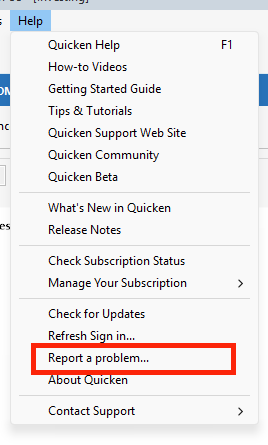
Be sure to check the option to include a sanitized file to aid in the investigation. A sanitized file removes personally identifiable information, so you can safely share it with the Quicken team.
Please let us know once you’ve submitted the report. We’ll be looking forward to your reply!
Quicken Carlos
Make sure to sign up for the email digest to see a round up of your top posts.
0 -
I'm also having the same very long startup issue.(version 66.28) Startup is over 2 minutes for a 1.8MB data file. After reading this community thread, I turned off Wi-Fi, and BOOM! startup was less than 5 seconds. I submitted a "report a problem" with logs, etc. Would someone in Quicken please resolve this ASAP?
0 -
Hi @Dale17837,
Thanks for sending the report and outlining the steps you’ve taken. We understand how frustrating this can be.
I’ve added the information to the current investigation ticket. At this time, we’re unable to provide an ETA for when it will be resolved, but please know that we are actively working on it.
Thank you for your patience!
(CBT-1083)
Quicken Carlos
Make sure to sign up for the email digest to see a round up of your top posts.
0




