American Express - Connection Errors

Comments
-
Transaction download HANDSHACK between multiple American Express Accounts are not working (NO TRANSACTIONS DOWNLOAD)
WHEN REAUTHORIZING THE ACCOUNT I GET A 'IM LOST MESSAGE' FROM THE HANDSHAKE.
I chatted with American Express… they say its the Quicken Software.
It seems like two major companies, like American Express AND Quicken would have a dedicated team to FIX problems associated with Tranaction download Handshakes.
But NO, I and many clients like me are left to fend for ourselves…. best AX could offer was to suggest downloading a CSV file to then enter into Quicken….
Thanks Quicken… thanks AX….
0 -
Hi @btrask3,
To better understand why this is failing, I have a couple of questions:
- Could you please share a screenshot of the error you’re seeing?
- When did the issue start?
If you haven’t tried this yet, I recommend deactivating the affected accounts. Here’s how:
- Select the account to open its register.
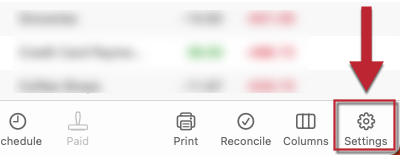
- Click the Settings gear icon in the lower right corner.
- Go to the Downloads tab.
- Click Disconnect Account.
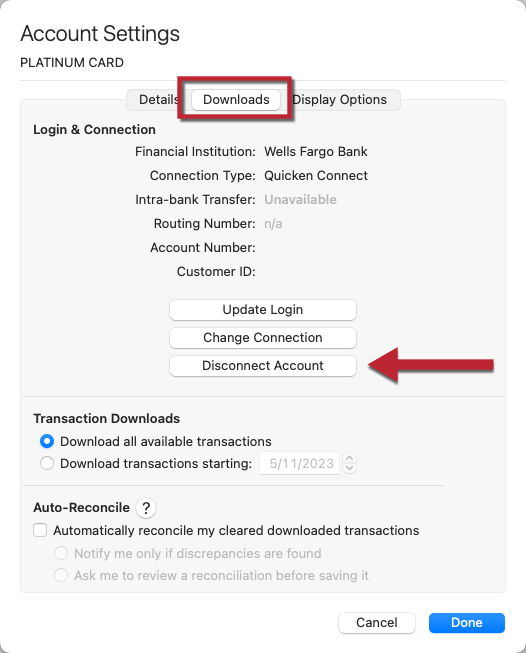
- Click Done.
- Quit Quicken.
After that, I suggest revoking Quicken’s access to your American Express account on their website.
While we can provide general instructions, websites may vary.
- Sign in to your American Express account.
- Navigate to Account Services (or Profile & Settings).
- Look for sections like:
- Security & Privacy
- Connected Apps
- Third-Party Access or Data Sharing
- Locate Quicken in the list of authorized apps.
- Click Remove Access, Revoke, or Disconnect, and confirm.
- Select the account to open its register.
- Click the Settings gear icon in the lower right corner.
- Go to the Downloads tab.
- Click Connect Account...
- Search for and select your financial institution.
- Click Continue and follow the prompts.
- When prompted, choose Link and carefully link to your existing Quicken account(s).
- Click Continue.
Let me know how it goes. I’ll be waiting for your reply!
Quicken Carlos
Make sure to sign up for the email digest to see a round up of your top posts.
0 -
Hi @btrask3,
I just wanted to follow up since I haven’t heard back from you. I’m checking in to see if you still need assistance.
Quicken Carlos
Make sure to sign up for the email digest to see a round up of your top posts.
0

