Duplicate transactions downloading data (Edited)

I never had a problem before July of 2025. I don't download data every month, perhaps at least 3 months. I'm referring to downloads from Fidelity. I downloaded around September. Next time was October. I then noticed that there were double entries in July. I called support, and she told me there was an error in the software and they were working on a correction. The correction would eliminate double entries and fix the database. Come the end of October, Nothing. She Lied!
Now I'm getting a similar problem. My Fidelity account ties with Quicken to the penny. I saved a copy of the good database. So now I downloaded January, February, and part of March. It changed my 2025 & 2024 database. I asked support if you can lock or freeze last years files. No.
One support person gave me the usual excuse. Quicken only downloads what Fidelity makes available. I don't buy it!!
I don't have the time to be searching through hundreds of transactions to find out what Quicken changed.
I've had Quicken for many years, but if I can't trust the data, why should I keep it?
[Edited-Readability]
Comments
-
Hi @baddabing,
Thanks for reaching out to the Quicken Community!
There are several possible reasons why duplicate transactions may appear. To help resolve the issue, we’ll first need to identify the cause. I have a few questions to better understand what’s happening:
- How do you typically download your transactions?
- Are they downloaded automatically through Quicken, or do you manually import a file from your financial institution’s website?
- Do the duplicate transactions have different Downloaded IDs?
- Could you please provide a screenshot of the duplicate transactions showing the Downloaded ID?
To check the downloaded ID, please follow these steps:
- Click the Register Columns (gear icon) at the top right of the account register

- Check the box for Downloaded ID, then click Done
- If you’re using Two-Line Display, select both Downloaded ID and Downloaded Reference
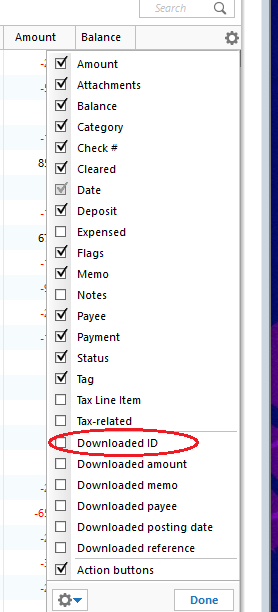
- Review the downloaded ID. The downloaded ID is a unique identifier for each transaction, which Quicken uses to determine which transactions have already been downloaded and which are new.
I’ll look forward to your reply.
Quicken Carlos
Make sure to sign up for the email digest to see a round up of your top posts.
0 -
Thanks for your response.
Like I said the transactions are long gone as they occurred July 2025. I'm now more concerned about changing data. I noticed that the price for a stock was dated Dec 26. which is the price in Fidelity statements. Then when I downloaded 2026 data it was changed to the Dec 31 price. I just read that I can freeze the transactions on a date by setting a pw. I did that for Dec 31.
I download the data using the one step update.
0 -
Hi @baddabing,
Thanks for your reply!
In addition to that, I recommend unchecking Download Quotes for the affected security. This will help prevent the price from changing.
To do this:
- Go to Tools > Security List.
- Locate the security you want to keep the price fixed.
- Uncheck Download Quotes.
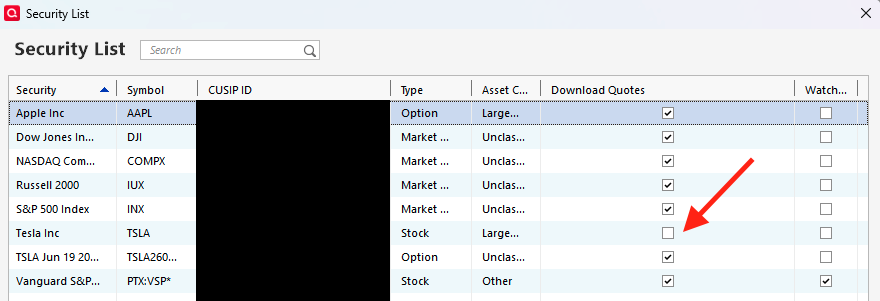
This will prevent the price from updating automatically.
When you’re ready to update the prices again, you can simply check the option back on.I hope this helps!
Quicken Carlos
Make sure to sign up for the email digest to see a round up of your top posts.
0

Categories
- All Categories
- 6 Product Ideas
- 34 Announcements
- 248 Alerts, Online Banking & Known Product Issues
- 19 Product Alerts
- 265 Welcome to the Community!
- 301 Before you Buy
- 1.5K Product Ideas
- 55.8K Quicken Classic for Windows
- 16.9K Quicken Classic for Mac
- 1K Quicken Mobile
- 834 Quicken on the Web
- 129 Quicken LifeHub