Future paycheck amounts incorrect

I have entered my paycheck in the Bills & Income for reminders of when I should be paid. The main part of my check goes into my savings, with a specified amount going into my checking. When I open Quicken, the amount set for my savings shows correctly.
The amount going to my checking is never correct, though it is a fixed number in the reminder. Sometimes it is my Federal tax amount, or my life insurance deduction, or my FSA amount.
The current workaround is to click on the transaction and select "Edit this instance and all future instances," then click OK to close. Then the amount for the next check and future checks show up correctly in the register until I close and open Quicken again.
I have re-entered the transaction, restored from backup (thanks Fidelity update), and run the validate and repair file option with no errors to no avail.
Thoughts on what is causing this?
Quicken for windows, R66.28 Build 27.1.66.28 Windows 11
Comments
-
Hi @Jeff Mich,
Thank you for taking the time to share what you’re experiencing and for outlining the steps you’ve already tried; that’s very helpful.
I have a few additional questions to better understand what may be happening with your paycheck reminders:
- When did you first notice the issue?
- Where is your Quicken data file located?
- To check, open Quicken and go to File
- At the bottom of the menu under Recent Files, the file with the check mark is the one currently open
- Please provide the full file path shown there
- Is your file being backed up or synced by any third-party services such as Carbonite, OneDrive, or Backblaze?
- Have you created a new test data file to see whether the same behavior occurs?
If you haven’t created a test file yet, here’s how to do it (this will not affect your main working file):
- Choose File menu > New Quicken File.
- Select New Quicken File.
- Click OK.
- In the File name field, enter the name of the new file, then click Save (Don't use any of these characters: * ? < > | " : \ / (asterisk, question mark, left and right angle bracket, pipe, straight quotation marks, colon, BACKSLASH, FORWARD SLASH). Also, don't add the .qdf extension (Quicken does that for you).
- Sign in with your Quicken ID. If you are prompted to create a Quicken ID but already have one, click Sign In under the Create Account prompt.
- Select if you want to use Mobile.
- Click Add Account to start adding accounts to the new file (add an offline account for test purposes, please).
Once I have this information, I’ll be able to guide you through the next steps.
I look forward to your response!
Quicken Laura
Make sure to sign up for the email digest to see a round up of your top posts.
0 -
Hi Laura,
I first noticed the issue around December 2025.
I did about a week ago delete a couple of my Bills and Income items that were having issues as it went from the paycheck to another bill that had a split. It seemed to fix one of them so far, but not the paycheck fully as now sometimes the items in the paycheck will show up as "uncategorized" or the transfer to an account is lost, even after being marked reconciled. Example my FSA and 401K show up as uncategorized even though I used the Paycheck wizard to create it and used the standard categories.
The file was located: C:\Users\"user"\OneDrive\Documents\Quicken\
The files are sync's to OneDrive but I have them all as local copies.What I have done in the last couple of days is move the file to eliminate the OneDrive issue.
C:\Users\"User"\localfiles\Quicken\It may take a few days to see if the issues persist.
0 -
Hi @Jeff Mich,
Thank you for following up and for providing additional information.
Based on what you’ve described, this appears to be related to a known issue where split bill reminders may be unintentionally modified. Our teams are currently investigating this behavior.
To assist with further analysis, I would greatly appreciate it if you could submit your log files. This will allow us to share the details with the appropriate team and help move the investigation forward.
To send your logs, please follow these steps:
- Open Quicken
- Click Help
- Select Report a Problem
- Click Send to Quicken
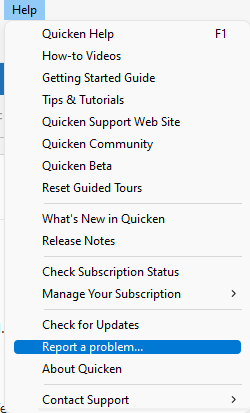
Once submitted, please let us know. I look forward to your response!
(CBT-1068)
Quicken Laura
Make sure to sign up for the email digest to see a round up of your top posts.
0 -
I am also having this issue. I have deleted my paycheck reminders and recreated them, it doesn't take long before all the split amounts are mixed up. The categories don't match the memo or the amounts, they are all scrambled. Any help would be appreciated, or do we just need to wait for a fix? I too noticed this behavior starting to happen in the last few months.
0 -
Hi @Mark McArthur,
Thank you for joining the thread. Our team is actively investigating this issue, and at this time, no action is required on your end.
That said, if you’re able to submit your log files using the steps provided above, we would greatly appreciate it. This will help us share additional details with the appropriate team for further investigation.
Thank you for your cooperation!
Quicken Laura
Make sure to sign up for the email digest to see a round up of your top posts.
0 -
The issue didn't change with moving to local storage. However, several days ago, I went into my "memorized" payee list and found several entries for my paycheck and deleted them all. After four days, no changes to my future items. We will see what happens this week when the new check comes in.
I realized this because my last paycheck showed up in the register like a standard entry with splits instead of the category Paycheck.0 -
Hi @Jeff Mich,
Thank you for sharing the updated results; that’s good to know.
I look forward to your next updates!
Quicken Laura
Make sure to sign up for the email digest to see a round up of your top posts.
0 -
Update: My check went in without an issue and future display numbers look normal in the register so my amount going into the checking is consistent again. However, the future entries show "Split" instead of "Paycheck", past entries show "—paycheck—", which isn't a large concern but the splits inside have incorrect values for the entries when you look at them. For instance, my employer contributes to my 401k but the amount has changed over the past few months. If the contribution was $50 and is now $60, and the paycheck in "Bills and Income" is set up for $60, when I hover over future entries in the register, it will show $50. When I went to confirm the entry for the last paycheck, the paycheck window opened and showed $60.
I checked, and I do not have any other memorized payees for my employer. So deleting them helped to fix some items. The Quicken file is still local, restored from a backup file, deleted, and re-created my paycheck with the new amounts after deleting the memorized list (so where is it getting the old entry?).
Really odd behavior.
[Edited Readability]0 -
Hi @Jeff Mich,
Thank you for the detailed update; this is very helpful.
Based on what you’re seeing, it does look like the paycheck reminder itself is now storing the correct values, but Quicken may still be referencing older split data when displaying future instances in the register. That would explain why you’re seeing $50 on hover, while the paycheck window shows the correct $60.
Since deleting the memorized payees helped partially, there are a couple of additional things you could try to help rule out any remaining inconsistencies:
- You could try deleting all future instances of the paycheck reminder and then allowing Quicken to regenerate them.
- If you haven’t already, recreating the paycheck reminder once more (after the memorized payees cleanup) may help ensure there are no lingering links to older data.
- As a test, creating a new Quicken file and setting up a simple paycheck reminder there can help confirm whether this is specific to the current data file.
Please let me know if you notice any changes after trying these steps, especially as new paycheck instances are created. We’re continuing to track this behavior as part of the ongoing investigation.
Thank you again for your continued updates!
Quicken Laura
Make sure to sign up for the email digest to see a round up of your top posts.
0 -
Hi Laura,
I did the first two items with no change. I did just do an update to R67.7 build 27.1.67.7 and on of the fixes listed was
- Resolved an issue where One Step Update could corrupt paycheck split amounts and details in files with Cloud Sync enabled."
After the update, I checked the paycheck and it still showed the incorrect amounts. I clicked edit on the paycheck, checked the amount was correct, which it was, and then saved it.
- Checked the paycheck and future paychecks and the amounts were correct
- I closed Quicken
- Opened Quicken and checked the amounts again
- The split is correct
Hopefully, the update to the new build fixed this particular issue.
1 - Resolved an issue where One Step Update could corrupt paycheck split amounts and details in files with Cloud Sync enabled."
-
Hi @Jeff Mich,
Thank you for letting me know. I’m glad to hear you’ve installed the latest release. I’ll keep an eye on your updates in case the issue persists.
Thanks again, and please feel free to reach out if anything else comes up.
Quicken Laura
Make sure to sign up for the email digest to see a round up of your top posts.
0
