OL-297-A U.S. Bank - PFM Direct Connect (Edited)

I'm getting a OL-297a error when downloading from US Bank. Is there something I need to do or is it wait it out issue?
Answers
-
Hi @hmday,
Thanks for reaching out to the Quicken Community!
To help us better understand the issue, I have a few questions:
- When did this issue first start?
- Do you know if your financial institution recently updated its security settings?
- Is your Quicken file backed up or synced through any third-party services, such as Carbonite, OneDrive, or Backblaze?
- Are you using a VPN, firewall, or antivirus software? If so, please let me know which one(s).
To troubleshoot the OL-297 error, I recommend the following steps to update your internet security settings:
Update your internet security settings
- 1. Click the Start button and select the Control Panel.
Windows 10: The Control Panel is located in the Windows System folder in the Start menu.
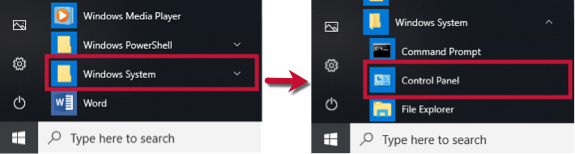
Windows 11: Go to the Start menu and select All apps.
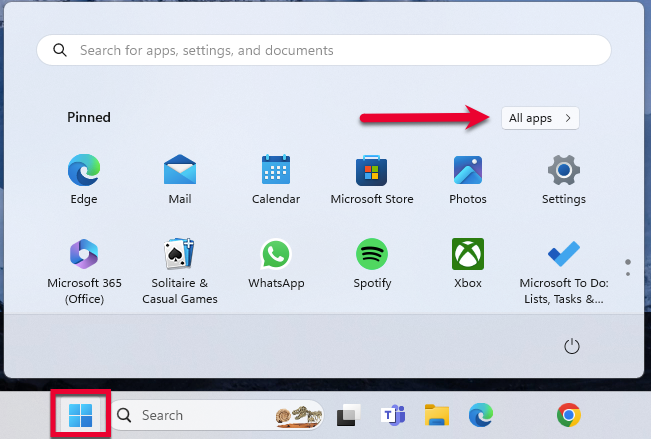
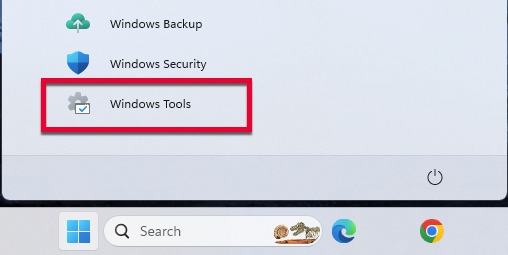
- Then, go to Windows Tools and select Control Panel.
- 2. Select Network and Internet, then Internet Options.
- 3. Go to the Advanced tab.
- 4. Scroll down to the Security Section.
- 5. Verify TLS 1.2 is checked.
- If it is not, check it.
- If it is already checked, continue to the If the issue persists section below.
- 6. Click Apply, then OK.
- 7. Try your update in Quicken again.
Please let me know how it goes. I’ll be waiting for your reply!
Quicken Carlos
Make sure to sign up for the email digest to see a round up of your top posts.
0 -
I also got an OL-297-a, during Scheduled Update of USB, at about 7am this morning.
BUT, when I tried another update just now, there were no problems.
Nothing downloaded, because there was nothing to download, but the effort was successful.
I'm connecting to them as "U.S. Bank - PFM Direct Connect".
Q user since February, 1990. DOS Version 4
Now running Quicken Windows Subscription, Business & Personal
Retired "Certified Information Systems Auditor" & Bank Audit VP1 -
questions: 1) this morning 2) not aware of any changes to the security settings at US Bank, I can still log in as usual to their site 3) no, I use quicken online backup 4) no security software except what is built into windows.
I have completed the internet setting check, still not working same error message
My connection is U.S. Bank - PFM Direct Connect
Maybe I just need to wait (see NotACPA)
thank you
0 -
Connection is back…thank you
0 -
Hi @NotACPA and @hmday,
Thanks for your reply and for sharing more details! I’m glad to hear that the connection is back up and running.I’m here to help if you run into any issues. Just let me know!
Quicken Carlos
Make sure to sign up for the email digest to see a round up of your top posts.
0 -
Quicken Carlos OL-297-a error has returned. I noticed that US Bank has changed its website. Not sure if anyone else is experiencing this or has a solution.
0 -
For the past two days I have been unable to connect to DFM - Direct Connect. Anyone else with this problem?
I am using Windows 11 OS
0 -
Hi @hmday and @rlmcculley,
Thank you for reaching out to the Quicken Community, and for sharing the details and screenshot of the error.
To help us investigate further, I recommend submitting your logs. You can do this by navigating to Help > Report a Problem…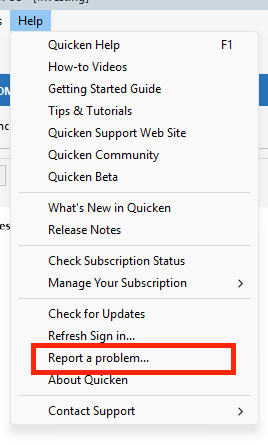
I look forward to your reply.Quicken Carlos
Make sure to sign up for the email digest to see a round up of your top posts.
0 -
Been having this same issue as others on this post for 3/26 & 3/27 getting the OL-297-A error from U.S. Bank PFM Direct. All settings on my end are correct so must be a US Bank issue.
0 -
I did "report the problem".
0 -
Hi @BigDWF,
Thank you for sending the logs, and thanks also for your reply @hmday.
I’ve reported the issue to our escalation team and submitted a ticket to investigate the connectivity error with U.S. Bank PFM Direct Connect. At this time, there’s no ETA. Here is the ticket: CBT-1087
(CBT-1087)Quicken Carlos
Make sure to sign up for the email digest to see a round up of your top posts.
0 -
Quicken Carlos It appears if there are transactions to be downloaded it connects, if there are no transactions to download it produces the error, causing intermittent error messages. Not positive but I thought I would pass it along….
0 -
Hi @hmday,
Thanks for following up and for sharing this observation. I’ve already created an investigation ticket regarding this issue, and I’ll be adding your note about the error occurring only when there are no transactions to download.
We appreciate your help in pinpointing this!
Quicken Carlos
Make sure to sign up for the email digest to see a round up of your top posts.
0 -
Since we have no visibility to the ticket, perhaps someone can provide an update from Quicken side? This issue is preventing not only downloading US Bank transactions, but more important, it is preventing bill paying via Quicken/US Bank.
0 -
Hi @k0mb1nat,
Thanks for joining the thread and for following up. We are still investigating the issue; however, we’re unable to provide an ETA for when it will be resolved.
For further investigation, please send the logs via Help > Report a Problem…
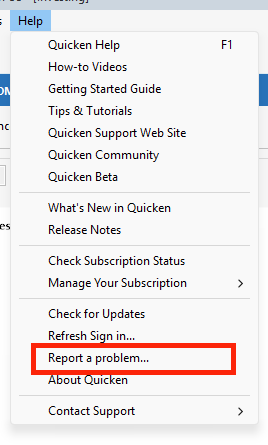
Please let me know once you’ve submitted them so I can attach them to the ticket for further investigation.
Thank you!
(CBT-1087)Quicken Carlos
Make sure to sign up for the email digest to see a round up of your top posts.
0 -
Quicken Carlos My US Bank connection has been working correctly for the past 2 days
0


