Securities & Cash Assigned to a business (Q Mac)

Hi - I have a brokerage account that is assigned to a business that contains Cash & Marketable Securities. Yet when I run a Business Balance Sheet report it doesn't show up in the report. How do I get that assigned in the report?
Answers
-
Hello @Nauset,
Thank you for reaching out! To clarify, when you say assigned to your business, do you mean you set that as the account's primary use? You can check that by clicking on the account to select it, then navigating to Accounts>Settings….
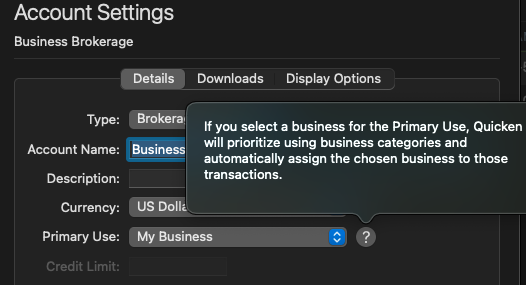
What do you see in your business balance report?
I look forward to your response!
Quicken Kristina
Make sure to sign up for the email digest to see a round up of your top posts.
0 -
Hi - Sorry for the late reply. To answer your first question, yes. The account is assigned to the business as the primary use.
When I run the Business Balance Sheet, it shows the account under "Long Term Assets". However for the value it shows as a negative value. I was able to trace the amount, and it represents taxes/fees paid on foreign dividends received.
No other values are reported on the balance sheet.
Is there any other configuration I need to make on the account?
On that same Account Settings>Details, the type is set to "Other Investment". I am not sure if that needs to change or if that impacts how data appears on the various reports
Thanks!
0 -
Thank you for your reply,
I wouldn't expect an "Other Investment" account type to affect the Business Balance Sheet, provided that the primary use reflects the correct business.
Do you track more than one business in your Quicken file? If you do, then I recommend confirming that you have the correct business set for the primary use and for the balance sheet.
If you're willing, it would be helpful to share screenshots of what you're seeing, since that can make it easier to see what is happening. (Please redact personal information from any screenshots you share.) If needed, please refer to this Community FAQ for instructions on how to attach a screenshot. Alternatively, you can also drag and drop screenshots to your response if you are not given the option to add attachments.
Thank you!
Quicken Kristina
Make sure to sign up for the email digest to see a round up of your top posts.
0
