Split transactions in reminders are mixing up categories and amounts

I have paychecks entered in Bills and reminders with large splits to account for all of the overtime, taxes, insurance, retirement, etc. that goes with each transaction. I set the reminder with everything in the correct order, and when I open Quicken the next time to enter the next paycheck, the categories (e.g.: taxes:federal:spouse) are no longer matched to the memo or the amount that I had set. And categories aren't in the order I created them, (salary is near the bottom of the list, not the top where I set it; Taxes move to the middle, not the bottom). The new order isn't anything I can make sense of. Correcting it or re-creating the entire entry takes way more time than it should. It makes reminders for paychecks useless.
This has been happening for about a year. I thought it was related to transfers to other accounts (HSA, 401k, etc), and so I took those out, but splits are still mixed up regardless of type of category, or tag, or memo. I thought one of the many updates would address it, but no. Can someone explain why this is happening, and if it will be fixed anytime soon? I've been using Quicken on my desktop for 30 years, and I've yet to come across anything so frustrating.
Answers
-
Are you using QWeb or QMobile? They're known to sometimes cause what you're reporting.
If you are using either, try turning them off for a while and see if that resolves your issue.
Q user since February, 1990. DOS Version 4
Now running Quicken Windows Subscription, Business & Personal
Retired "Certified Information Systems Auditor" & Bank Audit VP0 -
I don't use QWeb or QMobile. I do occasionally sync to a Quicken Classic app on my phone (not an automatic setting).
Today when I looked, the split on one of the paychecks was out of order, but not out of alignment. That's an improvement, and while it's not ideal, it's somewhat acceptable. I still don't understand the order that it is shifting to - it's not alphabetical by category, and it's not numerical by amount (though it's closest to that). Still a weird thing for Quicken to do to my scheduled split transactions.
0 -
Hello @d&tjenkins,
Thank you for following up with that additional information.
I believe the issue you are seeing is the same as what is described here:
Do you agree?
If so, we have created an escalation ticket for this issue. You can contribute to this investigation by going to Help>Report a problem>Send to Quicken and submitting your log files.
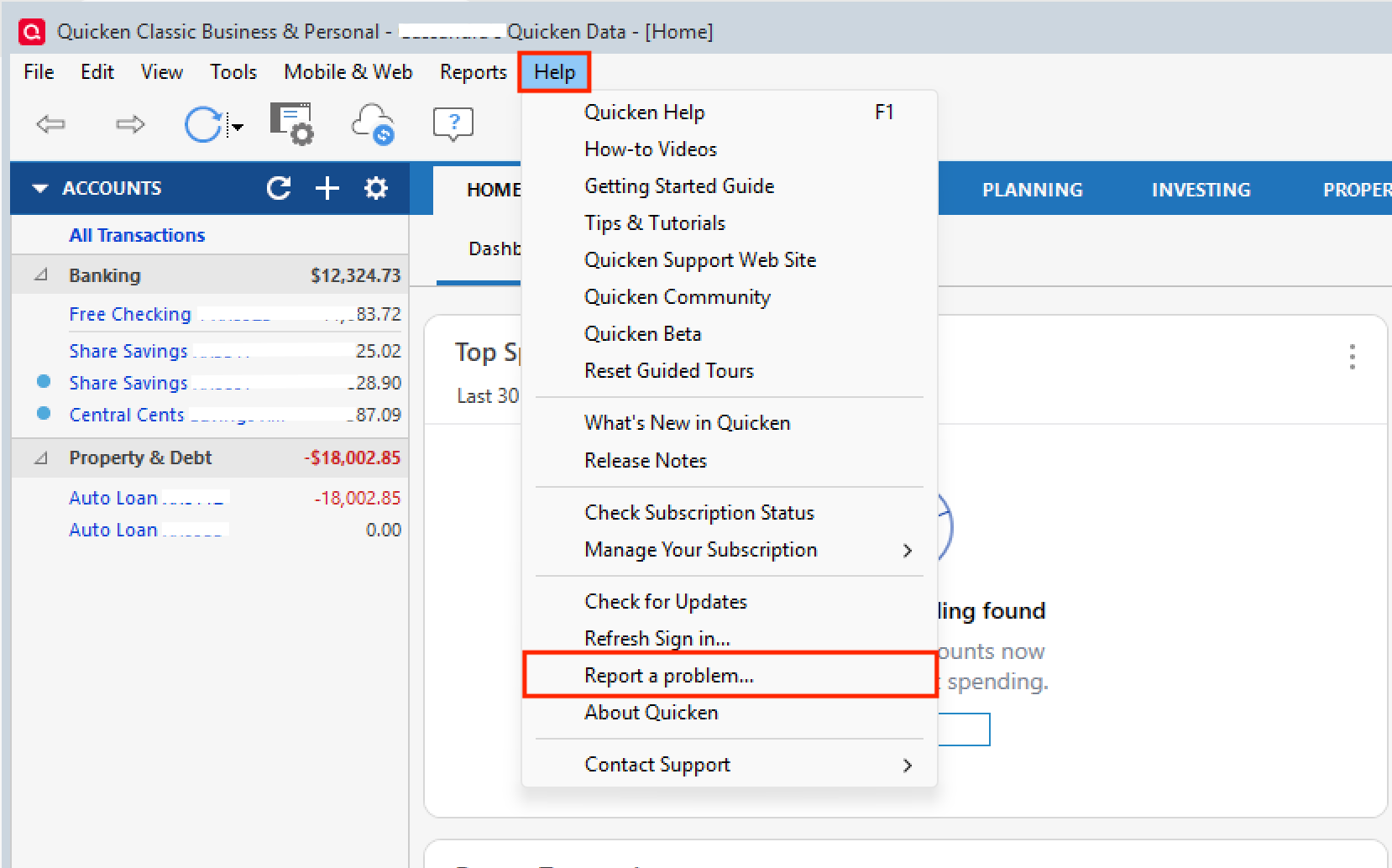
Including a sanitized version of your data file can be helpful as well, but is not required. Let us know when you have done a submission so we can add it to the ticket.
Thank you!
[CBT-1068]
Quicken Alyssa
Make sure to sign up for the email digest to see a round up of your top posts.
0


Categories
- All Categories
- 6 Product Ideas
- 34 Announcements
- 249 Alerts, Online Banking & Known Product Issues
- 19 Product Alerts
- 266 Welcome to the Community!
- 301 Before you Buy
- 1.5K Product Ideas
- 55.8K Quicken Classic for Windows
- 16.9K Quicken Classic for Mac
- 1K Quicken Mobile
- 834 Quicken on the Web
- 129 Quicken LifeHub