Discover credit card - Authorized, worked last month, now doesn't download

Windows 11
I had gone through the steps to "Reauthorize" my Discover card account, then it actually made me do the same "Reauthorize" a second time. But then I was able to download last month.
I did a One Step update earlier today and realized Discover did not update. I just went to do it again by choosing Update Now, and although it says successful, I get no transactions.
I can see on the Discover website that I've had many new transactions since 3/3, which is the last one in my register in Quicken.
I am using Express Web Connect, according to my Online Services. I know the first thing usually asked is "What troubleshooting did you try?", but honestly I have no idea what to try.
Thoughts?
Thanks,
Janet
Comments
-
Tried again this morning after closing and reopening Quicken, no luck. I can download into a spreadsheet from the Discover site - can I make my own QFX file and then import it? I really don't want to have to manually key all my credit card transactions!
0 -
OK, I turned off the Express Web Connect in Online Services and then went through the process to Reauthorize again, and it downloaded transactions. Hope this doesn't keep breaking.
1 -
Hello @sjtideman,
Thank you for updating your post and for sharing what ended up working for you!
I'm glad to hear that deactivating the connection and reauthorizing the account allowed the transactions to download again—this can be helpful for other users who may be experiencing the same or a similar issue.
If you happen to notice the issue returning, please feel free to reach back out and let us know! Thank you.
-Quicken Anja
Make sure to sign up for the email digest to see a round up of your top posts.1 -
Thanks for making this post. I have a Discover Card account which no longer connects at all. The problem is that I didn't see the notices about the need to update the Discover connection by 2/11/2026 until afterwards. However, it appeared I was still able to reauthorize and reconnect some weeks later after going into Quicken, and the account updated, maybe like that one time, and then I noticed Discover no longer was even on the update list when opening Quicken. I tried to reconnect the Discover account by going to Account Details/Online Services and hit the Set Up now button and then went through the motions, but when I got to the Discover Card page, submitted the credentials, and agreed to the terms and conditions, I got "HTTP Status 400—Bad Request." Simultaneously, the Quicken connection failed. I guess I have to add a new Discover account altogether?
UPDATE: I just spoke to Customer Service and was directed to Tools/Add Account. Discover Card was prelisted, so I clicked on this and started the process to add a new account, but I got the same end result: HTTP Status 400—Bad Request. He directed me to clear the cookies, which I did. So I started the process over, and this time, the connection succeeded, and then a Quicken window popped up asking whether to link the new account to the existing Discover account, which I said yes to, and now the old Discover account has updated, thankfully.
0 -
Thanks for the update, but I just tried the Tools/Add Account method and still got the "HTTP Status 400—Bad Request." error. Is anyone else having the same issue?
1 -
Hello @je2464 & @Jenkinsme3,
Thank you both for adding to this discussion with your experiences.
Thank you for sharing what worked for you, as this information could be helpful to others.
Have you tried clearing your web browser's cache and cookies? If not, try it out and let us know if that resolves the issue.
Thanks again!
Quicken Alyssa
Make sure to sign up for the email digest to see a round up of your top posts.
0 -
I was experiencing the "HTTP 400 Bad Request" error after being suddenly required to reauthorize my Discover credit and savings accounts (one of each).
Because of the inconvenience associated with setting cookie preferences all over again for the sites I visit, I initially tried clearing the cache only in Chrome (Windows 11). That didn't work. So I then cleared all cookies, and the Discover reauthorization was successful (Express Web Connect+).
1 -
Thank you for providing this additional context and letting us know what worked for you.
If you need more help, don't hesitate to reach out.
Thanks again!
Quicken Alyssa
Make sure to sign up for the email digest to see a round up of your top posts.
0 -
I am having the same problem. How do you clear cookies?
0 -
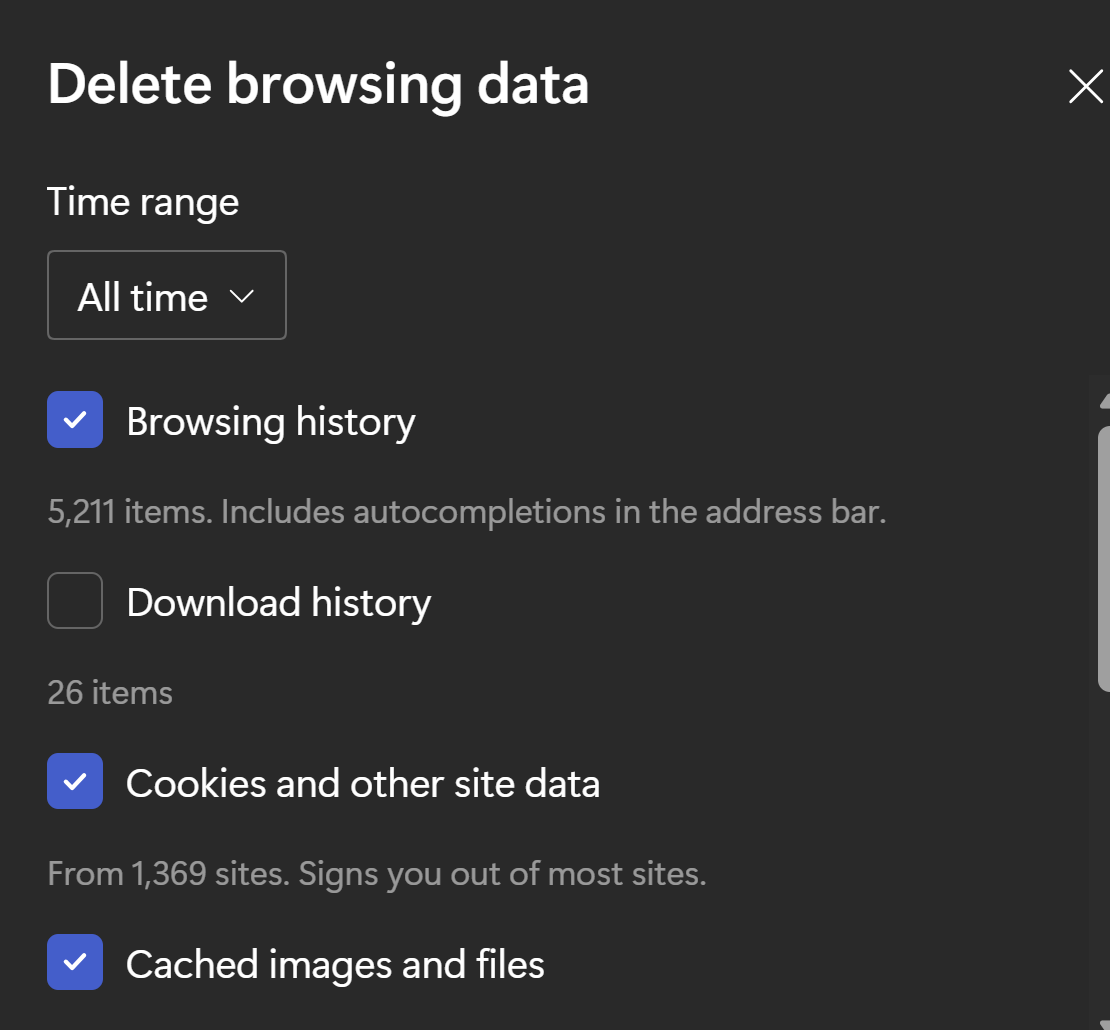
You want to clear the cache in your browser. Usually CTRL-SHIFT-DELETE will bring up the dialog. You can accept the default selections but make sure that "Cookies…" is selected. Below is the Microsoft Edge dialog box.
 1
1 -
Thank you for posing this question.
Thanks for sharing what it looks like on Microsoft Edge!
This is what it looks like with Google Chrome:
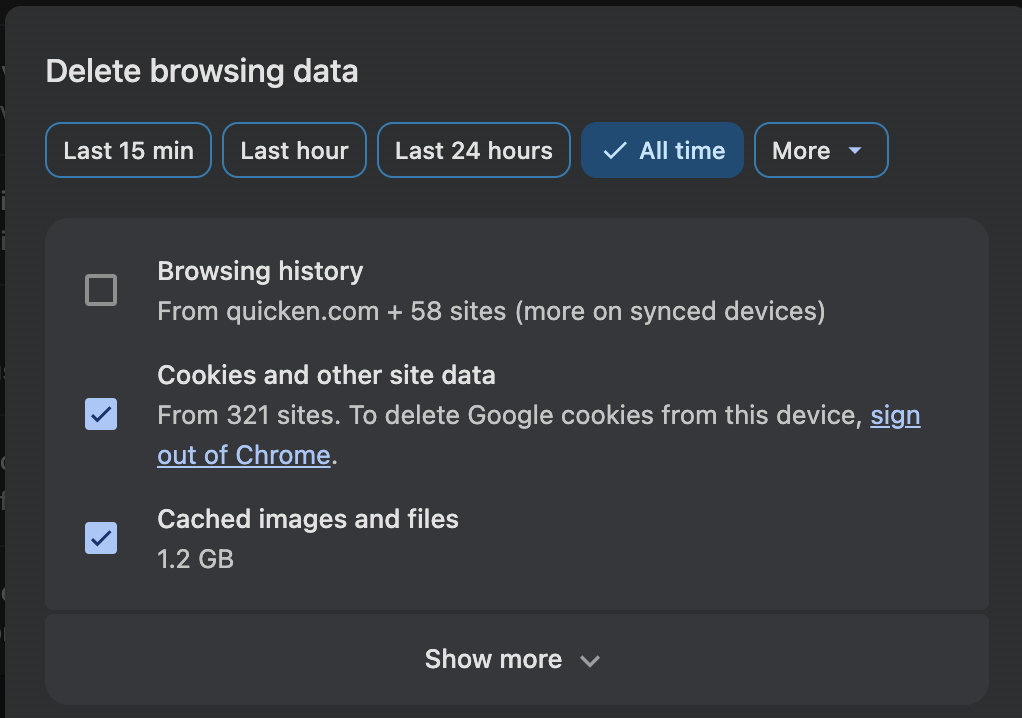
Hope this helps!
Quicken Alyssa
Make sure to sign up for the email digest to see a round up of your top posts.
0 -
No one is mentioning that Capital One bought Discover recently. Discover customer support might know what is causing the problems?
User since 1994. 36 current active accounts.
Quicken Classic Deluxe for Windows R62.16. Windows10 Pro (although "About" says Enterprise??)
1 -
Thank you for sharing that point.
Yes, contacting Discover may shed some light on this. From what I have seen, some users have done that and received mixed messages. If you reach out to them, let us know what you find.
Thanks again!
Quicken Alyssa
Make sure to sign up for the email digest to see a round up of your top posts.
0



