Add Account Column to Bill and Income Reminders Screen

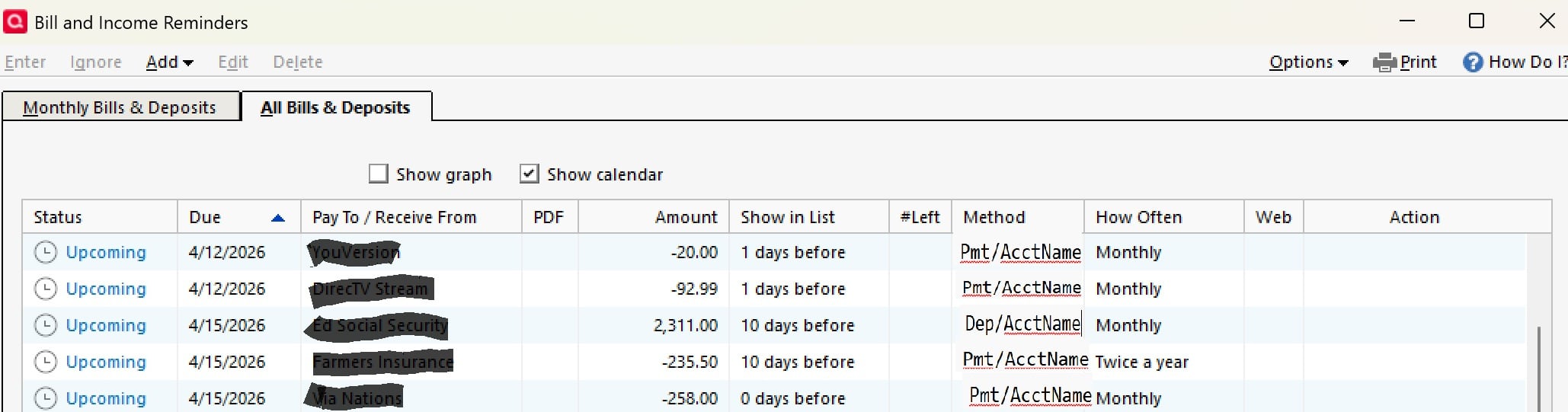
It would be very useful to be able to see both the Method (Payment/Deposit) and from/to which Account the upcoming transactions are for. Maybe adjust the Method column to show both?
Comments
-
For the time being, the "Account to use" is present on the "Monthly Bills & Income" tab, just not (for some unknown reason) on the "All Bills & Income" tab.
Q user since February, 1990. DOS Version 4
Now running Quicken Windows Subscription, Business & Personal
Retired "Certified Information Systems Auditor" & Bank Audit VP0 -
I can see the benefit but I'm not sure if there is enough real estate for adding that. I did cast my vote for it with the caveat that it can be done without removing any of the existing columns.
Quicken Classic Premier (US) Subscription: R66.23 on Windows 11 Home
0 -
How about setting up, customizing and using a Home tab's Classic View page (not the Dashboard)?
Add a Bill and Income Reminders view and use that instead of Tools / Manage Bill and Income Reminders.
This view does contain a column "Account to use". Here's an example from my Test file: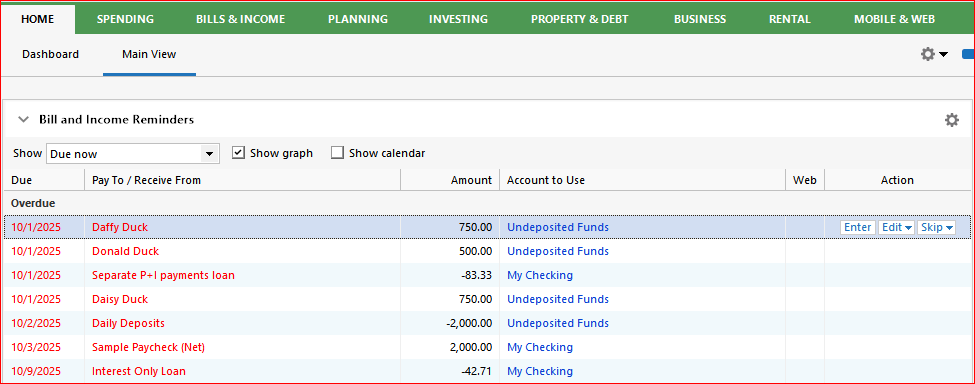 0
0


