Quicken is creating duplicate transactions on my matching downloads

When I accepting a match on my downloaded bank transactions, Quicken creates a duplicate. Anyone have success in correcting this? I am using Quicken Classic and Personal on OC
Comments
-
Hi @Doreen7456,
Thank you for reaching out and for bringing this to our attention.
What you’re describing does appear to be an unusual behavior that has been reported by multiple users. Our team is aware of the issue and is actively working toward a resolution.
In the meantime, it would be very helpful if you could submit your log files so we can share them with the appropriate team for further investigation. This information can play a key role in helping us identify and resolve the issue more quickly.
To send your logs, please follow these steps:
- Open Quicken
- Click Help
- Select Report a Problem
- Click Send to Quicken
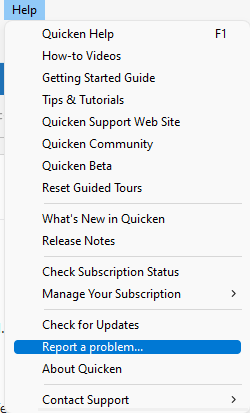
Once submitted, please let us know. I look forward to your response!
(CTP-16752)
Quicken Laura
Make sure to sign up for the email digest to see a round up of your top posts.
0 -
I have entered an expected automatic income deposit in the checking account register, and downloaded transaction says it matches, but when I approve, instead of marking the transaction cleared, it enters it as a duplicate.
0 -
Hi @rupleys,
This issue is related to a known problem, and our team is actively working on a resolution, as mentioned above. I would greatly appreciate it if you could submit your log files using the steps provided earlier.
Thank you!
Quicken Laura
Make sure to sign up for the email digest to see a round up of your top posts.
0 -
I'm running Quicken Classic Deluxe Version R66.28, Build 27.1.66.28. Since getting this latest version I've noticed that it is sometimes duplicating existing transactions in different accounts. Has anyone else experienced this issue? It's aggravating! It seems like every time I download an application update that's supposed to fix something (typically a problem I wasn't experiencing), it ends up breaking something else. I didn't realize that I had signed up to work in your QA department. Where's my paycheck?
Ridiculous!!!
Scott
0 -
Hi @smichels62
Thank you for reporting what you are experiencing. This is a known issue, and our team is actively working on a resolution, as mentioned above. I would greatly appreciate it if you could submit your log files using the steps provided earlier.
Thank you!
Quicken Laura
Make sure to sign up for the email digest to see a round up of your top posts.
0 -
@smichels62 To be clear, after downloading transactions to Account A, are the duplicate transactions appearing in a different account, or are you saying that they are in the same account but that problem affects several accounts?
If different accounts, are the duplicates the other side of transfers?
QWin Premier subscription0 -
I am experiencing the same behavior. I have sent my my logs into Quicken.
0 -
The duplicated transactions are staying in the same account, thankfully, but it happens with multiple accounts.
0 -
I sent in my log files this morning.
0 -
in reference to (CTP-16752) I sent my logs in yesterday
0 -
Thanks for sending the logs, @Doreen7456, @smichels62 and @MICHAEL J LAWSON.
Thanks for sending over the logs. I’ve added them to the escalation ticket. Our team is actively working on this and aiming to get it resolved as soon as possible, though we don’t have an ETA just yet.We appreciate your patience!
Quicken Carlos
Make sure to sign up for the email digest to see a round up of your top posts.
0 -
This sounds like the same problem I reported a week or so ago.
- In my case it seems to only happen to recurring automatic pay accounts. Had to wait until today to see another automatic payment account to be processed in order to see it happen again.
- Quicken is detecting duplicate transactions BECAUSE the bank (in my case Truist) is CHANGING the actual transaction date the payment hit the bank (eg: 4/1/2026) to the date it was processed (cleared) by the bank (eg: 4/2/2026)
1 -
I'll have to check but I think that's happening to me as well.
0


