"An unexpected error occurred, please try again later" error with TIAA

This discussion was created from comments split from:
Lost Ability to Download Transactions for TIAA 403B Account
.
Comments
-
Hello! I am having the same issue with my TIAA 403(b) accounts in Quicken. They have not been updated successfully in Quicken for Mac for the last two weeks (even though I can login to the website). I tried to create a new file to see if this would resolve the issue, but this did not work either. The only error I get is "an unexpected error occurred, please try again later". Any help would be appreciated.
0 -
Hello @ajg360,
Thank you for letting us know you're also having an issue connecting to your TIAA accounts. To help troubleshoot, please provide more information:
- Do you see the same "An unexpected error occurred" error in both the original file and the new one?
- If you see different errors, what other errors do you see?
- Do you connect to TIAA using Direct Connect or Quicken Connect?
- You can check this by selecting the account, then navigating to Accounts>Settings… and selecting the Downloads tab.
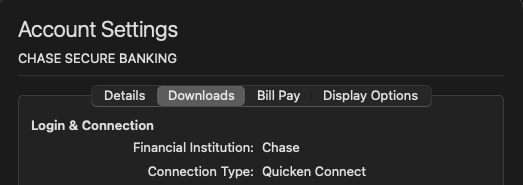
- You can check this by selecting the account, then navigating to Accounts>Settings… and selecting the Downloads tab.
I look forward to your reply!
Quicken Kristina
Make sure to sign up for the email digest to see a round up of your top posts.
1 - Do you see the same "An unexpected error occurred" error in both the original file and the new one?
-
Hi Kristina,
Sorry for the delayed response! To answer your questions:
- Yes, I am seeing the same error on both my original (10+ years old) Quicken file, and the new file that I created to test the connectivity.
- I am attempting to connect using the Direct Connect option (which is what I have always used to connect to these accounts). I prefer this, as it has had the detailed investment tracking that is useful to track these accounts.
Hope this helps! If there is anything else I can provide to you to help troubleshoot this, please let me know.
0 -
Thank you for your reply,
To get more information about the error, I would need to review the log files. Please navigate to Help>Report a Problem, and send a problem report with log files attached.
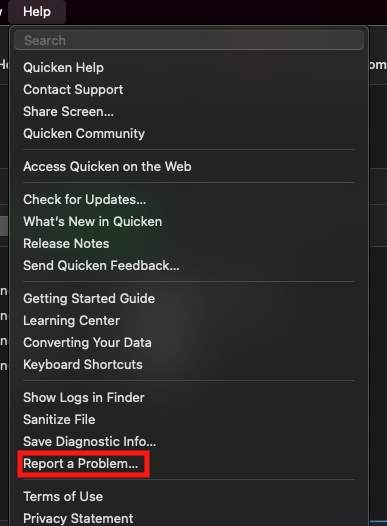
Please post to this discussion to let me know when the problem report is sent.
Thank you!
Quicken Kristina
Make sure to sign up for the email digest to see a round up of your top posts.
0 -
Hi Kristina,
I am sorry for the delayed response — I don't get e-mail notifications when you reply to the thread, and I didn't check the discussion thread until just now.
I have just sent the problem report over to Quicken, and included a sanitized version of my data file.
Please let me know if there's anything else I can do to help you.
0 -
Thank you for your reply and for sending those logs,
I reviewed the logs and can see you're getting an error code 2003 (the image below is from the OFX log).

Please follow the troubleshooting from our article on error code 2003:
Check the account number, routing number, and Customer ID information in the Account Settings screen.
If the account, routing, and Customer ID information appear to be correct, please contact the FI Online Banking Support for assistance in determining why the information you have stored in Quicken is being rejected by their servers. Only they can resolve this error for you, as it requires them to verify your account information on their servers against the information you use in Quicken.
To get to the Account settings screen, first click the account to select it, then navigate to Accounts > Settings.

I hope this helps!
Quicken Kristina
Make sure to sign up for the email digest to see a round up of your top posts.
0 -
Hi Kristina,
Thank you for letting me know. I opened a ticket with the financial institution. It will take a few days for them to get back to me, but hopefully that will get me some answers!
I will keep you posted to let you know what happens.
0 -
Hi Kristina!
TIAA was able to resolve the issue with my accounts, and now they are updating successfully! It took a while, but they just resolved them today.
Hope you have a great rest of your Sunday!
1 -
Thank you for the follow-up,
I'm glad to hear that TIAA resolved the issue!
If you need further assistance, please feel free to reach out!
Quicken Kristina
Make sure to sign up for the email digest to see a round up of your top posts.
0


