Video pop-up is showing on the wrong screen

When I display the Report "Portfolio Value and Cost Basis" (or any other report) I have always been able to hover the mouse at the top of (or in) any bar and it would show me the monetary value where the mouse is. I have been using the feature for many years. Starting 3-4 updates ago, this stopped working. It now shows the pop-up on my second monitor, and leaves an artifact on the second monitor when I move the mouse off the bar in the graph.
Comments
-
Hi @jeyates1,
Thank you for reaching out to the Quicken Community!To help better understand the issue, I would appreciate it if you could provide a bit more information:
- Where is your Quicken data file located? To check, please open Quicken and go to File. At the bottom of the menu above the exit button, the file with the check mark next to it is the one currently open. Please let me know the full file path shown there.
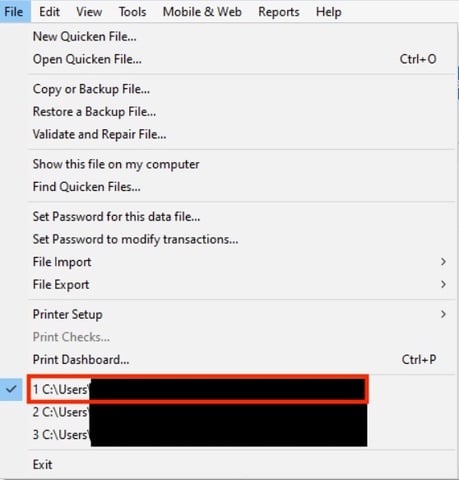
- Is your data file being backed up or synchronized by any third-party services, such as Carbonite, OneDrive, or Backblaze?
- Have you tried restoring a backup from a date prior to when the issue began?
- Does the issue occur with a saved report, a new report, or both?
I look forward to your reply!
Quicken Carlos
Make sure to sign up for the email digest to see a round up of your top posts.
0 - Where is your Quicken data file located? To check, please open Quicken and go to File. At the bottom of the menu above the exit button, the file with the check mark next to it is the one currently open. Please let me know the full file path shown there.
-
I have this problem as well.
Using Quicken Subscription version.
My data file is within a OneDrive folder
Not sure exactly when this started, but I noticed after going to Windows 11
0 -
Hi @jefflimm1124,
Thanks for joining this thread and for sharing additional details!
I recommend moving your Quicken data file out of OneDrive and into a local folder. To do this:
- Go to File > Show this file on my computer.
- Review the file location path shown at the top of the window.
- Close Quicken (keep the file location window open).
- Right-click on your Quicken data file and select Cut.
- Navigate to Local Disk (C:) > Users > [Your Username] > Documents > Quicken.
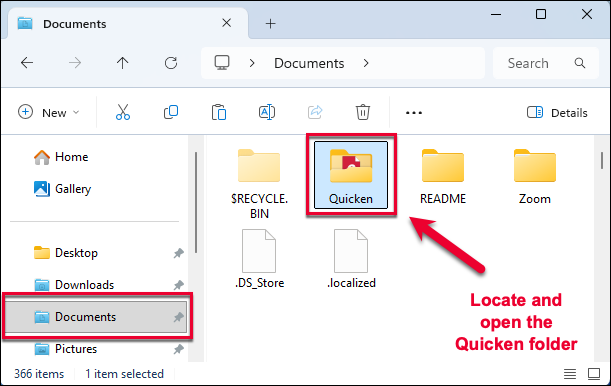
- In the Quicken folder, right-click an empty space and select Paste.
- Double-click the data file in the new location to reopen it in Quicken.
Once you've done this, try opening the report again.
Let us know how it goes!
Quicken Carlos
Make sure to sign up for the email digest to see a round up of your top posts.
0
