Can't treat SWGXX as cash in Schwab brokerage account

Just updated to Quicken Windows R66.18, and saw that R66.11's release notes said, "Improved: Added support for treating more than one money market fund as cash in brokerage account settings."
I thought perhaps that this would (finally, after years of waiting) treat Schwab Government Money Fund (SWGXX) as cash and make reconciliation seamless. How naive.
1. I went to Account Details in one of the Schwab brokerage accounts' Account Details. It said "Treat this Money Market as cash: SWVXX".
2. I did Reset Account and restarted Quicken.
3. I observed the account's holdings included SWGXX.
4. In Account Details, I clicked Set/Edit, then Customize, then Reset To Standard Behavior.
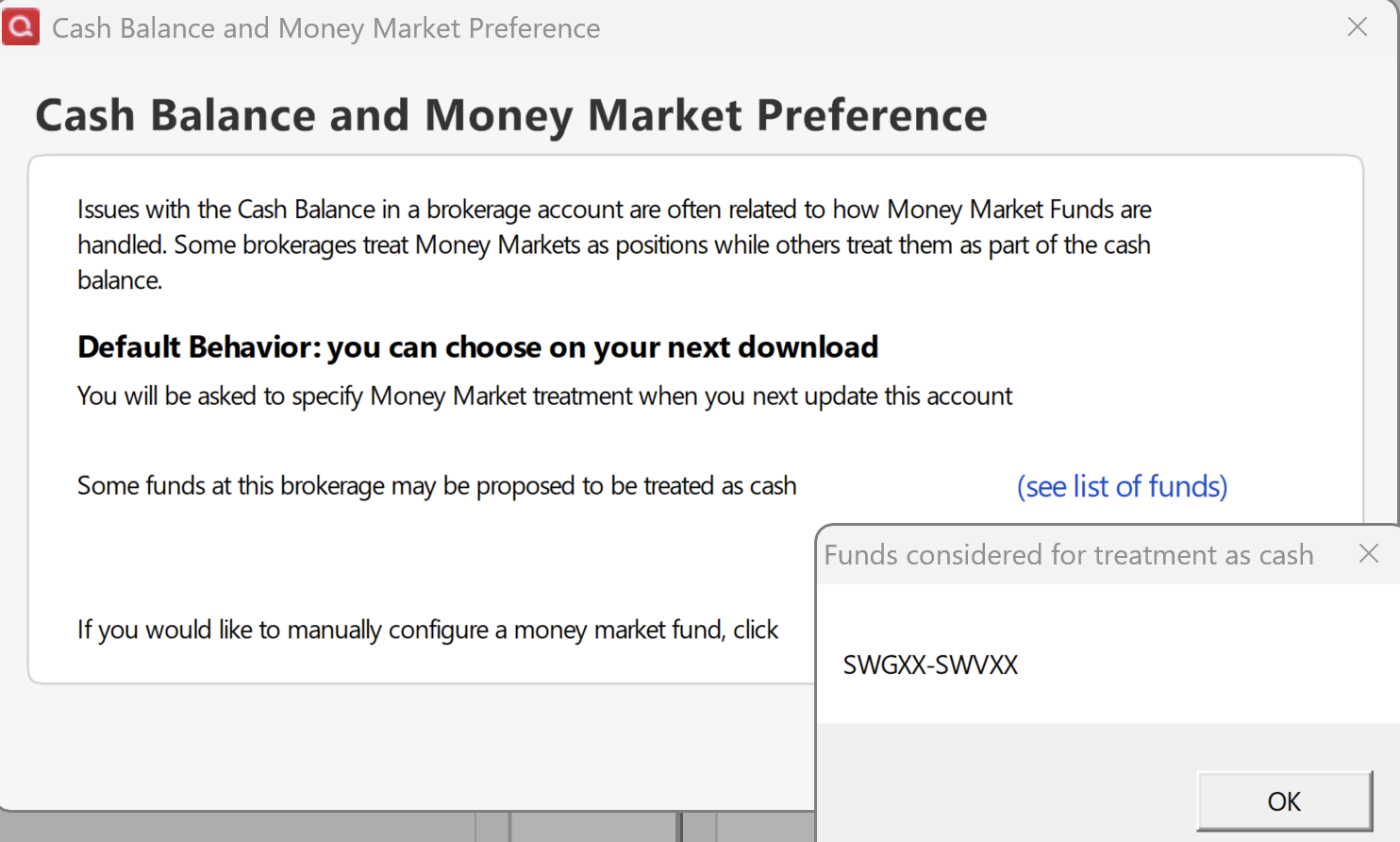
5. It said "Default Behavior: you can choose on your next download", and listed SWGXX as one of the funds proposed to be treated as cash:
6. I I restarted Quicken.
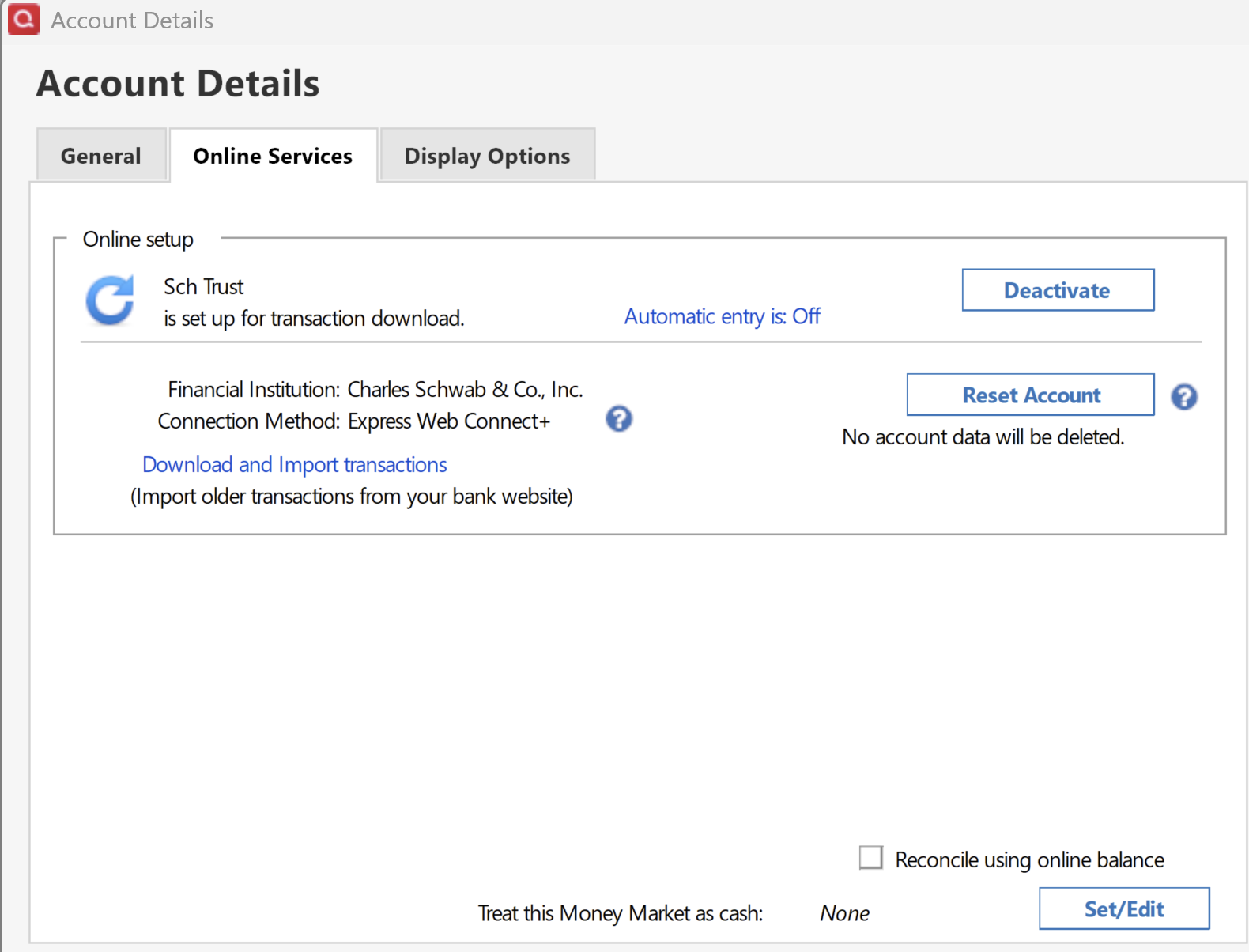
7. I selected the brokerage account and did Update Transactions. I wasn't asked to specify money market treatment, and Account Details still shows "Treat this Money Market as cash: None":
Comments
-
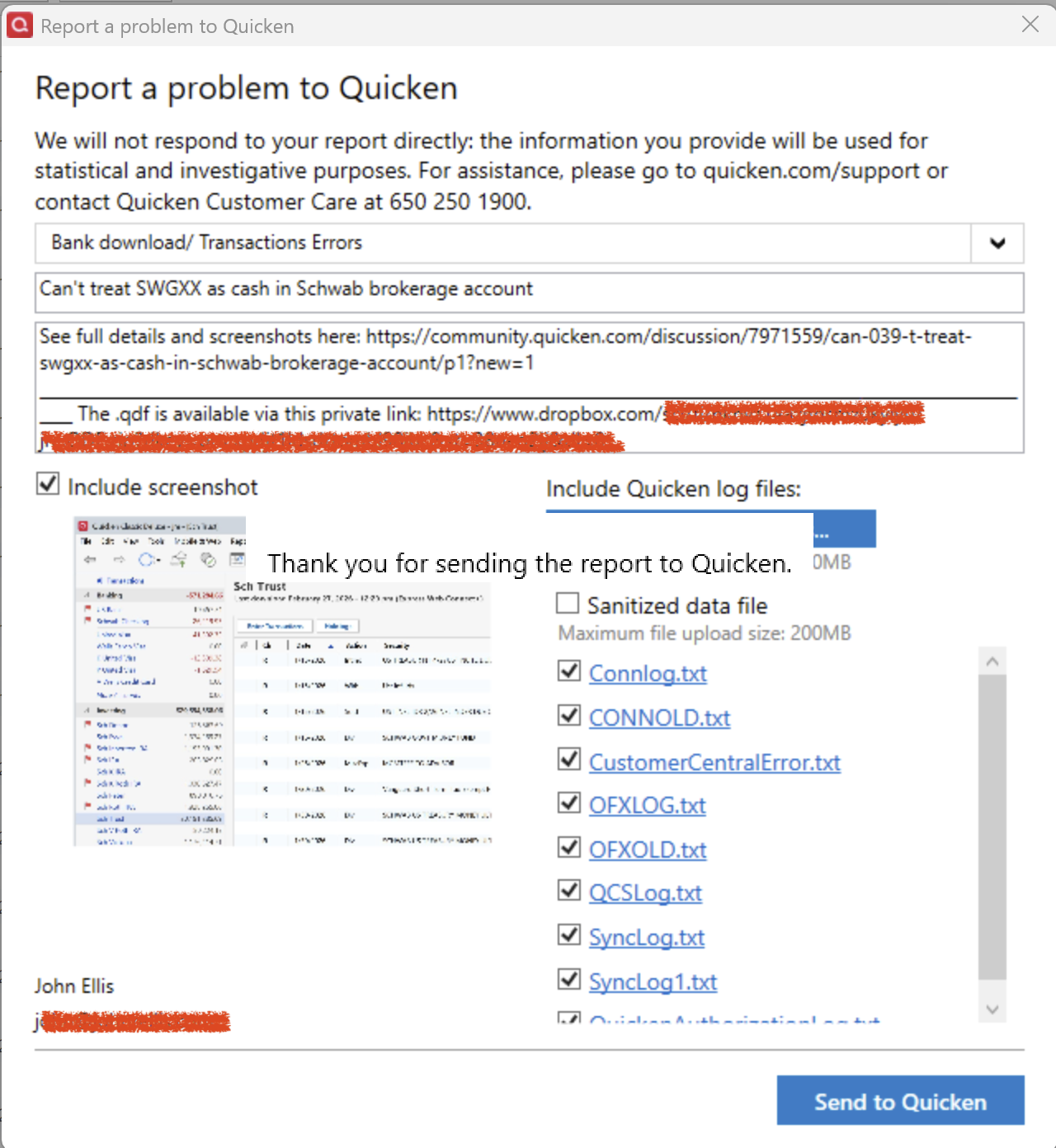
I tried doing Help > Report A Problem twice, and each time Quicken locked up and I had to terminate it via Task Manager. If the developers want details, they can contact me directly via the email address on my account.
 0
0 -
Hello @John Ellis,
Thank you for letting us know you're encountering this issue. To clarify, you didn't automatically get a prompt, but did you try manually setting SWGXX to be treated as cash?
I checked our internal tools and I see that the problem reports you attempted to send did arrive. Have you encountered any other issues with Quicken freezing? Typically, if the program freezes, it's either a program issue or a file-specific issue. To troubleshoot for a possible program issue, I recommend manually reinstalling the current patch. The download link and instructions are in this article:
I look forward to your reply!
Quicken Kristina
Make sure to sign up for the email digest to see a round up of your top posts.
0 -
I haven't encountered any other instances of Quicken freezing except when attempting to submit the problem reports. But I reapplied the current patch just to be sure.
"did you try manually setting SWGXX to be treated as cash?"
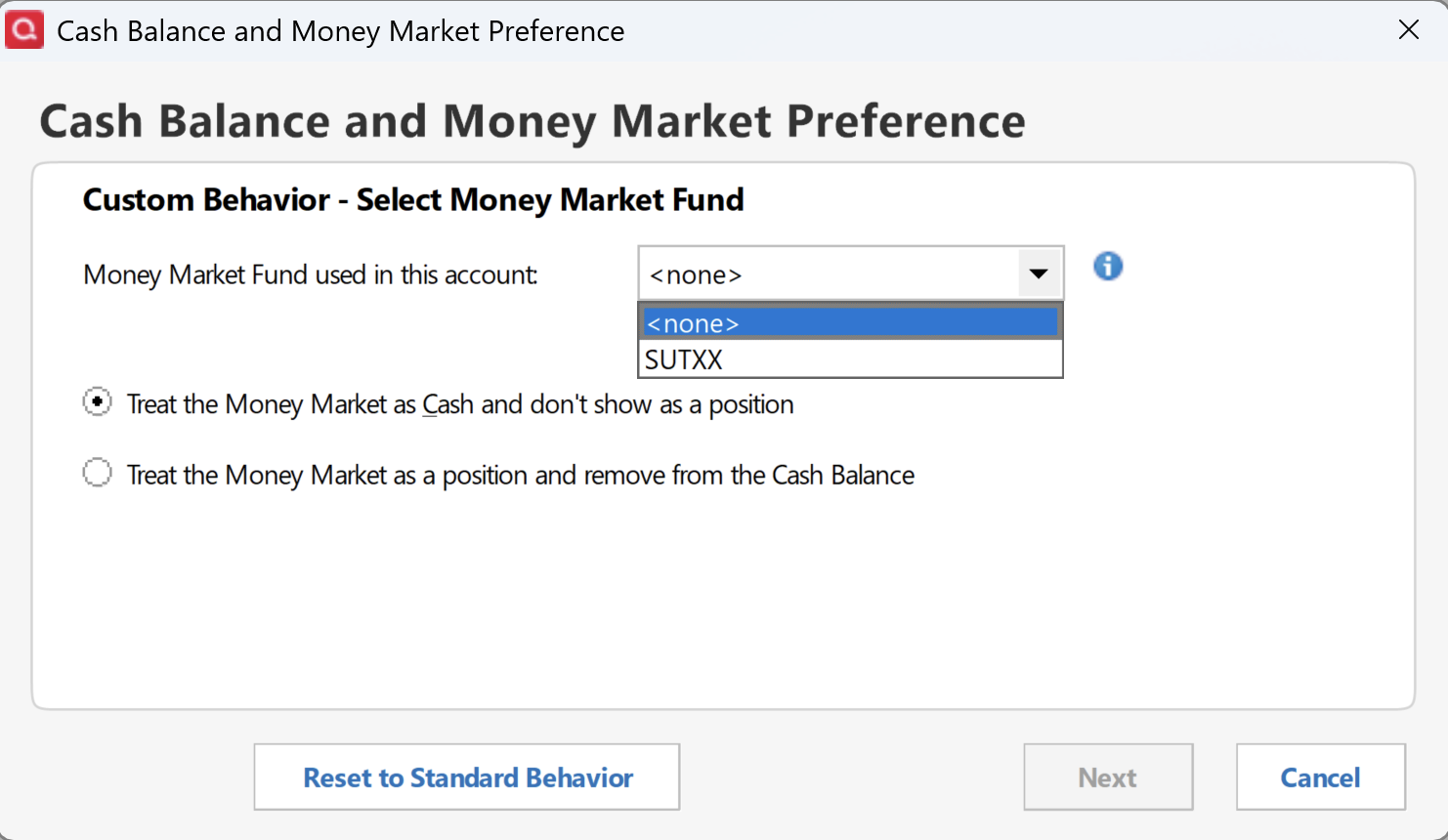
When I do Account Details > Online Services > Set/Edit > Customize, I'm only given the option of using SUTXX, a fund that has never been used with this account:
 0
0 -
Thank you for your reply,
The freezing when sending and problem report and the option to use a fund that isn't even in the account make me suspect the problem may be a file-specific issue. I suggest that you try validating your data file. Please save a backup file prior to performing these steps.
Validate:
- File
- Validate and Repair File...
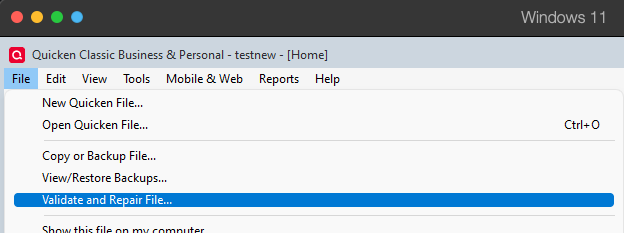
- Validate File
- Click OK
- Close the Data Log
- Close Quicken (leave it closed for at least 5 secs)
- Reopen Quicken and see if the issue persists.
Please let me know how it goes!
Quicken Kristina
Make sure to sign up for the email digest to see a round up of your top posts.
0 -
Unfortunately, your suggestion to do File > Validate And Repair File didn't make any change to the behavior reported above.
0 -
Thank you for your reply,
The next step is to restore a backup from before the issue started, if possible. To do that, please follow these steps from our article on backups:
Restore Quicken data
- Go to File > View/Restore Backups....
- Browse the Local and Online Backups tabs to find the backup file you want to restore. The Quicken backup file has the extension .QDF-Backup.
- Select the file to restore and click Restore Backup.
- Next, you will be given the option to overwrite the file you have open or to create a copy of the backup you're restoring.
- If you Create a copy, you will need to select a location to save the copy to and you will also need to give the copy a unique file name. After naming the file and selecting the location, click Save, then click Yes to open the restored file.
- What does it mean to overwrite a file?: Restoring a backup file replaces your current data with the data stored on the backup. Be aware that you'll lose any changes you made since the backup was created. If you want to preserve the current file, you must rename the current file or the file you are restoring. We recommend to avoid overwriting files.
Once you've restored an appropriate backup, please test to see if the issue is resolved in that newly restored file.
Thank you!
Quicken Kristina
Make sure to sign up for the email digest to see a round up of your top posts.
0 -
Hello @John Ellis,
We haven't heard back from you in a while. Do you still need assistance?
Check back and let us know! Thank you.
Quicken Kristina
Make sure to sign up for the email digest to see a round up of your top posts.
0 -
I've had to delete all SWGXX buy and sell downloads for at least 5 years in one of my Schwab accounts. I've reported this issue countless times. I just reported it again and it has ticket 3488895.
If I select and click the "Update cash balances "using the account's gear icon, the Update Cash Balance popup should show a Cash Representation button to treat SWGXX either as cash or a security. It is missing and I've never seen the option to add it. It therefore defaults to treating SWGXX as a security. Treating it as cash, as in my other Schwab account, automatically would deletes all buys and sells.
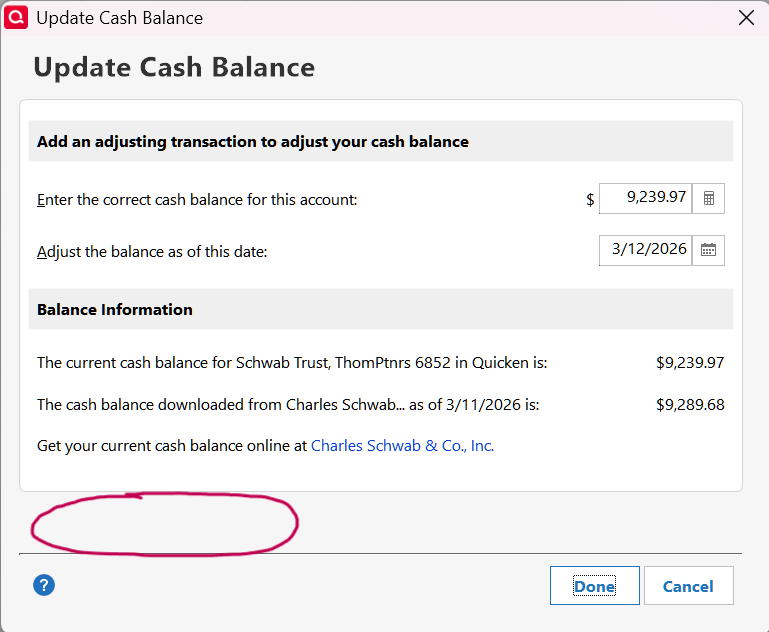 1
1 -
@Quicken Kristina The next step is to restore a backup from before the issue started
The issue has has been present for at least several years, and I don't have any backups going that far back.
0 -
@Ray I've had to delete all SWGXX buy and sell downloads for at least 5 years in one of my Schwab accounts. I've reported this issue countless times. I just reported it again and it has ticket 3488895.
Good. I posted about this same issue in Sep 2023, referencing 13 prior threads about the same problem:
[Edited - Enabled Link]
0 -
From my notes, Quicken changed One-Step-Update's connection methods for Schwab in 2018. It created a huge mess. I spent many hours for months correcting download errors to reconcile the accounts.
Besides this problem of needing to delete each buy/sell SWGXX transaction, the dividend transactions always download as zero. I've reported this problem many times too. In the Schwab website screenshot below, you'll see that the dividend's price and amount are blank. If Schwab won't fix it, the Quicken could compute the dividend as the price is always $1.00.
Around August 2025, Quicken changed Fidelity's connection method from DC to EWC+ with even worse problems. Many are still reported in this Community. Frankly, I don't understand why Quicken can't fix them!
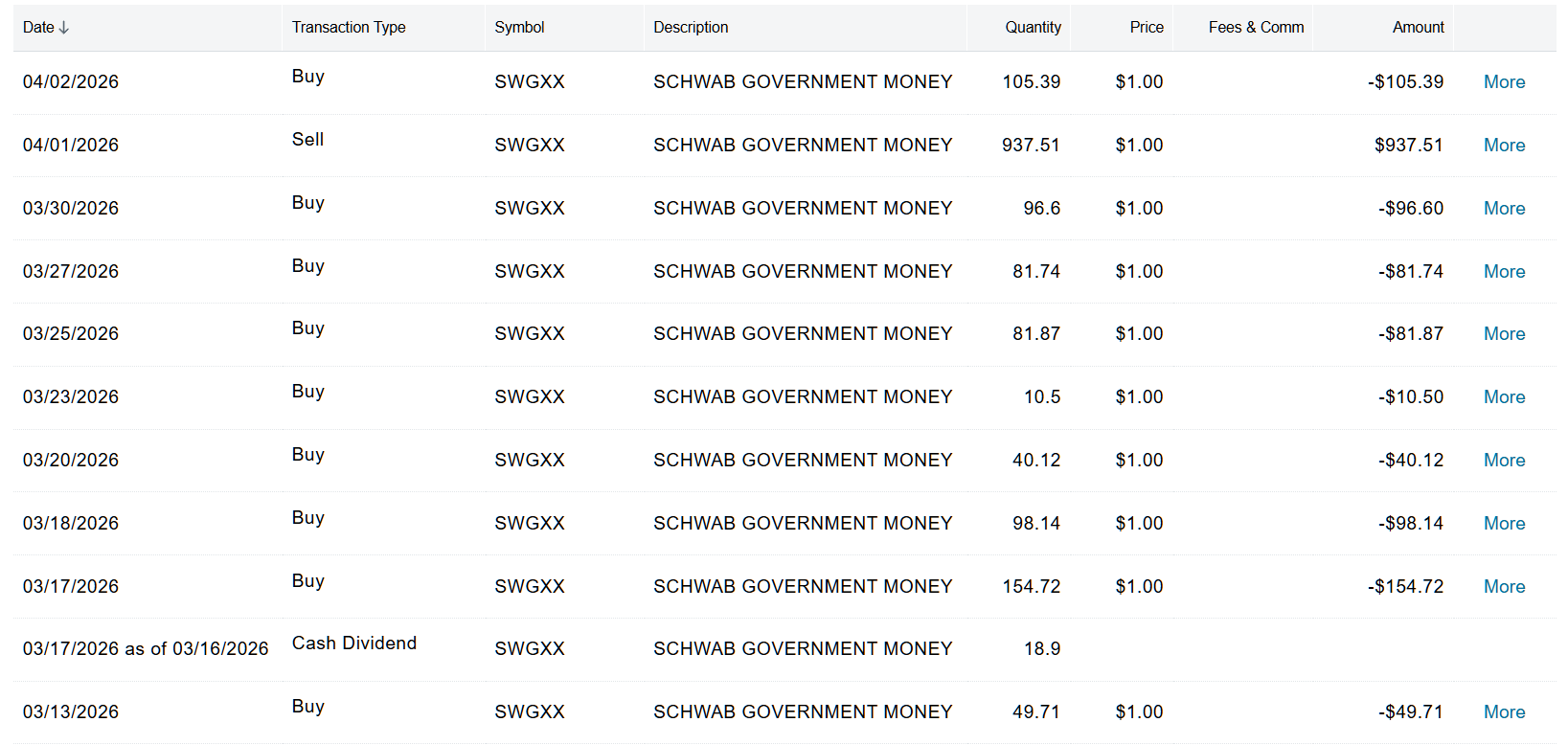 0
0 -
Oops, I included a link to the wrong post. Here is my post from Sep 2023 where I referenced 13 prior threads about SWGXX downloads, including the $0 dividends:
0 -
@Ray I don't understand why Quicken can't fix them!
I thought I read a while ago that Quicken uses a transaction-download service that is (maybe?) shared with Intuit's Quickbooks and perhaps others. If that's the case, then there are three parties involved with this issue: Quicken, the transaction-download service, and Schwab. If the download service predated Intuit's shedding of Quicken, there's probably a messy contractual arrangement with Intuit. That's a recipe for gridlock, finger pointing, lack of transparency, and inaction among the three "partners". But this is just all semi-informed speculation that Quicken is unlikely to elucidate.
0 -
Thank you for your replies,
I can see the issue was recently escalated, ticket number QWIN-26694. I can see @Ray is already on the ticket due to their earlier contact with Support. I added you to the ticket also @John Ellis.
Thank you!
Quicken Kristina
Make sure to sign up for the email digest to see a round up of your top posts.
1 -
Following up on my earlier post,
@John Ellis Our teams need you to confirm that when you look in the Online Center, the balance for SWGXX is non-zero. Please check and let us know what you see in the Online Center.
Thank you!
Quicken Kristina
Make sure to sign up for the email digest to see a round up of your top posts.
0 -
Ever since Quicken changed from DC to EWC+ around August 2025, Fidelity downloads have contained incorrect transactions. I have two accounts using FDRXX for cash representation. With difficulty, I was able to reconcile the cash balances each month in both accounts. In February, it got a little worse.
In March, Quicken wasn't even close in matching the cash balance in the Fidelity's statement. Quicken had downloaded nearly 100 transactions in one account. Quicken has 74 because it combines Div and ReInvest into a single ReinvDiv transaction. For the first time, it had 7 placeholder, 3 XIn, 3 XOut, 4 Bought, and 3 Sold. FDRXX's dividend was ReinvDiv.
I opened the reconciliation panel. Because the Difference was off by thousands, I cleared all checkmarks, then checked each transaction that was in Fidelity's March statement. When finished, the Difference was off by the amount of the FDRXX dividend. None of the 20 above transactions were in the statement. This screenshot shows the checkmarks.
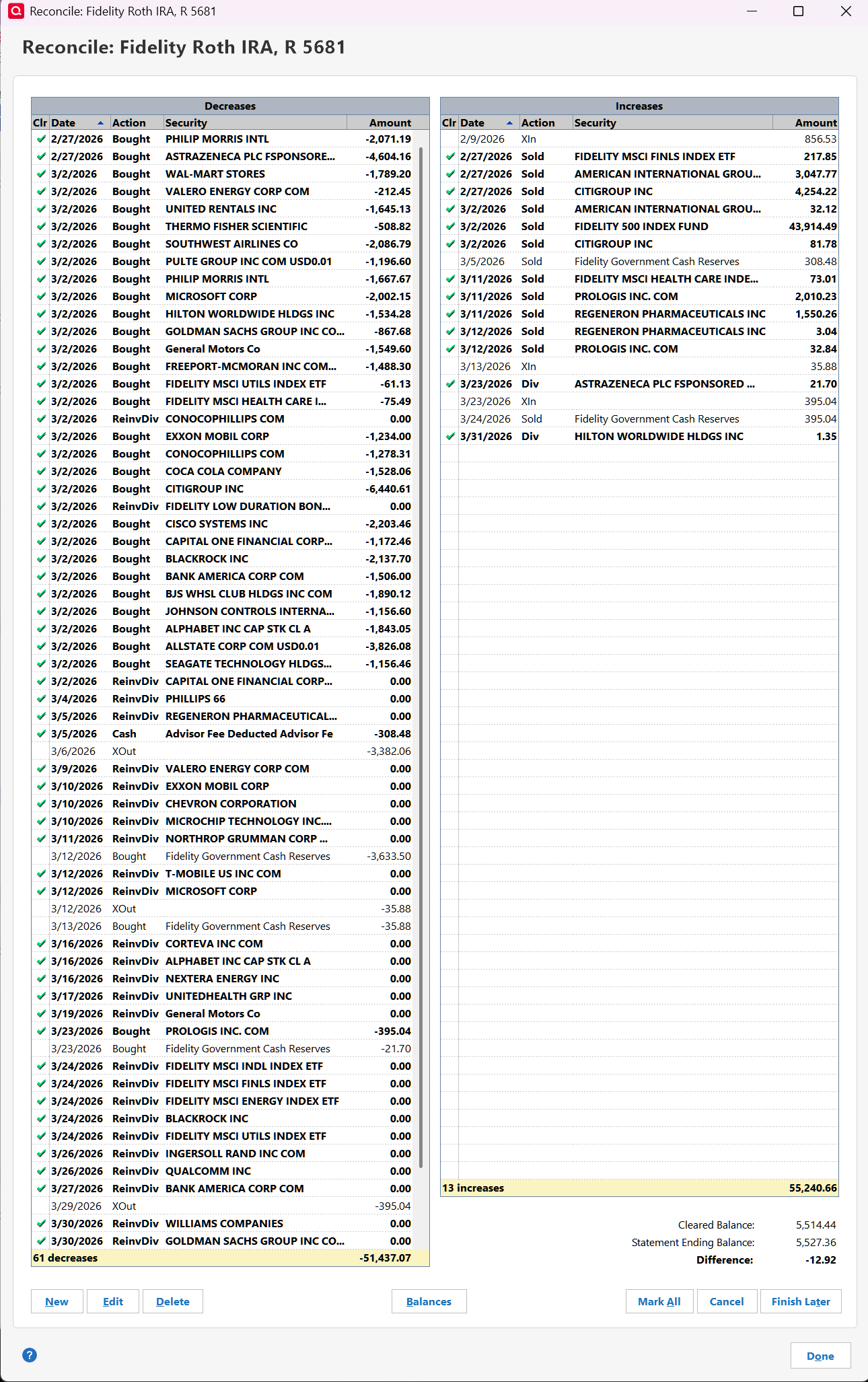
To make the Difference zero, I tried to edit the dividend transaction. I changed it to "Inc - Income (div, Int, etc.)" but when I saved it, it changed to a stock split??? I then tried to copy and paste the February transaction, but Quicken said the date had to be earlier than 2/28???
I ran Validation on the datafile. It said, "Corrected 9 Bought or Shares Added transactions that were incorrectly categorized as a realized gain." These are FDRXX transactions in March. They don't affect the cash balance.
In the register, the Cash Bal matched the February statement. The statement balance in March is $5,527.36 but the register has $12.92 because 20 "new" transactions affect the register.
I then used the "gear" and opened Update Cash Balance. It says the register balance is $12.92 (correct) and the Fidelity balance is zero. Wrong, it's $5,527.36. The Cash Representation button says I'm using FDRXX to represent my cash balance.
I opened Tools > Online Center. I used the Holding tab. Compare Portfolio for the account says, "Your Quicken account and your Brokerage Holdings are in Agreement." How can that be?
I also used Tools > Security list as that's the only place to see cash representation securities like FDRXX. It says I have zero shares? I should have 5,527.36 for this account alone.
I also have two other data files with these Fidelity accounts. All have the same problem so it's not a datafile issue.
How do I fix these problems?
What is Quicken doing? After 7 months, can't they get these serious problems fixed?
0 -
@Quicken Kristina Our teams need you to confirm that when you look in the Online Center, the balance for SWGXX is non-zero.
Just now, after updating transactions, here's what I see in Online Center > Balances:
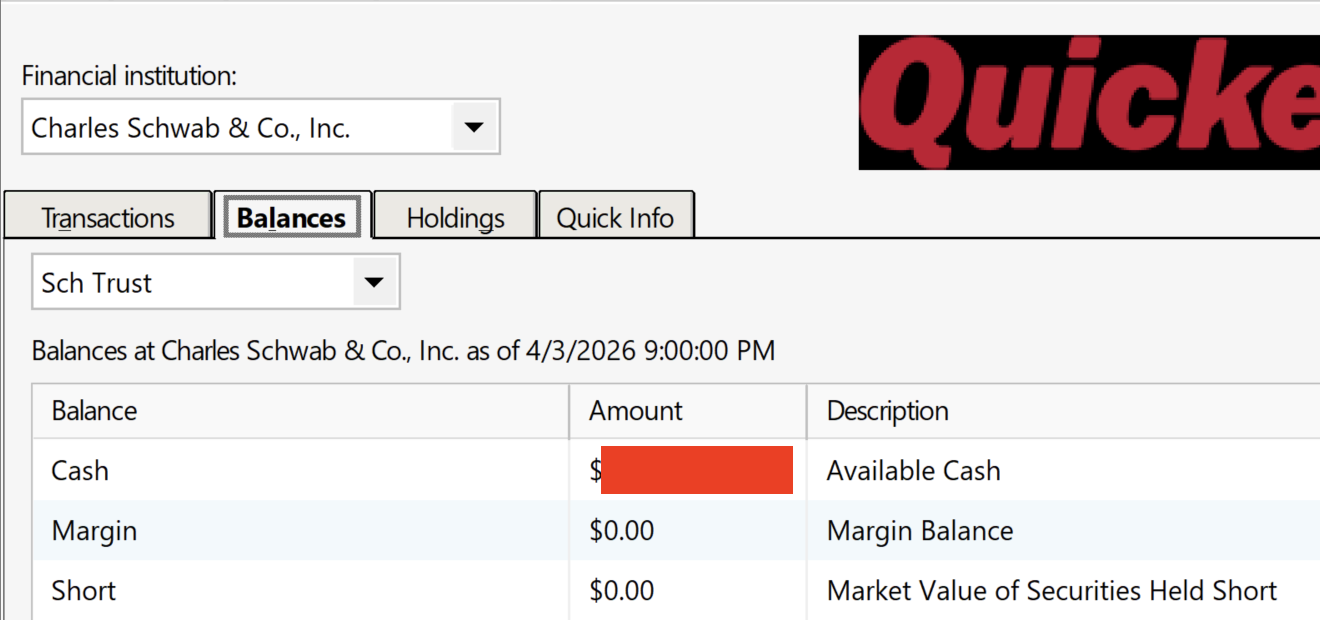
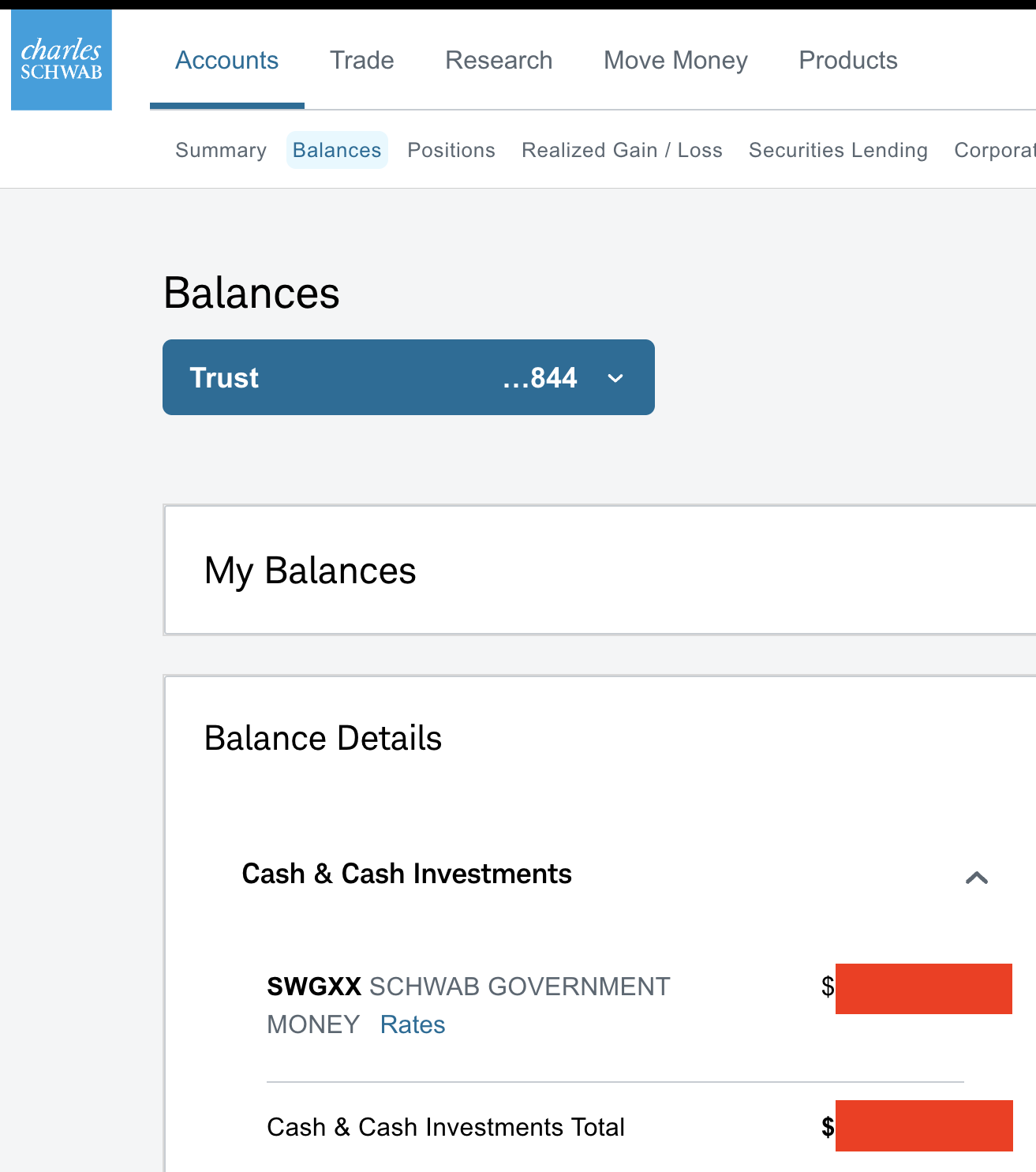
The amount for Cash (covered in red) matches exactly the amount shown for that account's sweep at Schwab.com:
Online Center > Holdings doesn't show SWGXX:
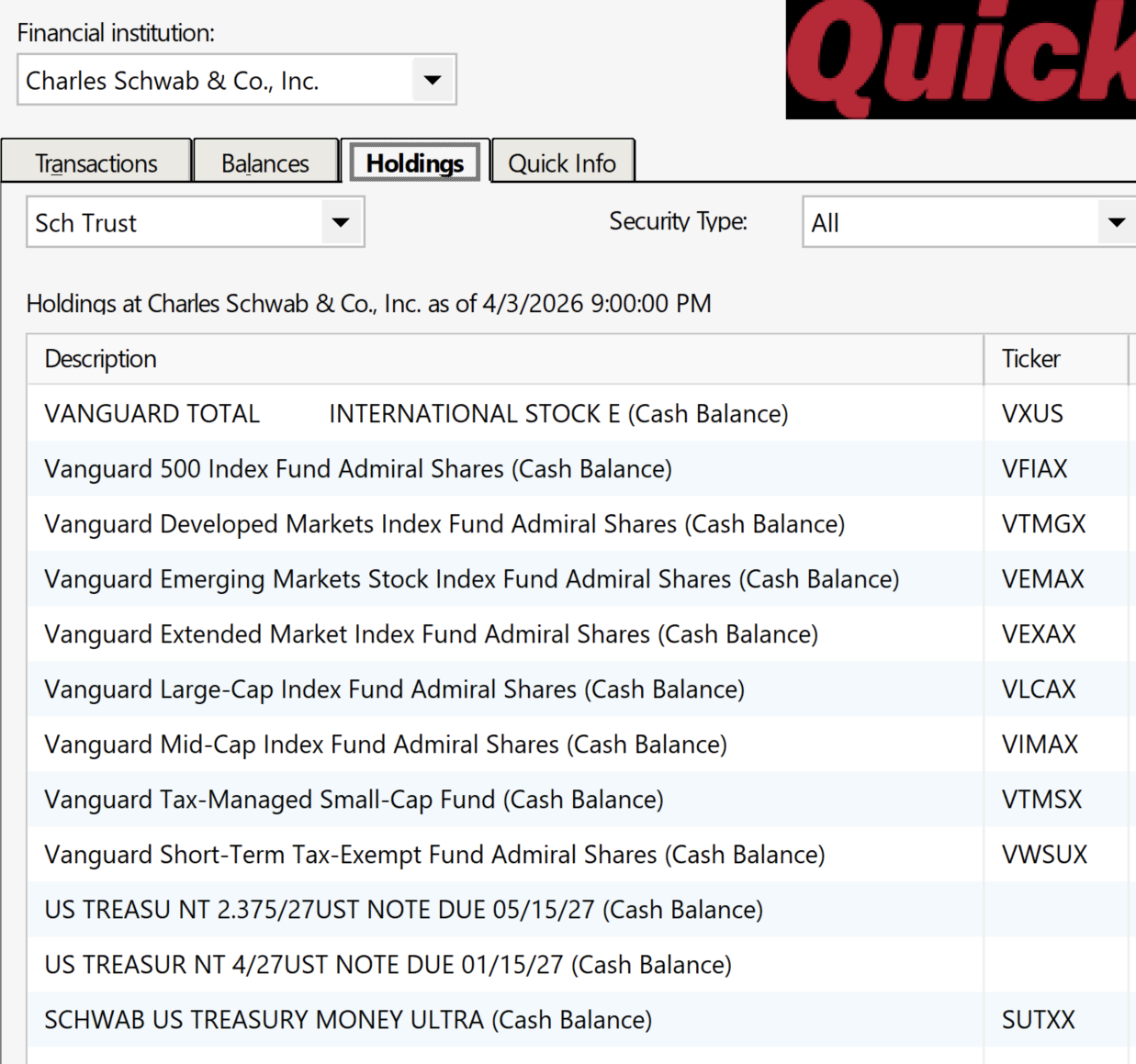
Note that since I first posted above on 2/27, I've added holdings of manually purchased Schwab US Treasury Money Ultra (SUTXX) shares, which aren't to be treated as a cash position. Schwab does not use SUTXX as a cash sweep and does not display its holdings under Cash & Cash Investments (see screenshot above), but SUTXX is the only option displayed in Account Details > Online Services > Set/Edit > Customize:
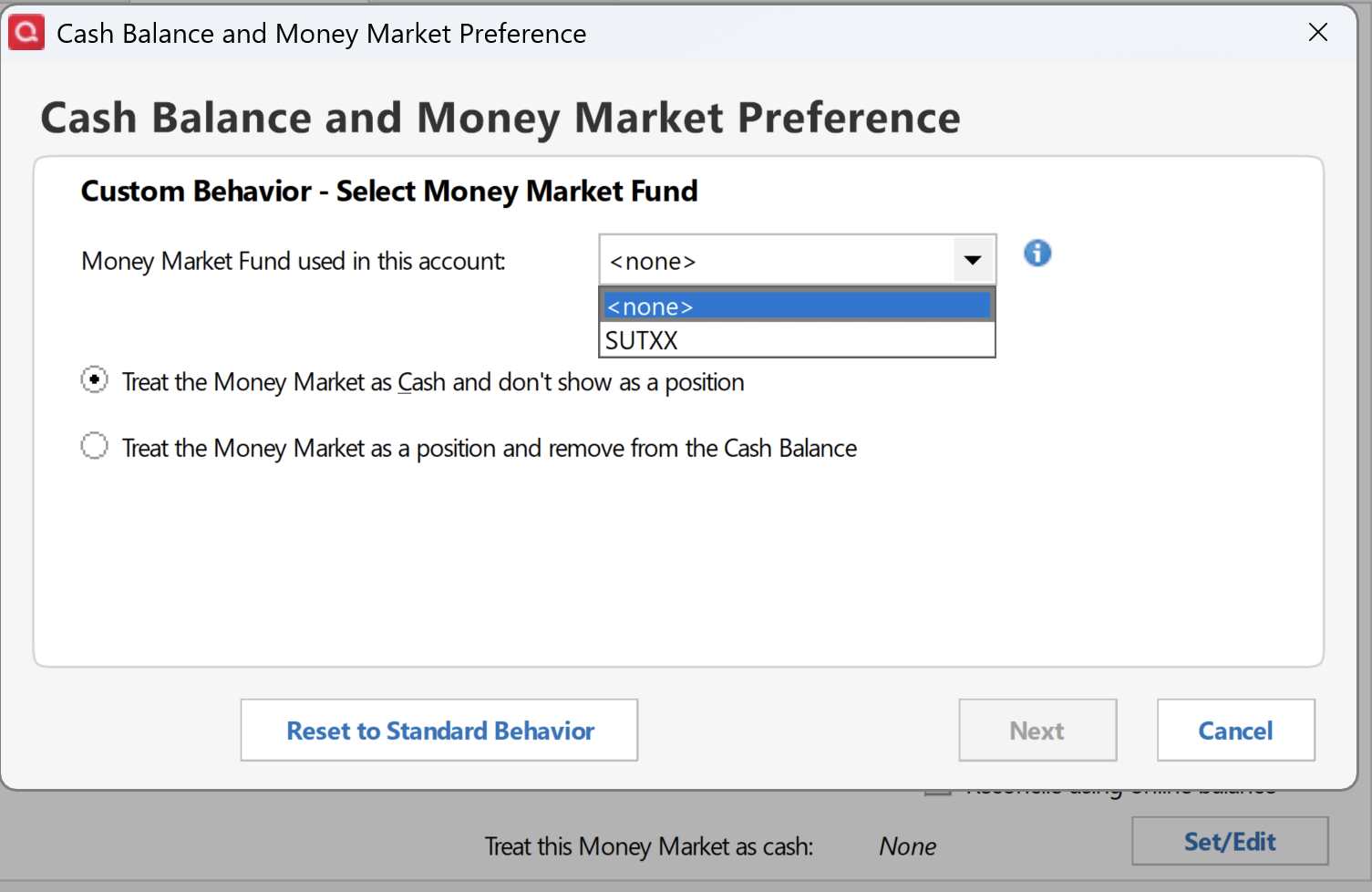
Clicking Reset To Standard Behavior still results in "Treat This Money Market As Cash: None", with no option to select SWGXX.
Thanks much for your attention to this issue.
0 -
Thank you for confirming,
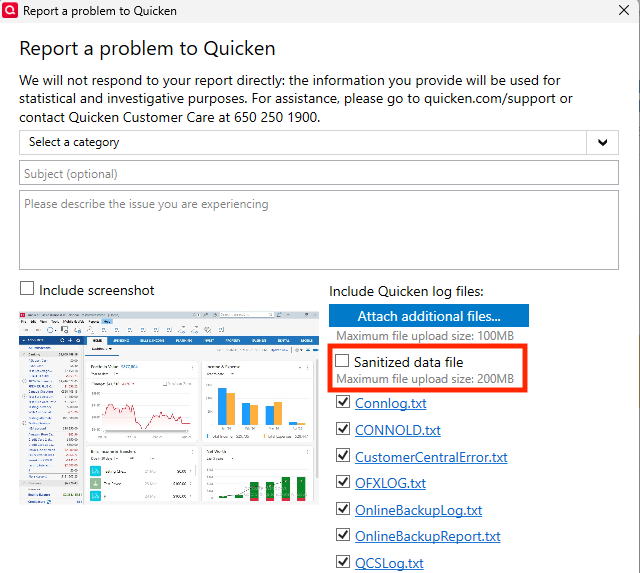
I forwarded that information to our teams, and they requested that you please send a sanitized data file. To do that, please go to Help>Report a Problem. There should be an option to select Sanitized data file. Please select that option and send the problem report.
Thank you!
Quicken Kristina
Make sure to sign up for the email digest to see a round up of your top posts.
0 -
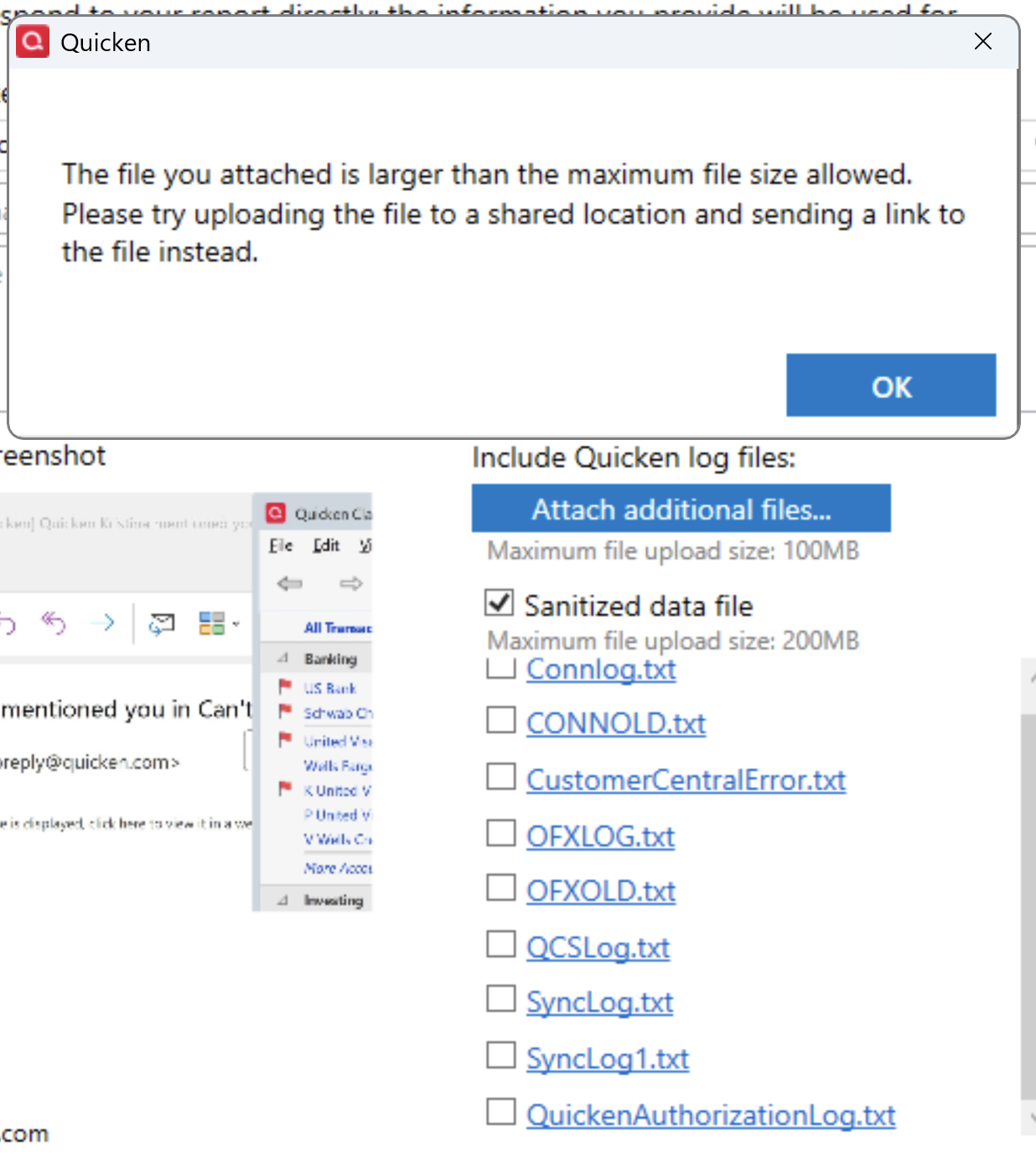
@Quicken Kristina, I get this error when I select Sanitized Data File (the .qdf is 387 MB). How to proceed?
 0
0

