Quicken Just Keeps Getting Worse-New & Old Bugs

Quicken Classic on Windows is just getting unusable for me with a long list of bugs.
- I have registers that will not keep their formatting, reported 9/2024 #11292345 thread 20452090, still broken.
- Receivables transactions that will not clear (Phantom Payment) 12/2024 #7958033.
- Receivable out of balance 10/2024 #2889794.
- Customer Address in Invoicing does not populate, must manually enter in each payee address even though they are in they are in the Address Book. I tried rolling all the way back to R66.11, but the bug persists, so this must be a data corruption issue but Super Validate finds no errors. This bug has open reports dating to 11/2024, do they not recognize how bad this is for anyone doing invoicing?
- Memorized Payees no longer works in R66.28, all fields are blank. The memo field no longer appears in the Memorized Payees Edit, so it looks like it's been eliminated.
I do dozens of invoices every months and about 100 transactions in the registers and this is now more than doubling my time in managing my business. Support is no help, they say they escalate my open cases, but nothing ever happens. How do I get actual support to correct documented errors.
Comments
-
@Jon_sacks Can you please provide the links to where you've reported those issues in this forum, so that we can also look into them?
And number 5, in particular, looks like a data corruption issue rather than a bug.
Q user since February, 1990. DOS Version 4
Now running Quicken Windows Subscription, Business & Personal
Retired "Certified Information Systems Auditor" & Bank Audit VP0 -
Report Threads
https://community.quicken.com/discussion/7958033/quicken-will-not-clear-a-receivable-transaction#latest
https://community.quicken.com/discussion/7956683/accounts-receivable-out-of-balance-search-for-problem-records#latest
https://community.quicken.com/discussion/7955771/register-column-widths-changing-on-exit-of-register#latestOn the Bill To not displaying in invoicing, this was supposed to have been corrected in R65.15 (https://community.quicken.com/discussion/7968395/windows-r65-xx-release-us?utm_source=community-search&utm_medium=organic-search&utm_term=invoice+bill+to+not+diplaying), but it is not, I did a Super Validate and it did not find any errors and it happens on all my Quicken Files. It was confirmed with Customer Support who had me deprecate back to .11, but it did not correct the problem and they confirmed.
Here is the thread where it is still reported as an ongoing problem with no solution: https://community.quicken.com/discussion/comment/20545027#Comment_20545027?utm_source=community-search&utm_medium=organic-search&utm_term=no+bill+to+on+invoice
On the current issue of Memorized Transactions not displaying the detail in the register (they come up in the pull down list) but the data in the memorized transaction is not populated in the register, again reported to support, but no resolution.
1 -
I assume you are referring to Memorized Payees. Memorized Transactions apply only to investing accounts.
Please go to Edit > Preferences > Data entry and QuickFill and check the "Complete fields using previous entries" and "Recall memorized Payees" options. These should both be checked.
If that does not explain your issue, please go to Tools > Memorized Payee List and look at the items there. Do some Payees have multiple entries, perhaps some with no details? That might explain why the register is not populating as you expect.
Do you have entries in the Address Book for Payees? I don't use the Address Book, and perhaps that is related to the issue you are seeing.
I find it important to carefully manage my Memorized Payees. For Payees where the amount varies, I set the amount to zero and check the Lock box. That prevents the Payee details from being changed each time you use it. I also un-check the "Automatically memorize new payees" option at Edit > Preferences > Data Entry and QuickFill.
QWin Premier subscription0 -
Independently I solved two of my issues, the failure to populate the memorized transactions in the register and the problem with the Bill To in invoicing. Both were related to the "Recall Memorized Payees" not being checked (as you suggested, wish I had seen it sooner!).
Quicken Support was no help on this, I just went on a search and destroy looking at all the options since I was convinced this was not a new bug since deprecating back to R65.15 did not correct the issue as support had recommended (problem appeared after R66.23).
I did not modify this switch, it's either a new switch or in a release this switch got turned off. The behavior is not documented in the help or anywhere in the community and the Help indicates they are for the Register not for data entry in forms like the Invoice (I wonder where else this is an issue?).
That this behavior now applies to "Data Entry" in a "Create Invoice" to no longer pull up the information from the "Address book" (not the Memorized Payee List) is either a bug or a new feature that needs to be documented.
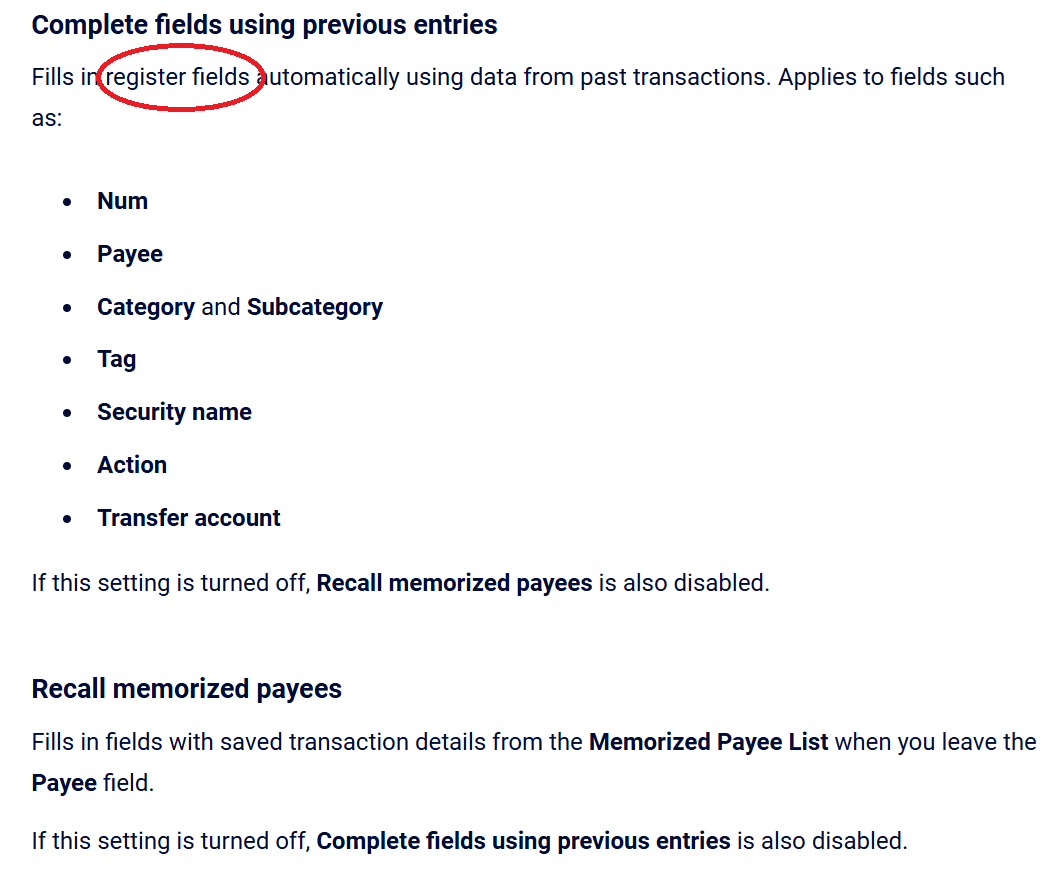
The full resolution is posted Here (20548334).
Quicken is just not helpful in solving anything but the simplest problems, that is really the issue. I'm a person that has a lot of software/computer experience and by the time I will call technical support, I have exhausted everything that I can think of doing. The last thing I want to do is call someone to tell me to turn the computer off and on again after 10 minutes of navigating their Bot.They say they open cases and escalate issues, but that does not help since they don't ever solve the problem. 4 support "specialists" I have called over the last 30 days following up on the issue have not suggested looking for this switch. Clearly this demonstrates how lacking support really is and in this instance, they had it as an open Bug since December 2025 and nobody researched it, when in fact it is an Undocumented "Feature"?!?
0 -
You are right that annoyingly, Quicken sometimes changes settings when you install an update. This has been going on for years. I find this most often with backup preferences.
Thanks for discovering and pointing out that these settings also control data entry in other place besides the register. The Help should certainly make that clear.
QWin Premier subscription1

