Budget Report - Account Missing

I use the budget report to track my budget vs. actuals. I have investment accounts set up. When I need to transfer funds from an investment to my checking account, I record it in the checking account as a deposit with the investment account as the category. I record the transaction gross of taxes and show taxes separately as part of a split transaction. For example, a $10,000 investment withdrawal and $2,000 income taxes is shown in 2 separate lines of a split transaction in an $8,000 deposit to my checking account.
In my budget report, the $10,000 is not showing up, yet the $2,000 is displayed.
I have no idea why the investment withdrawal is not showing.
Comments
-
Hi @stevebarr32,
Thanks for reaching out to the Quicken Community!
Let me ask a few questions to better understand the issue:
- Can you upload a screenshot of the transaction that is missing from the report?
- What type of report are you running? Is it from the Reports section?
- Have you checked that all the categories you want to see are selected in Manage Budget Categories, including the accounts (for transfers)?
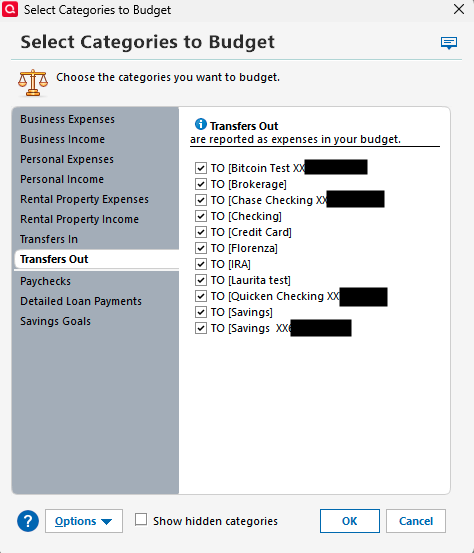
This will help us pinpoint what’s going on and provide the best guidance.
I look forward to your reply!
Quicken Carlos
Make sure to sign up for the email digest to see a round up of your top posts.
0 -
So the entry is:
Debit (increase) Checking Account $8,000 split as
Credit (decrease) Investment Account $10,000
Debit (increase) Taxes Categories $2,000and debits equal credits.
The $10,000 is not an income or expense event, it's simply a transfer from one Account to another Account and that, normally, is not shown on a budget. (With a bit of customization you can get that $10K to show up as an ersatz form of "income", but it's still not income.)
On the other hand the $2,000 amount IS an expense and, accordingly, shows up in the report.
0
