ROI wrong for two investments (both bond funds)

For some reason the ROI is way off for two of my investments. Both are bond funds. At first I thought it was wonky because I had bought them in the last year but it's been over year now.
I've attached an image of the Value view of one of the investments. I've replaced the totals with description, I trust it's clear.
One weird thing is that the 'Amount Invested' is way off. And this isn't a case where I bought and sold the security at all - this shows all my investment activity on this security.
And even if the Amount Invested was right, it should still a small positive ROI.
Any idea what's happening and how to fix it?

Comments
-
I just remembered this problem from earlier… basically for some reason I have some 'invisible' transactions that are messing things up.
E.g. for this security, the transactions below show up in the security view history, but I can't see them in the account Register at all (despite having 'Show Hidden Transactions' activated in Preferences).
I'm guessing this is messing up ROI as well, annoyingly.
 0
0 -
That certainly looks odd. Are you saying that in Preferences the Show hidden transactions box is checked but in the register for that account there are no transactions for 4/19 and 4/20/25?
Note that in the Security Detail View, the Transaction History will have the date of the Added transaction but in the account's Holdings view, the date of the lot will be what you entered as the "Date acquired" in the Added transaction.
Also if you no longer hold any of the shares of the lot you added, it will not appear in the Holdings view. It appears that the 6 transactions you show total zero shares, so the holdings after 4/20/25 will not include those shares.
QWin Premier subscription1 -
thanks, Jim, as always, for your comments and thoughts!
Re: this question: "Are you saying that in Preferences the Show hidden transactions box is checked but in the register for that account there are no transactions for 4/19 and 4/20/25?"
I'm saying that in Preferences the Show hidden transactions box is checked but in the register for that account there are no transactions for 4/19, but there are transactions for 4/20/25.
Below are the Security Detail view for the security in question, and also the transaction view in the Register for the relevant account (showing every transaction for this security). (Note that this is a little different from the Security view above - basically I realized it was safe to delete the offsetting adds and deletes that were showing up on 4/20).
You can see that the Security Detail view shows two transactions on 4/19 (adds) and also an offsetting remove on 4/20, but the account Register doesn't show those adds on 4/19, just the remove on 4/20. But you can see that the remove is clearly removing something hidden because the share balance remains essentially the same after the 2/24/2025 and 4/20/2025 transactions.
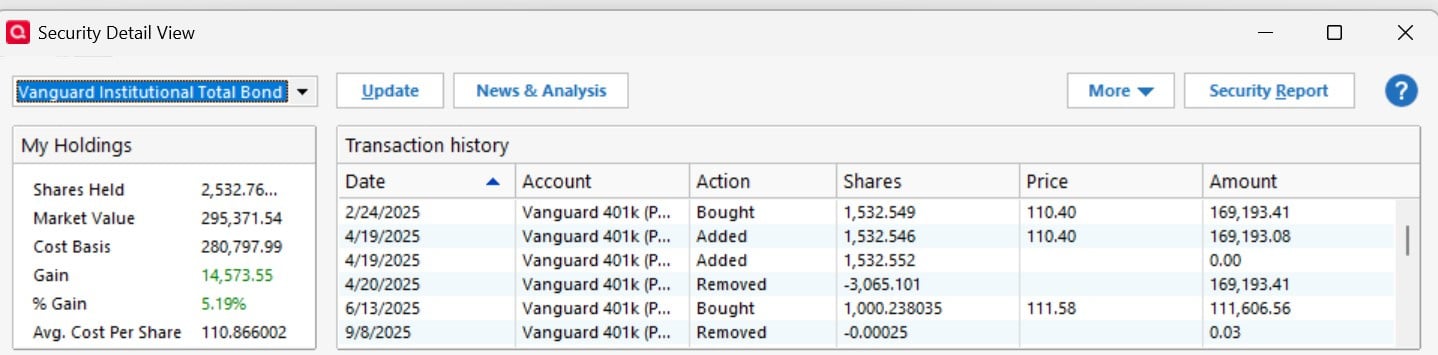
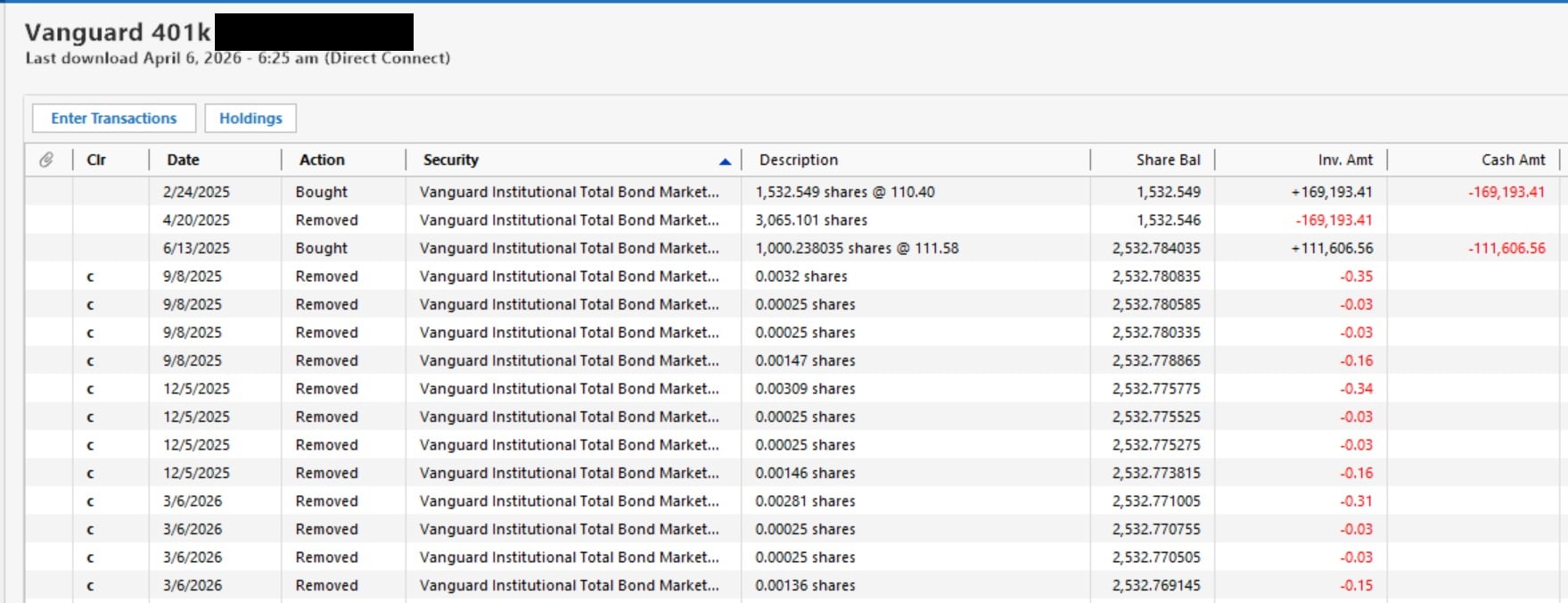
Also, in the Remove on 4/20, here's the Lots view:
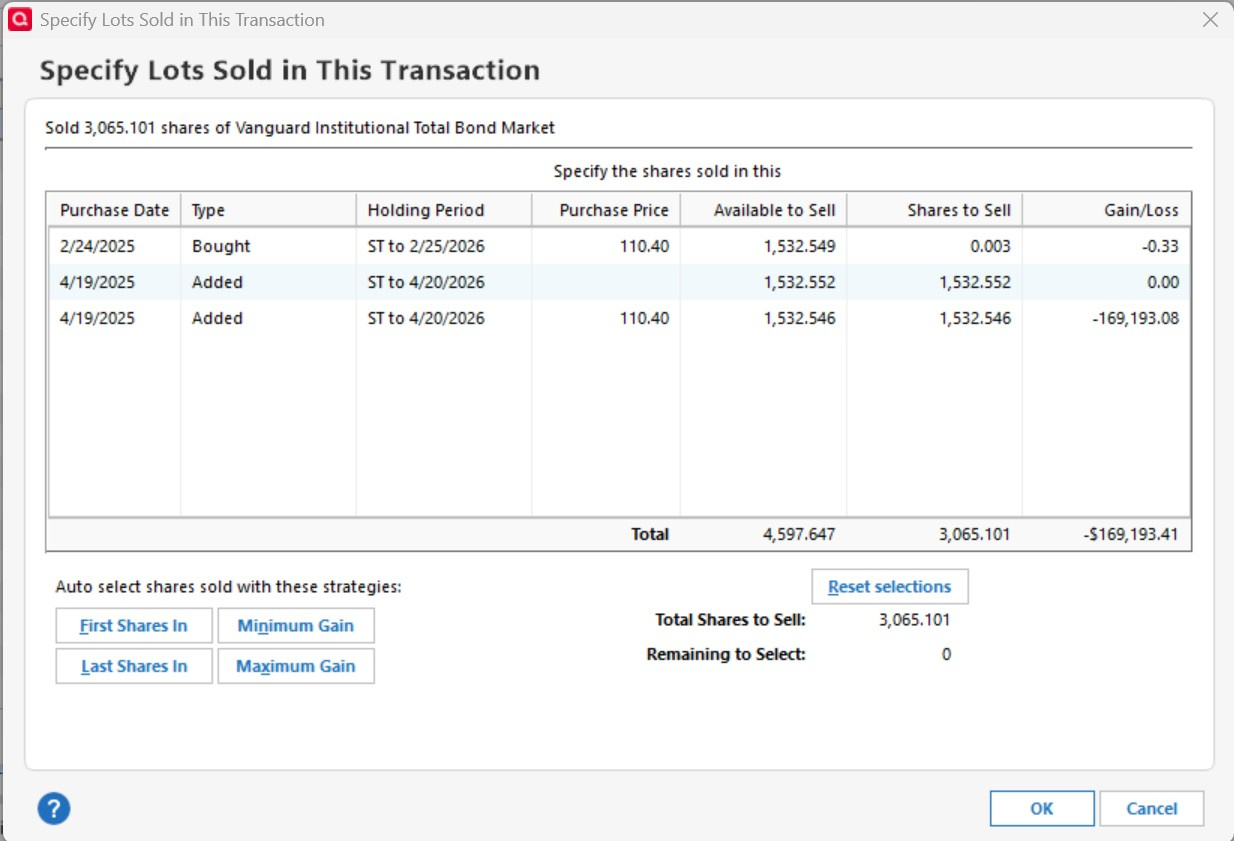
Overall - basically it seems that Quicken is really tracking these two 4/19/2025 Adds, but they aren't showing up in the Register. And, going back to my original question, it's these Adds and Removes that are throwing off the Amount Invested and hence ROI on this security.
0 -
By the way Jim, one more comment - on the other thread you had suggested forcing a recompute using Ctrl-Z. I did that for these securities - with no effect.
0 -
OK, that makes things clearer.
If you go to your Vanguard account online, what is the correct current share balance for this security?
What does it show for the history of purchases and sales of this security?
What does it show for the tax lots that you currently hold?
The quarterly Removed transactions are presumably to cover fees. It would be slightly more accurate to show them as Sold with a MiscExp for the fees, but they are only for a few pennies so I would not worry about that.
QWin Premier subscription0 -
If you go to your Vanguard account online, what is the correct current share balance for this security?
It shows the same balance as Quicken's 3/6/2026 balance above - 2,532.769.
What does it show for the history of purchases and sales of this security?
Vanguard shows the same transactions as the Register above EXCEPT that it doesn't have the 4/20/2025 Remove transaction (or the hidden 4/19/2025 Add transaction)
What does it show for the tax lots that you currently hold?
Huh… actually I can't see the tax lots on Vanguard, either on the dashboard or the statement. It's inside a 401k (Retirement Plans view) which in general is annoying on Vanguard, so maybe I'm missing it, or maybe it doesn't track lots inside a 401k.
The quarterly Removed transactions are presumably to cover fees. It would be slightly more accurate to show them as Sold with a MiscExp for the fees, but they are only for a few pennies so I would not worry about that.
Fair point - Quicken downloads them as Remove transactions so I've just been accepting that. Like you say, it's pennies on a 6 figure investment so I haven't cared.
0 -
OK, so the Removed on 4/30/25 is incorrectly adjusting the Investment amount to 0 and leaving the share balance unaffected., and it does not correspond to anything at Vanguard. I would make a backup in case the result is not what you expected and then simply delete the Removed transaction.
QWin Premier subscription0 -
Hi - I tried deleting the Removed transaction on 4/20/2025. Basically that results in the 'hidden Adds' still being in place, and the total in Quicken then being inaccurate (overstated) vs. the reality.
0 -
I am not seeing where (or if) you have attempted to Validate and Repair the file (an option in the File pull-down menu).
If that does not help, I would try a limited rebuild whereby you would create a new account and then move transactions from the old account to the new account. Hopefully the 'moves' would not include these bogus hidden transactions. Care might be necessary if you have transfers within this account to and from other accounts. Before starting such a path be sure you have a good backup, and then proceed cautiously with small steps.
0 -
I should have mentioned - I've done Validate and Repair (and also 'super validate and repair') since this issue came up last year. The 'hidden transactions' are still there and are still hidden.
I don't think I'm up for creating a new account and all the effort & risk associated with that. To be honest the current issue (of ROI being understated) isn't worth it.
It's still very weird to me that I have these invisible transactions - that are clearly there (as shown by the fact that they show up in the Security Detail View and the Lots view, as well as the fact that they're being Removed), but aren't visible in the Register.
If these invisible transactions were visible, I'd just delete them, and everything would be fine.
The best answer would be for someone from Quicken to clarify how you can have invisible transactions, and how I make them visible / editable.
0 -
@Ted P Have you tried the Validate and Repair with the "Rebuild Investing Lots" option selected since deleting the 4/30/25 Removed transaction?
That should rebuild your tax lots based on existing transactions and thus may get rid of the phantom lots, and it should not cause further damage, but please make a backup just before trying it, just in case …
QWin Premier subscription0 -
I just retried the Validate (actually 'super validate') and nothing changed - the Add transactions are still invisible in the account registry but are visible in other views (Security Detail, Lots).
0 -
@Ted P You did not answer my question of April 7. Did you try the "Rebuild investing lots" option?
QWin Premier subscription0 -
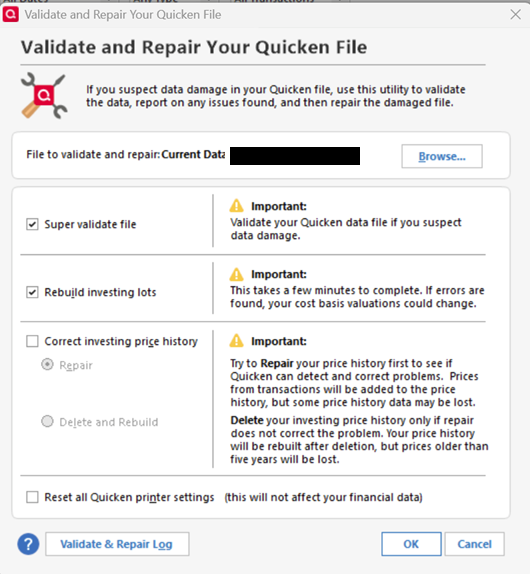
@Jim_Harman sorry for not being specific. Yes, I did a Super Validate using the Rebuild investing lots option (as below).
 0
0
