The user should have the option to bypass being prompted by the One Step Update Settings dialog

For most people they will be either be using the Password Vault with Direct Connect or not need to put in passwords for Express Web Connect/Express Web Connect +, and they will want to update all of the accounts they have previously set in the One Step Update Settings.
There isn't any need to prompt them with the One Step Update Settings dialog every time they run One Step Update.
There should a preference to turn off this prompting.
As an example, if I have only Express Web Connect/Express Web Connect + accounts then I should be able to start a One Step Update with Ctrl+1 or by clicking on the One Step Update icon, I shouldn't have to click through the One Step Update Settings dialog.
For people that using the Password Vault and Direct Connect, it should prompt only for that password (once per session).
For the rare case where the user is using Direct Connect, but not the Password Vault and therefore needs to enter the passwords, the One Step Update Settings dialog should be shown, no matter what the preference is set to.
Comments
-
A touch confused — Did you leave a NOT out of this segment?
… if I have only Express Web Connect/Express Web Connect + accounts … I should have to check through the One Step Update Settings dialog.
0 -
I don't need this option but will vote for it as an OPTION.. From my Main Screen I do an OSU by clicking "Update Now" and don't get the "Setting dialog" unless I click on "Settings". All 17 accounts are EWC…. I only do 1 OSU update per day but do need the ability to access settings when I want to select just specific FI's to update.


THEN THE MAIN SCREEN UPDATE SHOWS THE CURRENT DATE AFTER THE UPDATE…

Windows 11 (2 separate computers)..... Quicken Premier.. HAVE USED QUICKEN CONTINUOUSLY SINCE 1985.
0 -
I never quite figured out why in some data files whenever I click on OSU I always get the OSU Settings popup while in other files I never get it unless I manually select the OSU Settings option. I will note, however, that I only get the OSU Settings popup for the first OSU or Update Now that I do during a session. Successive OSUs or Update Nows in that same session never open that OSU Settings popup.
It would be really nice to have the option to turn off the automatic opening of the OSU Settings popup when doing OSU or Update Now unless one specifically opts to have that popup open. So this idea has gotten my vote.
Quicken Classic Premier (US) Subscription: R66.23 on Windows 11 Home
0 -
Ditto @Boatnmaniac . I like this idea.
- Q Win Deluxe user since 2010, US Subscription
- I don't use Cloud Sync, Mobile & Web, Bill Pay1 -
I agree. When I log in to do an update, I immediately have to log in AGAIN … to do an update.
0 -
This option would be incredibly easy to implement.
It's discouraging that this currently has only 14 votes when I've seen ideas with 80+ votes take 4 years or more to even make it to the development "planned" phase.
Quicken user since 1991
VP, Ops & Tech in the biometric space
0 -
I voted yes because I agree with the premise of the vote…..even though that's the way mine already works!
I never get the OSU Settings screen anymore, unless I specifically select it. I used to, but this changed in the fairly recent past - I want to say maybe 6 months ago or so. I do get prompted for the vault password since I have one FI that still uses Direct Connect. I'm running Quicken Classic Windows R66.23
0 -
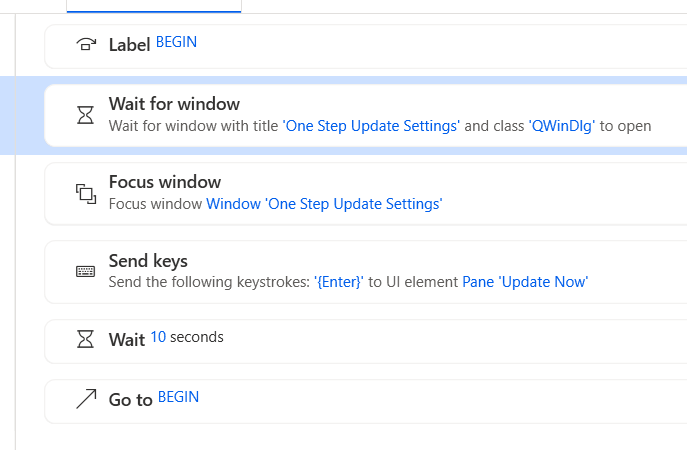
Did this in Power Automate:
Quicken user since 1991
VP, Ops & Tech in the biometric space
1 -
It's not really a "One Step Update" if there is more than one step. Please fix this… I've already put the accounts in that I want updated and passwords. If I click on One Step Update, everything that I have previously entered should automatically update with a single click.
0 -
I agree: Please fix the two-step update.
It seems that others have some different behavior, and maybe there is an existing solution.This is how it works for me:
- I have selected Edit > Preferences > "Download transactions when Quicken starts" = ON
- When I first open the program, it gives the Enter Password popup.
- After entering the password, it proceeds to One Step Update without opening the settings window.
- I normally leave the program open on my computer.
- For subsequent updates, I press the Update button, and the Settings window opens.
- I never need to change settings. If I wanted to change settings, I could use the Update pulldown and select "Update Settings". The appearance and behavior of Update and "Update Settings" are identical, except at startup.
- I have to press "Update Now" to proceed.
- OSU is one of the most common operations, so it is significant to eliminate an extra step.
Is there an existing solution or work-around?
@retird, @tompfr - Do you have "download when starts" OFF? Do you generally run update only once after you start the session? If so, it seems that your behavior is consistent with mine, but your use is a little different by not doing multiple updates in the same session.
- @Boatnmaniac - Is there something you are doing different from me?
- @MSStateDawg - I like your creative solution, and I may try it.0 -
@tgrantdavis if you don't have any Direct Connect accounts you can delete the Password Vault and it will bypass asking for the password, but currently there isn't any preference in Quicken that will bypass the One Step Settings window.
0 -
Thanks, @Chris_QPW
I was getting that idea, and had to check my accounts. It really doesn't save me much, though, because I run OSU many more times than I restart the program.0 -
I have one account with Direct Connect, but I am closing it, so I deleted the password Vault.
[If you want to do the same, the menu is: Tools > Password Vault > Delete]
Now, the Enter Password popup is gone, but the Settings window pops up where it didn't before.
It is slightly easier at startup to hit Enter than to type the vault password, but the primary problem of Settings remains.
I do notice that any Direct Connect accounts require the passwords to be entered in the Settings screen. That probably explains why it is there - legacy. This could be resolved by skipping the screen when no passwords are required.
Anyhow, the purpose of this thread is to streamline the update process and not waste the users time. If this development fix is started, it might open up this flow, and it should consider the other bugs in update. So, I will describe the other problems that I see that get in the way of Update actually being one step. You can split them out to separate issues if you like.
The optimum flow is to press the update button, and for the program to complete all of the updates completely and reliably without further user actions.
There are other interruptions in the update flow:
1) Unreliable busy indication (ignoring the Update button) - While the program is doing other things, including maximizing and re-focus, it should indicate to the user that it is busy and not accepting inputs. There is an hourglass indicator on the cursor. It flashes on, but is sometimes off for significant time when it is not listening. After my computer has been inactive or I have been using another program, I commonly pull up the open Quicken window and press Update. It frequently does not respond for two or many clicks. I have adopted the habit of repeatedly clicking until the update window appears. This behavior can also be seen for other functions and while it is busy with other actions. There should be a more reliable indication that the program is busy.
2) Ignoring the Update Now button - There are times when pressing the Update Now button in the Settings window just cancels the operation. The Settings window closes, but the Progress window does not open. I would like to look away to do something else while the updates are being done. Now, I have to watch carefully, and I have to recognize when this happens and run Update again. That is more user time, attention, and clicks. The functions of all buttons should be reliable.
3) False updates - Sometimes when the Progress screen does appear, and there are no new transactions, but updating again immediately gives new transactions. The updates should be reliable, or any error should be indicated.
4) Phantom flags - After an update, sometimes accounts will show red flags, as if there are new transactions, but none are listed. Repeating update brings the new transactions. This has been happening to me for the past six years on fifteen different accounts, from seven different institutions, mostly brokerage, but some credit cards. It occurs roughly every two days. This causes me to do more updates, more clicks.
Thus, I would like to see the complete update process worked over, streamlined, and debugged.0 -
I don't believe this is an option that could be toggled. I think it's a bug that some people encounter with some data files. I personally have never seen the Settings dialog when I perform OSU. I always invoke OSU via a toolbar icon, if that has any relevance.
EDIT: I just now invoked OSU via the Tools menu and did get the Settings dialog. Note that in the Tools menu, the item is shown as "One Step Update…" where three dots generally indicate the user must complete a dialog before the function will be performed.
Try invoking OSU from the tool bar and see whether that makes a difference.
Quicken user since version 2 for DOS, as of 2025 using QWin Premier (US) on Win10 Pro & Win11 Pro on 2 PCs.
0 -
I get the Settings dialog no matter how I invoke One Step Update. The only time I have ever had One Step Update without the Settings dialog is when I used to have Direct Connect accounts and it was the first time I did the update in the session, and then I would get the Password Vault dialog instead.
I have tried.
- Ctrl+1
- Tool bar Icon, both just clicking on it, and clicking on its "down arrow" → One Setup Update → All Accounts
- Clicking on the One Step Update Icon in the account bar.
- Selecting Tools → One Step Update…
0 -
I have multiple Datafiles and I have that BUG in just 1 file. Only in the 1 of several files, the setting come up before doing the update.
I tried to track down the priblem but never figured out the cause.
0 -
There are two things I am doing differently than you:
- I generally close my Quicken sessions when I am done working in the data file. Granted, I run 4 different data files each day plus occasionally a couple of test tiles so each data file session needs to be closed before a different data file can be opened. But, still, unless I am planning to come back to work in the file, again, in a little while I will generally close it.
- I do not have my Preference set to run OSU upon opening Quicken. I prefer to make any manual transaction entries first before running OSU.
Quicken Classic Premier (US) Subscription: R66.23 on Windows 11 Home
0 -
It does seem to be a bug in the program that is triggered by some combination of things in the datafile. I also had this problem at one time and it went away after restoring a datafile from before it started happening (and it hasn't returned).
Perhaps if somebody experiencing this could use Help -> Report a problem... and check the box to include a sanitized datafile, the developers might be able to track down the source of the problem. Of course, simply sanitizing the file could result in the problem going away, if my theory about the bug is even true.
0