Red circle with slash icon

This suddenly appeared next to "More Accounts" in my account list pane, and when I did an update, the dialog box said the accounts next to the icon needed my attention. These were closed accounts. I deleted them, but the icon remains. Only now, when I click on the " More Accounts" dropdown, there are no accounts listed anymore.
How do I get rid of this, and why did it suddenly appear in the first place? Those closed accounts didn't cause any trouble before.
Thanks.
Comments
-
Hi @Ellary Kahan,
Thanks for reaching out to the Quicken Community!The red circle icon can appear in two different scenarios:
1. Closed Account in Quicken
This appears when an account has been closed within Quicken and marked as closed. This action typically does not generate any error messages during transaction downloads (unless the account was still set up for online services at the time it was closed). Once an account is marked as closed, it cannot be reopened or have the icon removed.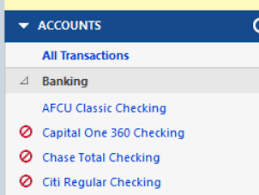
2. Error During One Step Update (CC-800)
The red circle with a slash may also indicate an error during One Step Update, specifically an error code CC-800.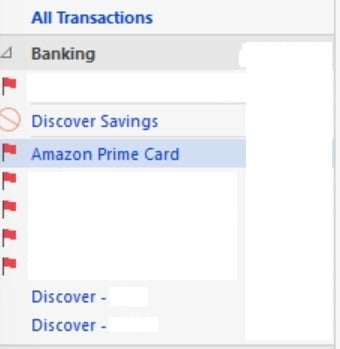
Based on your description, it sounds like you may be experiencing the second scenario related to the CC-800 error. Could you please confirm which icon you are seeing? That will help me provide the most accurate troubleshooting steps.
I look forward to your reply!Quicken Carlos
Make sure to sign up for the email digest to see a round up of your top posts.
0 -
One step update does not give me an error. When I start it, the dialog is displayed, urging me to fix the red circle errors. I just continue the update.
0 -
Hi @Ellary Kahan,
Thank you for your reply and for providing more details.Before following any troubleshooting steps, I recommend creating a backup of your Quicken data file.
Then, please locate the accounts showing the red circle and follow these steps:
To deactivate an account1. Go to the Tools menu and select Account List…
2. In the Account List, select the account you want to deactivate, and then click Edit.
3. In the Account Details window, click the Online Services tab.
4. Click Deactivate next to the service you want to disable.
5. Click Yes To the message confirming if you want to disable this service.
Once completed, please double-check that no accounts still show the red circle icon, then proceed with reactivating the accounts.
To Reactivate Account(s)- Go to Tools > Add Account.
- Select the bank for the deactivated account(s). If prompted, select the connection method.
- Enter your credentials and click Connect.
- When the list of located accounts appears, choose LINK next to each account you want to reactivate.
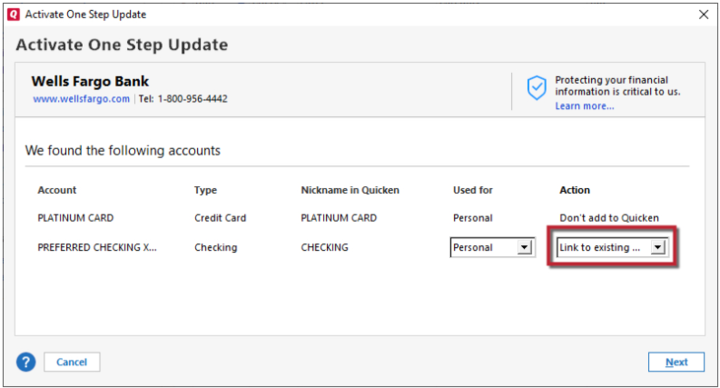
- Click Next, then Done on the last prompt.
Let me know how it goes!
Quicken Carlos
Make sure to sign up for the email digest to see a round up of your top posts.
0 -
I guess I didn't make myself clear. The red circle is appearing next to the More accounts drop-down. But when I click on the drop-down, the red circle does not appear next to any of the four accounts listed there. But, I looked at one account, it was an old Visa account, and I deactivated online services for it, and the red circle went away.
I deleted the accounts, and the More accounts selection went away. So I'm Good.
Thanks for your help.0 -
Hi @Ellary Kahan,
Thank you for your reply, and for letting us know that the red circle was removed after deactivating the closed account.
If you’d like to keep the history from closed accounts and prevent this type of issue with the red circle icon, I recommend deactivating the account after closing it with your financial institution. After that, you can proceed to close the account in Quicken and hide it if you prefer.
The “More Accounts” option will appear when one or more boxes are selected in the Manage Hidden Accounts section. To access this screen, go to Tools > Manage Hidden Accounts.
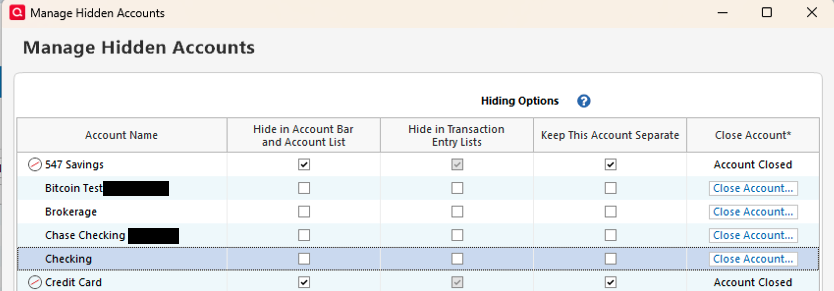
If you do not need to keep the history under “More Accounts,” you can delete the accounts, and the “More Accounts” option will be removed from the account list.
You can choose the option that works best for you, depending on how you prefer to manage your accounts in Quicken.I hope this helps!
Quicken Carlos
Make sure to sign up for the email digest to see a round up of your top posts.
0 -
Yes it does. The accounts I closed were very old, and I no longer needed any history. Thanks for your help.
0 -
Thanks for following up! I’m glad to hear that the steps above worked for you. This may also help other users who are experiencing the same issue.
If you need any further assistance, please don’t hesitate to reach back out.
Quicken Carlos
Make sure to sign up for the email digest to see a round up of your top posts.
0 -
@Ellary Kahan - Even if you do not need the actual history in the old accounts anymore, I recommend using extreme caution before deleting them. The reason for this is that if there are any transfer transactions to/from them to with other currently active accounts they will also be deleted in those active accounts. This will cause account balance issues in the still active accounts.
Since it sounds like you have already deleted those old accounts you might want to review the account balances of your currently active accounts to make sure they were not adversely affected by that action.
Quicken Classic Premier (US) Subscription: R66.23 on Windows 11 Home
0 -
Thanks. No change to my account balances.
0

